

AI Development Tools
Lovable AI App Builder: Build Full-Stack Apps with Natural Language
From prototype to production without writing code manually


Senior Software Developer & Trading Technology Specialist
Ethan Parker is a software developer with over 8 years of experience in building web applications, trading tools, and financial technology solutions. He specializes in Python, JavaScript, API integrations, and trading automation, helping traders improve efficiency through innovative technology.
Lovable AI App Builder represents a shift in how software gets built. Instead of writing React components, configuring Supabase tables, and wiring up authentication by hand, you describe what you want in plain English and the system generates a working application. The approach has earned the label vibe coding — a term that captures the experience of guiding an AI through conversation rather than typing syntax. For founders, product managers, and designers who understand product logic but not implementation details, this changes what's possible in a weekend.
Contents
- 1. What Is Lovable AI App Builder
- 2. How Lovable Works Under the Hood
- 2.1. Natural Language to Code Pipeline
- 2.2. The Tech Stack: React, TypeScript, Vite, Tailwind
- 3. Core Features That Set It Apart
- 3.1. Real-Time Preview and Iteration
- 3.2. GitHub Integration and Code Ownership
- 3.3. One-Click Deployments
- 4. Starting From Templates Instead of Blank Canvas
- 5. Database and Backend With Supabase Integration
- 6. Authentication, Payments, and Third-Party Services
- 7. Pricing Tiers: Free to Enterprise
- 8. Who Uses Lovable and Why
- 8.1. Founders Building MVPs
- 8.2. Product Managers Validating Ideas
- 8.3. Designers Turning Mockups Into Live Apps
- 8.4. Developers Accelerating Routine Work
- 9. Security, Compliance, and Enterprise Readiness
- 10. Community, Guides, and Learning Resources
- 11. How Lovable Compares to Bolt, v0, Replit, and Cursor
- 12. Limitations and Honest Constraints
- 13. Final Assessment of Lovable AI App Builder
The platform emerged from the observation that most early-stage products share common patterns: user accounts, data storage, payment flows, admin dashboards. Writing these from scratch repeats solved problems. Lovable packages those patterns into a conversational interface backed by real code generation. The output isn't a locked-down no-code artifact — it's a standard React, TypeScript, Vite, and Tailwind project that lives in your GitHub repository. You can eject at any point and continue with traditional development.
This article walks through what Lovable does, how the underlying pipeline works, where it excels, where it struggles, and how to decide whether it fits your workflow. We'll cover the template library, Supabase integration, pricing tiers, security posture, and how it compares to alternatives like Bolt, v0, Replit Agent, and Cursor.
What Is Lovable AI App Builder
Lovable is a browser-based development environment that translates natural language prompts into full-stack web applications. You type a request — "build a SaaS landing page with waitlist signup and Stripe checkout" — and the system produces a multi-file project with routing, state management, API routes, and a configured Supabase backend. The generated code follows modern React patterns: functional components, hooks, TypeScript interfaces, and Tailwind utility classes.
The product targets a gap between traditional no-code tools and full manual coding. No-code platforms like Bubble or Webflow abstract away code entirely but impose platform constraints. Traditional coding offers total control but requires deep framework knowledge. Lovable sits in the middle: you steer with language, but the output is portable, readable code you own. The company describes it as an AI full-stack engineer rather than a website builder, emphasizing that the result includes backend logic, database schema, and deployment configuration — not just frontend markup.
Since its public launch, the platform has added support for authentication flows, row-level security policies, Stripe subscriptions, email templates, file uploads, and real-time subscriptions via Supabase Realtime. Each capability arrives as a promptable feature rather than a configuration panel. You don't toggle "enable auth"; you say "add user login with email and Google OAuth" and the necessary tables, policies, and UI components appear.
How Lovable Works Under the Hood
The prompt-to-code pipeline combines several stages. First, a planning model breaks the request into a structured specification: pages, components, data models, API endpoints, and third-party integrations. This specification feeds a code generation model trained on React, TypeScript, Supabase, and Tailwind patterns. The generated files pass through a validation layer that checks for TypeScript errors, missing imports, and Supabase schema consistency. Finally, the project spins up in a preview sandbox where you can interact with the live app and request changes.
Natural Language to Code Pipeline
When you send a message, the system maintains context across the conversation. Early prompts establish the product concept; later prompts refine specific screens, adjust styling, or add features. The model tracks the evolving file tree so it doesn't regenerate unchanged files unnecessarily. This incremental approach keeps iteration fast — a typical change request returns updated files in seconds rather than minutes. The conversation history also serves as implicit documentation: you can scroll back to see why a particular architectural decision was made.
The Tech Stack: React, TypeScript, Vite, Tailwind
Every Lovable project uses a consistent stack: React 18 with TypeScript, Vite for bundling and dev server, Tailwind CSS for styling, and React Router for navigation. State management leans on React Query for server state and Zustand or Context for client state. The backend runs on Supabase — Postgres database, Auth, Storage, Edge Functions, and Realtime. This stack isn't configurable; the opinionated choice reduces decision fatigue and ensures generated code follows a predictable structure that the models understand well.
The lock-in concern is real but mitigated by code ownership. Since the output is a standard Vite project, you can clone the GitHub repo, run npm install, and develop locally with any IDE. The Supabase project is yours — Lovable creates it under your account or connects to an existing one. There's no proprietary runtime or hosted-only execution environment. If Lovable disappeared tomorrow, your code and database would continue functioning.
The preview sandbox deserves attention. It's not a static screenshot — it's a fully functional Vite dev server running in a container. You can click buttons, submit forms, navigate routes, and see console logs. When you request a change, the system applies a diff to the relevant files and hot-reloads the preview. This tight loop makes vibe coding practical: you see the result of each instruction immediately, catch regressions early, and refine UX details without leaving the browser.
Core Features That Set It Apart
Several capabilities distinguish Lovable from chat-based code assistants like ChatGPT or Claude. The most visible is the integrated preview, but the GitHub synchronization, one-click deployment, and template system matter more for real projects.
Real-Time Preview and Iteration
The preview pane updates as you chat. Add a dark mode toggle, and the component appears with working state management. Request a loading skeleton for the dashboard, and the suspense boundaries wrap the data-fetching components. The model understands the existing codebase well enough to make targeted edits rather than rewriting entire files. This surgical editing capability improves as the project grows — the context window includes the relevant file contents, so the model knows your naming conventions, component structure, and type definitions.
GitHub Integration and Code Ownership
Connect your GitHub account once, and every project can push to a repository you own. The initial push creates the full project structure with a sensible .gitignore, README, and package.json. Subsequent changes commit with descriptive messages like "Add user dashboard with revenue charts" or "Fix authentication redirect loop." You can also pull changes made locally — if you edit a component in VS Code and push, Lovable's context updates on the next prompt. This two-way sync means you're not locked into the browser editor.
One-Click Deployments
Deployment targets include Vercel, Netlify, and custom domains via Lovable's hosting. The deployment configures environment variables automatically: Supabase URL, anon key, Stripe keys, and any secrets you've added. For production apps, the recommended path is Vercel with a connected GitHub repo — pushes to main trigger preview deployments, merges trigger production. Lovable handles the initial setup; after that, the standard Git workflow takes over.

The template library provides starting points for common application types. Categories include SaaS, marketplaces, internal tools, dashboards, landing pages, and AI-powered apps. Each template is a complete Lovable project — you can fork it, customize via chat, and deploy. Templates aren't rigid scaffolds; they're more like reference implementations that demonstrate how to structure authentication, role-based access, subscription gating, and multi-tenant data isolation in the Lovable paradigm.
Starting From Templates Instead of Blank Canvas
Blank-canvas prompting works for simple ideas but struggles with complex products. The template approach acknowledges that most builders know what they want — a two-sided marketplace, a client portal, a content management system — but not how to architect it. Templates encode architectural decisions: where to put middleware, how to organize route groups, which Supabase policies implement row-level security for multi-tenancy. You start from a working pattern and describe deltas: "change the onboarding flow to ask for company size" or "add team invitation emails."
The template gallery is searchable by category, tech tags, and community ratings. Popular templates show fork counts and recent activity, signaling which ones are maintained. You can also publish your own projects as templates, creating a flywheel where successful patterns propagate. For agencies building similar products for multiple clients, private templates reduce setup time dramatically.
Database and Backend With Supabase Integration
Supabase integration is the backbone of Lovable's full-stack claim. When you request a feature that needs persistence — user profiles, product catalog, order history — the system generates SQL migrations, TypeScript types, and React Query hooks automatically. The migrations run against your Supabase project in the correct order. You can inspect the generated schema in the Supabase dashboard, modify it manually, and the types regenerate on the next pull.
Row-level security policies deserve special mention. Multi-tenant applications require data isolation: users see only their organization's data. Lovable generates RLS policies that enforce this at the database level, not just in application code. When you say "users can only access projects in their workspace," the system creates policies on the projects table referencing the workspace_members join table. This approach prevents entire classes of authorization bugs that plague hand-rolled implementations.
Edge Functions extend the backend beyond CRUD. Need a webhook handler for Stripe events? A scheduled job that sends weekly digests? An image optimization pipeline triggered on upload? Describe the requirement and Lovable creates a Deno-based Edge Function with the appropriate triggers. The functions deploy to Supabase's global edge network with zero configuration. Cold starts are minimal, and logs stream to the Supabase dashboard.
Authentication, Payments, and Third-Party Services
Authentication flows cover email/password, magic links, OAuth providers (Google, GitHub, GitLab, Bitbucket, Azure, Discord), and SSO via SAML or OIDC for enterprise plans. The generated UI includes sign-up, login, password reset, email verification, and profile management pages. You can customize the flow by prompting: "add phone verification via Twilio" or "require email verification before dashboard access." The auth state persists across sessions via secure HTTP-only cookies.
Stripe integration handles one-time payments, subscriptions, usage-based billing, and customer portal access. The prompt "add Pro plan at $29/month with 100 API calls" generates the Stripe Price objects, checkout session creation, webhook handler for subscription events, and a billing page where users manage their plan. The system also creates database tables to sync subscription status, enabling feature gating in your React components.
Other integrations include SendGrid and Resend for transactional email, S3-compatible storage for file uploads, and generic REST/GraphQL API connectors. The connector framework lets you describe an external API — "call the OpenAI API with the user's prompt and stream the response" — and Lovable generates a typed client with React hooks. Webhooks from external services route to Edge Functions for processing.
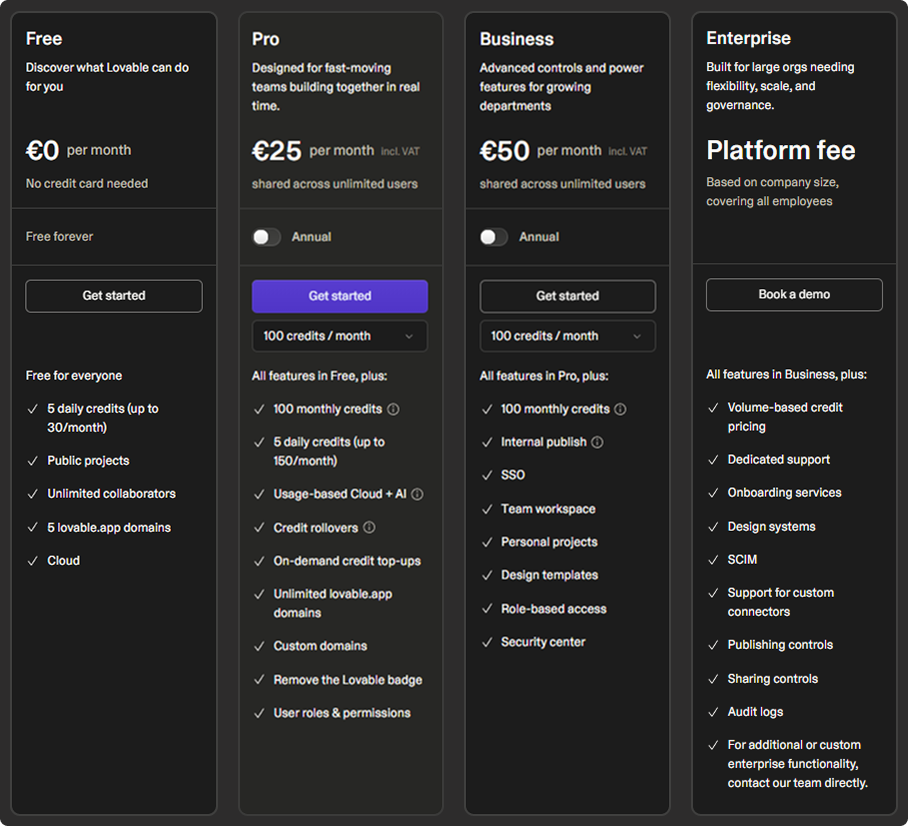
Pricing follows a credit model. Each prompt consumes credits based on complexity — a simple UI tweak might cost 1-2 credits, while generating a full dashboard with charts and real-time data could cost 20-50. The Free tier includes 50 credits monthly, enough for experimentation and small prototypes. Pro at $25/month provides 500 credits, custom domains, and priority preview environments. Business at $100/month adds 2,500 credits, team collaboration, SSO, and dedicated support. Enterprise offers custom credit volumes, on-premise deployment options, audit logs, and SLA guarantees.
Pricing Tiers: Free to Enterprise
The credit system aligns cost with usage rather than seat count. A solo founder building one product pays the same as a five-person team building five products, provided total prompt volume stays within the tier. Credits roll over month-to-month on paid plans. The Free tier resets monthly without rollover. For teams, the Business tier includes shared workspaces where members can access each other's projects, leave comments on preview deployments, and manage billing centrally.
Scroll horizontally to see all columns
| Feature | Free | Pro | Business | Enterprise |
|---|---|---|---|---|
| Monthly credits | 50 | 500 | 2,500 | Custom |
| Custom domains | No | Yes | Yes | Yes |
| Team collaboration | No | No | Yes | Yes |
| SSO / SAML | No | No | Yes | Yes |
| Priority support | No | No | Yes | Yes |
| Audit logs | No | No | No | Yes |
| On-premise option | No | No | No | Yes |
Credit consumption varies. A new project from template typically costs 30-80 credits depending on complexity. Iterative changes range from 1-10 credits. Complex refactors — "migrate from REST to GraphQL" or "add multi-language support with i18n routing" — can exceed 100 credits. The platform shows an estimate before executing expensive prompts. Unused credits on paid plans accumulate up to 3x the monthly allowance, providing buffer for sprint cycles.
Who Uses Lovable and Why
The user base spans technical and non-technical roles. Understanding each persona's workflow clarifies where the tool adds value and where it creates friction.
Founders Building MVPs
Non-technical founders use Lovable to validate ideas before hiring engineers. A founder can build a functional prototype with real user accounts, payments, and data persistence in days rather than months. The prototype isn't throwaway — if the idea validates, the codebase becomes the starting point for the engineering team. Several Y Combinator companies have launched MVPs this way, then graduated to custom development while retaining the Supabase backend.
Technical founders use it differently: they accelerate the boring parts. Auth, admin panels, settings pages, email templates — these consume disproportionate time in early stages. Lovable generates them in minutes. The founder then focuses on the product's unique logic, which often requires manual coding anyway. The hybrid approach — AI for scaffolding, human for differentiation — is the most common pattern among experienced builders.
Product Managers Validating Ideas
Product managers at larger companies use Lovable for internal validation. Instead of writing PRDs and waiting for engineering bandwidth, they build working demos for stakeholder review. The demo includes real data flows: form submissions persist, role-based views differ, notifications trigger. This shifts conversations from "imagine this screen" to "try this flow." Feedback cycles compress from weeks to hours.
The limitation appears when the demo needs to integrate with existing internal systems — legacy APIs, proprietary databases, complex permission models. Lovable can consume external APIs but doesn't reverse-engineer undocumented schemas. PMs typically build the frontend experience in Lovable, then hand off to engineers for integration work.
Designers Turning Mockups Into Live Apps
Designers with Figma proficiency can import designs via the Figma integration. The plugin extracts components, colors, spacing, and typography into a design token file that Lovable references. You prompt "implement the dashboard design from Figma" and the system generates Tailwind config and React components matching the spec. The workflow isn't fully automatic — complex interactions still need prompting — but it eliminates the design-to-code translation layer for standard components.
The Figma sync works both ways. Changes made in Lovable's preview can be pushed back as Figma comments for design review. This bidirectional loop matters for teams where design and implementation iterate together. Designers who understand component architecture get the most mileage; those who only work in static frames hit limits when describing responsive behavior or state transitions.
Developers Accelerating Routine Work
Professional developers adopt Lovable selectively. They use it for greenfield projects, internal tools, and spike prototypes. For existing codebases, the GitHub sync allows pulling the repo, making AI-assisted changes in Lovable, and pushing back. The model handles boilerplate well: CRUD admin panels, form libraries with validation, chart dashboards with filtering, export-to-CSV utilities. These tasks follow predictable patterns the model has seen thousands of times.
Experienced developers report friction when the generated code doesn't match their conventions — folder structure, naming, testing patterns, error handling philosophy. The model adapts to some extent if you provide examples in the prompt, but it won't perfectly replicate a team's style guide. The pragmatic approach: generate the scaffold, then refactor to your standards. The time saved on scaffolding usually exceeds the refactor cost.

The community showcase reveals the range of production apps built with Lovable: B2B SaaS platforms, consumer marketplaces, internal tools for logistics companies, AI-powered content generators, and educational platforms. Many launched products show revenue screenshots and user metrics. The community forum hosts prompt engineering discussions, template sharing, and bug reports. Lovable staff participate actively, often shipping fixes within days of reported issues.
Security, Compliance, and Enterprise Readiness
Security architecture centers on the fact that your Supabase project lives in your account. Lovable never stores your database credentials, API keys, or user data. The integration uses OAuth tokens with scoped permissions — Lovable can create tables, functions, and policies but cannot read existing data unless you grant explicit access. This design means a compromise of Lovable's systems doesn't expose your production data.
Enterprise plans add SAML/SSO, audit logs capturing every prompt and deployment action, IP allowlisting for preview environments, and dedicated infrastructure options. The audit log is particularly valuable for compliance: it records who requested what change, when, and which files were modified. SOC 2 Type II certification is in progress as of this writing. Data processing agreements and HIPAA BAAs are available for Enterprise customers.
Community, Guides, and Learning Resources
Documentation covers the prompt patterns that produce reliable results: how to specify data models, describe UI states, request error handling, and compose multi-step features. The guides section includes walkthroughs for common products — "Build a Notion Clone," "Build a Stripe Billing Portal," "Build a Multi-Tenant Dashboard." Each guide shows the prompt sequence, expected outputs, and common pitfalls.
Video tutorials range from 5-minute quickstarts to hour-long build-alongs. The YouTube channel publishes weekly, often featuring community members building real products. The Discord server has channels for help, showcase, prompt-library, and feature-requests. Response times from staff and experienced community members are typically under an hour during business hours.
How Lovable Compares to Bolt, v0, Replit, and Cursor
The AI app builder category has several credible options. Each makes different trade-offs.
Scroll horizontally to see all columns
| Dimension | Lovable | Bolt.new | v0.dev | Replit Agent | Cursor |
|---|---|---|---|---|---|
| Primary interface | Chat + preview | Chat + preview | Chat + preview | Chat + IDE | IDE + chat |
| Backend included | Supabase (full) | Supabase / Firebase | None (frontend only) | Postgres / custom | None (bring your own) |
| Code ownership | Full (GitHub) | Full (GitHub) | Full (export) | Full (Replit/GitHub) | Full (local) |
| Deployment | Vercel/Netlify/Lovable | Netlify/Vercel | Vercel | Replit/anywhere | Manual |
| Best for | Full-stack products | Rapid prototypes | UI components | Full-stack + IDE | Existing codebases |
| Learning curve | Low-medium | Low | Low | Medium | High (devs only) |
Bolt.new excels at rapid prototypes and visual experiments. Its strength is speed — you see a working app in seconds. The trade-off: less control over backend architecture, and the generated code can be harder to maintain long-term. Bolt is ideal for "show me this idea" moments; Lovable is better for "build this product I'll maintain for years."
v0.dev from Vercel focuses on UI components and design systems. It generates beautiful React components with Tailwind and shadcn/ui but doesn't include backend, database, or auth. You copy components into your existing project. It's a frontend accelerator, not a full-stack builder. Many teams use v0 for design system components and Lovable for application scaffolding.
Replit Agent provides a full cloud IDE with AI assistance. You get a Linux container, terminal, database, and deployment — all in the browser. The agent can write code, run commands, install packages, and debug. It's more powerful for developers who want AI pair programming in a complete environment. The learning curve is steeper, and the credit model can surprise heavy users. Lovable feels more guided; Replit feels more open-ended.
Cursor is an AI-enhanced VS Code fork. It's for developers who write code daily and want autocomplete, chat, and agent modes inside their editor. It doesn't generate project scaffolding or manage deployments. If you're a professional engineer building a complex system, Cursor likely fits your workflow better than any chat-based builder. Lovable and Cursor serve different personas — though some developers use both: Lovable for initial scaffold, Cursor for deep feature work.
Limitations and Honest Constraints
No tool eliminates complexity — it relocates it. With Lovable, complexity moves from syntax to prompt engineering. You need to describe requirements precisely. Vague prompts like "make it better" or "add analytics" produce generic results. Effective prompts specify: "add Mixpanel tracking to the signup button with event name 'signup_clicked' and properties plan and referrer." The learning curve is prompt literacy, not coding syntax.
The model occasionally hallucinates APIs that don't exist — Supabase methods, Stripe parameters, Tailwind classes. These appear as TypeScript errors in the preview. The fix is usually a follow-up prompt: "the createClient import is wrong, use the correct Supabase SSR pattern." The system self-corrects quickly, but you need to recognize the error. Non-technical users sometimes get stuck here.
Large refactors remain risky. Asking "convert the entire app to use React Server Components with Next.js" will likely break the project. The model doesn't have a holistic understanding of the codebase at that scale. Major migrations still require human architecture. Lovable works best for incremental feature development within an established structure.
Mobile responsiveness sometimes needs explicit prompting. The generated Tailwind classes include responsive prefixes (md:, lg:) but the model may not test breakpoints thoroughly. Always verify the preview at mobile widths and prompt fixes: "the navigation menu overflows on screens under 640px, add a hamburger menu."
Credit costs can escalate during exploration phases. Early in a project, you might iterate through 5-10 versions of a dashboard layout before settling. Each iteration consumes credits. The Free tier's 50 credits exhaust quickly this way. Paid tiers provide buffer, but it's worth planning prompts: batch related changes, use templates, and avoid throwaway experiments on limited credits.
Frequently Asked Questions
Can I use Lovable without knowing how to code?
Yes. Non-technical users build functional apps by describing features in plain English. The platform handles code generation, database setup, and deployment. However, you'll progress faster if you learn basic concepts: components, state, props, API calls, and database relationships. The documentation includes a glossary for these terms.
What happens to my code if I cancel my subscription?
Your code remains in your GitHub repository. Your Supabase project stays in your account. You lose access to Lovable's preview environment, prompt history, and credit-based generation, but the application continues running. You can clone the repo and develop locally with any tool.
Does Lovable work with existing codebases or only new projects?
Primarily new projects. You can import an existing GitHub repo, but the AI's ability to understand and modify large existing codebases is limited. The typical workflow: generate the initial scaffold in Lovable, then continue development in your preferred IDE. Some teams use Lovable for new feature branches, then merge via GitHub.
How does Lovable handle database migrations safely?
Migrations are generated as SQL files and applied to your Supabase project in sequence. You can review each migration before it runs. The system creates down migrations for rollback. For production databases, the recommended practice is to test migrations on a staging branch first, then apply to production via Supabase's migration tooling.
Can I use a database other than Supabase?
Not directly. The generated code assumes Supabase client libraries and Postgres-specific features like row-level security and realtime subscriptions. You could eject the code and rewrite the data layer for another backend, but that defeats the purpose. If you're committed to PlanetScale, Neon, or a self-hosted Postgres, other tools may fit better.
What AI models power Lovable's code generation?
Lovable uses a combination of proprietary fine-tuned models and frontier models from providers like Anthropic and OpenAI. The specific model mix evolves. The company doesn't publish exact model names or versions, but the output quality targets production-ready React, TypeScript, and Supabase patterns.
Is there a limit to how complex an app Lovable can build?
Practical limits exist. Apps with hundreds of components, complex domain logic, or heavy algorithmic requirements will exceed the context window and credit budget. The sweet spot: MVPs, SaaS products, internal tools, marketplaces, dashboards — typical CRUD applications with auth, payments, and real-time features. Highly specialized systems (trading engines, game engines, ML pipelines) need custom engineering.
Final Assessment of Lovable AI App Builder
Lovable AI App Builder delivers on its core promise: turning product descriptions into deployed full-stack applications with real backends. The generated code is readable, portable, and built on a mainstream stack. For founders validating ideas, product managers aligning stakeholders, designers implementing systems, and developers scaffolding routine work, it compresses weeks of setup into hours. The GitHub ownership model removes platform lock-in risk. The Supabase integration provides a production-grade backend without infrastructure management.
The constraints are real. Prompt engineering replaces syntax knowledge — you still need to think clearly about data models, user flows, and edge cases. Credit costs require budget awareness. Complex refactors and novel architectures need human hands. The tool amplifies product thinking; it doesn't substitute for it. Teams that treat Lovable as a force multiplier for clear product vision will ship faster. Teams that expect it to replace product thinking will generate impressive demos that fail in production.
If you're building a standard web application — user accounts, data persistence, payments, admin views, real-time updates — and you want to move from concept to deployed product in days rather than months, Lovable is the strongest option in the current landscape. The combination of full-stack generation, code ownership, and Supabase backend makes it uniquely suited for products that need to graduate from prototype to production without a rewrite.