

Development Tools
Lovable Stripe Integration: Accept Payments in Your AI-Built Apps
Learn how to integrate Stripe checkout, subscriptions, and webhooks into apps built with Lovable's AI app builder.


Senior Software Developer & Trading Technology Specialist
Ethan Parker is a software developer with over 8 years of experience in building web applications, trading tools, and financial technology solutions. He specializes in Python, JavaScript, API integrations, and trading automation, helping traders improve efficiency through innovative technology.
Lovable has changed how developers and non-technical founders build software. You describe what you want in plain English, and the AI generates a working React application with Supabase backend, authentication, and deployment handled automatically. But most real applications need to accept money. That is where the Stripe integration comes in. It lets you add checkout flows, subscription management, and payment processing without leaving the Lovable environment or writing boilerplate payment code by hand.
Contents
- 1. How the Lovable Stripe Connector Works
- 2. Setting Up Your Stripe Account for Lovable
- 3. One-Time Payments vs Subscriptions
- 4. Creating Products and Prices in Stripe Dashboard
- 5. Webhook Handling and Database Sync
- 6. Customer Portal for Self-Service Billing
- 7. Testing Payments End to End
- 8. Handling Edge Cases and Failure Modes
- 9. Security Considerations
- 10. Pricing and Cost Structure
- 11. Common Integration Patterns
- 12. Extending the Generated Code
- 13. Migration from Other Payment Providers
- 14. Troubleshooting Common Issues
- 15. Production Deployment Checklist
- 16. Final Assessment of Lovable Stripe Integration
The integration is not a separate plugin you install. It is built into the platform's connector system. When you ask Lovable to add payments, it scaffolds the necessary Stripe components: a checkout session creator on the backend, a redirect handler on the frontend, and webhook endpoints for subscription events. The generated code follows Stripe's current best practices and uses the latest API versions. You still need a Stripe account and API keys, but the glue code that usually takes hours to write appears in seconds.
This guide walks through the entire process. We cover initial setup, the different payment modes you can implement, how to handle webhooks for subscription lifecycle events, testing strategies, and the limitations you should know before committing to this approach. Whether you are building a SaaS product, a marketplace, or a simple digital download store, the patterns here apply.
How the Lovable Stripe Connector Works
Lovable's connector system treats Stripe as a first-class service. When you prompt the AI to add payments, it does not just drop in a script tag. It creates a Supabase Edge Function that acts as your Stripe backend. This function handles checkout session creation, portal sessions for customer self-service, and webhook verification. The frontend receives a simple hook or component that opens the Stripe-hosted checkout page. After payment succeeds or fails, Stripe redirects back to your app with a session ID that your code can verify.
The architecture matters because it keeps your secret keys off the client. The Edge Function runs in Supabase's infrastructure, not in the browser. Your publishable key goes to the frontend for Stripe.js initialization, but the secret key never leaves the serverless function. This is the same pattern Stripe recommends for any production application, and Lovable implements it by default.
You interact with this system through the chat. A typical prompt might be: "Add a Pro plan at $29/month with Stripe subscriptions. Users should upgrade from the dashboard and manage their billing in a customer portal." Lovable then generates the pricing table component, the upgrade button, the checkout session creator, the success and cancel pages, and the customer portal link. It also creates the webhook handler that updates the user's subscription status in the database when payments succeed, fail, or cancel.
Setting Up Your Stripe Account for Lovable
Before you ask Lovable to add payments, you need a Stripe account in test mode. Sign up at stripe.com if you do not have one. Complete the business verification steps eventually, but for development you can skip most of them. You need two keys from the Stripe dashboard: the publishable key (starts with pk_test_) and the secret key (starts with sk_test_). You also need a webhook signing secret once you configure the endpoint, but Lovable helps with that part.
In your Lovable project, open the Supabase integration panel. There is a section for Edge Function secrets. Add STRIPE_SECRET_KEY and STRIPE_WEBHOOK_SECRET there. The publishable key goes in your frontend environment variables as VITE_STRIPE_PUBLISHABLE_KEY. Lovable's generated code reads these automatically. Do not hardcode keys in the chat prompt. The AI knows to reference environment variables.
One common mistake is using live keys in a development project. Keep test and live environments completely separate. Create a separate Lovable project for production if needed, or use Supabase's environment management to swap keys. Stripe test cards (like 4242 4242 4242 4242) only work with test keys. Live cards only work with live keys. Mixing them produces confusing errors.
- Create Stripe account and complete basic verification
- Copy test publishable key (pk_test_...) and secret key (sk_test_)
- Add secret key to Supabase Edge Function secrets as STRIPE_SECRET_KEY
- Add publishable key to frontend env as VITE_STRIPE_PUBLISHABLE_KEY
- Configure webhook endpoint in Stripe dashboard after first deployment
- Copy webhook signing secret to Supabase as STRIPE_WEBHOOK_SECRET
One-Time Payments vs Subscriptions
Lovable supports both payment models, but the generated code differs. For one-time payments, the checkout session uses mode: 'payment'. The success page confirms the order and you typically fulfill immediately or queue a fulfillment job. For subscriptions, mode: 'subscription' creates a recurring billing relationship. The webhook handler becomes more important because it must track subscription status changes over time: active, past_due, canceled, trialing, incomplete.
Subscriptions also require a customer portal integration so users can update payment methods, downgrade, or cancel. Lovable generates a portal session creator that returns a URL. You place a "Manage Billing" button in your dashboard that opens this URL. Stripe hosts the portal, so you do not build forms for credit card updates or invoice history.
Scroll horizontally to see all columns
| Aspect | One-Time Payment | Subscription |
|---|---|---|
| Checkout mode | payment | subscription |
| Webhook complexity | Low (checkout.session.completed) | High (multiple subscription events) |
| Customer portal | Not needed | Required for self-service |
| Database tracking | Order record | Subscription status, period dates, cancel_at |
| Typical use case | Digital downloads, courses, services | SaaS, memberships, recurring access |
You can mix both in the same app. A course platform might sell individual courses as one-time payments and offer an all-access subscription. Lovable handles this by creating separate checkout flows for each product type. The database schema includes a generic orders table and a subscriptions table, each linked to the user. The AI understands context if you describe both in the same conversation.
Creating Products and Prices in Stripe Dashboard
Lovable does not create Stripe products for you. You define products and prices in the Stripe dashboard, then reference their price IDs in your prompts. This separation is intentional. Pricing is a business decision that changes independently of code. When you want to adjust a price, you edit it in Stripe. The Lovable code reads the price ID from your prompt or environment variable and passes it to the checkout session. No redeployment needed for price changes.
Create a product for each tier: Free, Pro, Team, Enterprise. For each paid tier, create a recurring price (monthly and optionally annual). Copy the price IDs (they look like price_1AbCdeFgHiJkLm). In your Lovable prompt, say: "Add three tiers using these Stripe price IDs: Pro monthly price_1AbCde, Pro annual price_1FgHiJ, Team monthly price_1KlMnO." The AI generates a pricing table with the correct IDs and handles the checkout flow for each.
Annual billing deserves special attention. Stripe supports it natively with recurring prices set to interval: year. Lovable's generated pricing table can show both monthly and annual options with a toggle. The checkout session uses whichever price ID the user selects. You should also configure a trial period if you offer one. Trials are set on the price or passed in the checkout session. The webhook handler receives customer.subscription.trial_will_end events so you can notify users before they are charged.
Webhook Handling and Database Sync
The webhook endpoint is the most critical piece for subscriptions. Stripe sends events for every meaningful change: invoice.payment_succeeded, invoice.payment_failed, customer.subscription.updated, customer.subscription.deleted, checkout.session.completed. Lovable's generated Edge Function verifies the webhook signature using your STRIPE_WEBHOOK_SECRET, then routes each event type to a handler that updates your Supabase database.
The database schema typically includes a subscriptions table with columns: user_id, stripe_customer_id, stripe_subscription_id, status, price_id, current_period_start, current_period_end, cancel_at_period_end. The webhook handler keeps this row in sync. When a payment fails, status becomes past_due. When the user cancels, cancel_at_period_end becomes true and status remains active until the period ends. When the subscription finally ends, status becomes canceled.
The webhook is your source of truth. Never trust the frontend state for subscription status. Always read from the database that the webhook updates.
Idempotency matters. Stripe may send the same event multiple times. The generated handler uses the event ID to deduplicate. It stores processed event IDs in a simple table with a unique constraint. If a duplicate arrives, the database rejects the insert and the handler returns 200 without side effects. This prevents double-crediting or double-canceling.
- invoice.payment_succeeded → extend subscription period, clear past_due
- invoice.payment_failed → set status to past_due, trigger retry emails
- customer.subscription.updated → sync status, price_id, period dates
- customer.subscription.deleted → set status to canceled
- checkout.session.completed (one-time) → create order record, fulfill
- customer.subscription.trial_will_end → notify user 3 days before charge
Customer Portal for Self-Service Billing
Stripe's hosted customer portal eliminates the need to build billing management UI. Users can update payment methods, view invoice history, download receipts, change plans, and cancel subscriptions. Lovable generates a button that calls an Edge Function to create a portal session, then redirects the user to the returned URL. The portal configuration lives in your Stripe dashboard under Settings → Billing → Customer portal. You choose which features to enable: payment method updates, plan changes, cancellation, invoice history.
Plan changes in the portal work automatically if you configure them correctly. In the portal settings, you define which products are upgrade/downgrade targets for each other. When a user switches from Pro to Team, Stripe creates a subscription.schedule or prorates immediately depending on your configuration. The webhook receives customer.subscription.updated with the new price_id. Your database syncs, and the user's access level changes on the next page load.

One limitation: the portal cannot handle complex migration logic like "move user data to new schema" or "grant access to new feature flag." Those require application-level code. The webhook handler can trigger Supabase database functions or call other Edge Functions when specific plan changes occur. You would extend the generated handler with custom logic for your app's needs.
Testing Payments End to End
Stripe provides test card numbers that simulate different outcomes. The most common is 4242 4242 4242 4242 for successful payments. For 3D Secure authentication, use 4000 0027 6000 3184. For declined payments, use 4000 0000 0000 0002. For insufficient funds, use 4000 0000 0000 9995. These work only with test mode keys. Lovable's generated checkout flow accepts these cards in the Stripe-hosted form.
Testing webhooks locally requires a tunnel. Stripe CLI (stripe listen --forward-to localhost:54321/functions/v1/stripe-webhook) forwards events to your local Supabase Edge Function. But Lovable projects deploy to Supabase's cloud, so you can also configure the webhook endpoint to point directly to your deployed function URL. Use the Stripe dashboard's "Send test webhook" feature to verify each event type updates your database correctly.
Handling Edge Cases and Failure Modes
Real payments fail in ways that are hard to simulate. Cards expire. Banks decline for fraud suspicion. Customers dispute charges. Network timeouts leave sessions in unknown states. Lovable's generated code handles the happy path well, but you need to understand the gaps. For example, if a checkout session completes but the webhook delivery fails (network issue, function timeout), Stripe retries with exponential backoff. Your idempotency logic protects against duplicate processing, but the user might not see access granted until the retry succeeds.
Another gap: the frontend redirect after checkout. If the user closes the browser before returning to your success page, the webhook still fires and the database updates. But the user sees no confirmation. You should implement a "Check my subscription status" button in the dashboard that reads from the database directly. This also helps when webhooks are delayed.
- Expired cards: Stripe retries automatically, webhook updates status to past_due
- Disputes: charge.dispute.created webhook → notify admin, restrict access if needed
- Refunds: charge.refunded webhook → update order/subscription status
- Network timeout on checkout redirect: user can click "Restore access" button
- Webhook delivery failure: Stripe retries for up to 3 days with backoff
- Duplicate events: idempotency key prevents double processing
Assume webhooks will be delayed, duplicated, or arrive out of order. Design your database state machine to handle any sequence.
Security Considerations
The Lovable Stripe integration follows Stripe's security model, but you have responsibilities. Never log full card details. Stripe.js tokenizes card data in the browser, so your servers never see raw numbers. However, webhook payloads contain customer email, billing address, and payment method metadata. Treat this as PII. Supabase encrypts data at rest, but you should configure row-level security so users only see their own subscription data.
Verify webhook signatures. The generated code does this, but if you modify the handler, keep the verification. Without it, anyone could POST fake events to your endpoint and manipulate subscription status. Use the official Stripe library's constructEvent method with your webhook secret. Do not write custom signature verification.
API keys: rotate them periodically. Stripe allows multiple active secret keys. Create a new one, update the Supabase secret, verify everything works, then revoke the old one. Do this quarterly or when team members leave. The publishable key is safe to expose in frontend code, but the secret key must never appear in client bundles, logs, or version control.
Pricing and Cost Structure
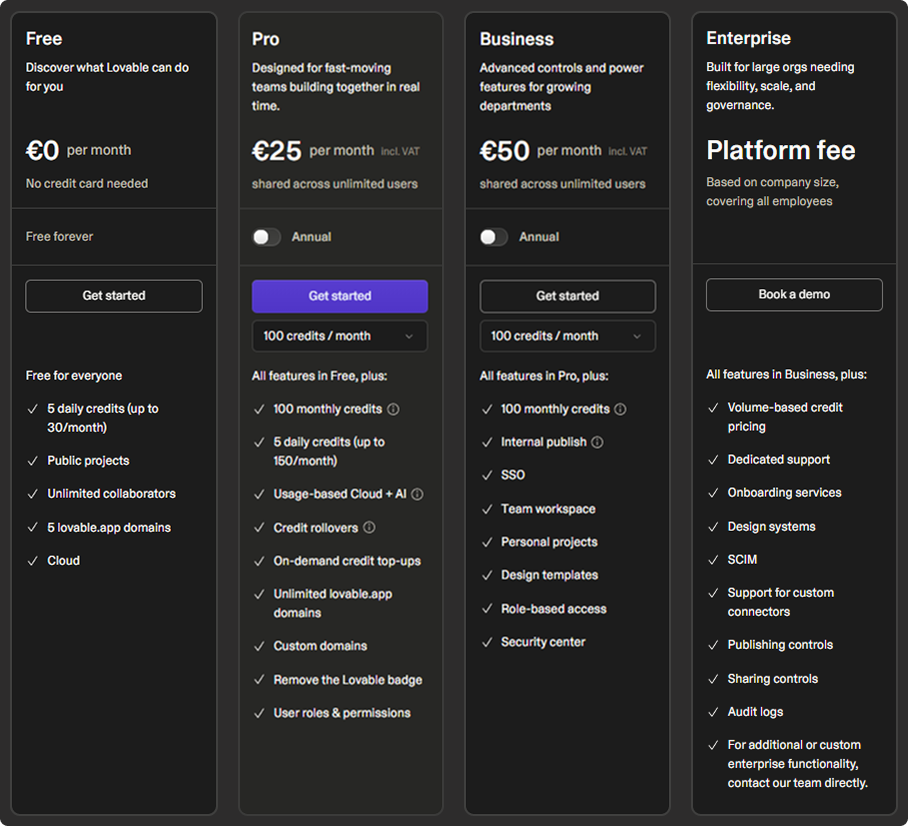
Lovable does not charge extra for the Stripe connector. You pay Stripe's standard fees: 2.9% + 30¢ per successful card charge for US cards, slightly higher for international. Subscriptions have no extra fee beyond the transaction cost. Stripe Radar for fraud protection is included. The customer portal is free. Connect (for marketplaces) has additional fees. Lovable's pricing is based on AI credits and team seats, not transaction volume.
Supabase Edge Functions have a generous free tier (2 million invocations/month) and then $2 per million. A typical SaaS with 1,000 subscribers generates maybe 5,000 webhook events per month (renewals, retries, portal sessions). That is well within the free tier. Database storage for subscription rows is negligible. The main cost at scale is Stripe's percentage, not infrastructure.
If you build a marketplace using Stripe Connect, the fee structure changes. You pay the standard transaction fee plus Connect fees (0.25% for Standard, custom for Express/Custom). Lovable can generate Connect onboarding flows, but that is more complex than standard payments. Most Lovable users start with standard Stripe charges and only adopt Connect when they need to split payments between platform and sellers.
Common Integration Patterns
Beyond basic subscriptions, several patterns appear frequently in Lovable projects. Usage-based billing: you meter API calls or AI credits in your backend, then report usage to Stripe via the subscription item's quantity. The webhook handler does not manage this; your application code calls Stripe's usage records API. Lovable can generate the reporting function, but you must trigger it from your usage-tracking logic.
Free trials without credit card: create a subscription with trial_period_days and payment_behavior: 'default_incomplete'. The user gets access immediately. If they do not add a payment method before the trial ends, the subscription becomes incomplete and access stops. Lovable generates the trial logic, but you need a UI that prompts for payment method before trial expiry.
Lifetime deals: these are one-time payments for permanent access. Create a one-time price in Stripe. On checkout.session.completed, set a user flag like has_lifetime_access = true. No subscription row needed. The webhook handler for one-time payments is simpler. This pattern works for course platforms, template marketplaces, or software licenses.
- Standard subscriptions: recurring monthly/annual, portal self-service
- Usage-based: metered billing reported from application logic
- Free trials: trial_period_days with payment_behavior default_incomplete
- Lifetime access: one-time payment, permanent flag in database
- Freemium: free tier in app logic, upgrade triggers checkout
- Team seats: quantity-based subscription, portal manages seat count
Extending the Generated Code
Lovable gives you a working starting point. Most production apps need customizations. You might want to grant feature access based on subscription metadata, send custom emails on payment failure, integrate with a CRM, or enforce usage limits. The generated Edge Functions are regular TypeScript files in your Supabase project. You can edit them directly in the Supabase dashboard or pull the code locally, modify, and deploy.
A common extension: after a successful payment, create a record in an orders table with line items, then trigger a fulfillment Edge Function that sends a license key, enrolls the user in a course, or provisions a subdomain. The webhook handler calls this function asynchronously. You can also add Stripe metadata to the checkout session (user_id, plan_name, referral_code) so the webhook has context for fulfillment.
Treat Lovable's generated payment code as a scaffold, not a black box. Read it. Understand it. Extend it where your business logic diverges from the standard path.
Another extension: admin dashboard for revenue metrics. Stripe has a dashboard, but you might want in-app charts showing MRR, churn, LTV. Supabase can aggregate subscription data into materialized views. Lovable can generate the admin UI components. The webhook handler keeps the raw data current; your analytics queries read from the aggregated views.
Migration from Other Payment Providers
If you are moving an existing app to Lovable and already have Stripe customers, you do not need to recreate them. Import the customer IDs into your Supabase users table. When generating the Stripe integration, tell Lovable: "Use existing Stripe customer IDs from the user profile. Do not create new customers." The checkout session creator will attach to the existing customer. Subscriptions continue uninterrupted.
Migrating from Paddle, Lemon Squeezy, or another merchant of record is harder. Those providers own the customer relationship. You cannot export payment methods to Stripe due to PCI rules. Customers must re-enter card details. The typical approach: keep the old provider for existing subscribers (grandfather them), route new signups to Stripe via Lovable. Over time, the old base shrinks. Communicate clearly so users understand why they need to update billing.
Troubleshooting Common Issues
Webhook signature verification fails: usually means the STRIPE_WEBHOOK_SECRET in Supabase does not match the one in Stripe dashboard. Check both. Also verify the webhook URL in Stripe matches your deployed Edge Function URL exactly, including the /functions/v1/stripe-webhook path. A trailing slash mismatch can cause issues.
Checkout redirects to a 404: the success and cancel URLs in the checkout session must match routes in your Lovable app. The generated code creates /payment/success and /payment/cancel pages. If you renamed or deleted them, update the checkout session creator to use the correct paths. Use relative URLs so they work on preview and production deployments.
Subscription status shows incomplete: this happens when a subscription requires payment but the payment method is missing or declined. Check the latest invoice on the subscription. If payment_failed, the user needs to update their card via the customer portal. If no payment method, they need to add one. The portal handles both. Your app should detect incomplete status and prompt the user.
- Webhook signature mismatch → verify secret matches in both places
- 404 on success/cancel → check route paths in checkout session creator
- Incomplete subscription → prompt user to add payment method via portal
- Past due not clearing → check if retry succeeded, manual invoice pay
- Portal returns 403 → verify customer ID matches Stripe customer
- Price ID not found → confirm price exists in same Stripe account as secret key
Production Deployment Checklist
Before switching to live mode, verify every item. This is not a complete security audit, but it catches the most common launch problems. Test the full flow with a real card in test mode first. Then create a separate Stripe account or use the same account's live keys for a final end-to-end test with a small real charge (you can refund it immediately).
- All environment variables set in production Supabase project
- Live webhook endpoint configured in Stripe dashboard
- Webhook signing secret updated to live version
- Test mode keys replaced with live keys in Supabase secrets
- Stripe account business verification completed
- Customer portal configured with your branding and support links
- Email receipts and invoice emails enabled in Stripe
- Tax calculation configured if selling globally (Stripe Tax)
- Legal pages updated: terms, privacy, refund policy
- Monitoring alerts set for webhook failures and payment errors
After launch, monitor the Stripe dashboard's webhook delivery logs. Set up alerts for failed deliveries. Supabase logs show Edge Function invocations and errors. Check both daily for the first week. Most issues appear in the first 48 hours: a missed webhook, a misconfigured price ID, a redirect loop. Fix them fast. Users notice payment problems immediately.
Frequently Asked Questions
Does Lovable charge extra for Stripe integration?
No. The Stripe connector is included. You only pay Stripe's standard transaction fees (2.9% + 30¢ per successful charge) and your Lovable plan for AI credits.
Can I use Stripe Connect for marketplace payments?
Yes, but it requires more custom code. Lovable can generate the onboarding flow for connected accounts, but you will need to extend the webhook handler for platform fees, payouts, and account verification.
What happens if a webhook fails to deliver?
Stripe retries with exponential backoff for up to 72 hours. The generated handler uses idempotency keys so duplicate deliveries do not cause double processing. Monitor the Stripe dashboard webhook logs for persistent failures.
Can I offer free trials without collecting credit cards?
Yes. Create a subscription with trial_period_days and payment_behavior: 'default_incomplete'. The user gets access immediately. Before the trial ends, prompt them to add a payment method via the customer portal.
How do I handle usage-based billing with Lovable?
Create a metered price in Stripe. Your application code tracks usage (API calls, AI credits) and reports it to Stripe via the usage records API. Lovable can generate the reporting function, but you must call it from your usage-tracking logic.
Is the generated code PCI compliant?
The integration qualifies for SAQ A because Stripe hosts the checkout form and never sends raw card data to your servers. You must still secure your webhook endpoint, use HTTPS, and protect API keys.
Can I migrate existing Stripe customers to a Lovable project?
Yes. Import customer IDs into your Supabase users table. Tell Lovable to use existing customer IDs when creating checkout sessions. Subscriptions continue without interruption.
Final Assessment of Lovable Stripe Integration
The Lovable Stripe integration is genuinely useful for the platform's target audience. It removes the boilerplate that stops many AI-generated prototypes from becoming real businesses. You get a working checkout flow, subscription management, customer portal, and webhook sync in minutes instead of days. The code follows current Stripe best practices and runs on Supabase's reliable Edge Function infrastructure.
It is not a no-code payment builder. You still need to understand Stripe concepts: products, prices, customers, subscriptions, invoices, webhooks. Lovable generates the glue, but you make the business decisions. If you treat it as a black box, you will struggle when something breaks or when you need behavior outside the standard path. Read the generated code. It is readable TypeScript, not minified magic.
The main limitation is that complex billing models (usage-based with complex tiers, dynamic pricing, multi-currency with local payment methods) require significant custom code on top of the scaffold. But for standard SaaS subscriptions, one-time purchases, and lifetime deals, the generated code covers 90% of what you need. The remaining 10% is where your product differentiates.