

AI Development Tools
Lovable Dev Student Discount: What Students Get and How to Claim It
Complete guide to student pricing, eligibility requirements, and maximizing your Lovable Dev account as a student.


Senior Software Developer & Trading Technology Specialist
Ethan Parker is a software developer with over 8 years of experience in building web applications, trading tools, and financial technology solutions. He specializes in Python, JavaScript, API integrations, and trading automation, helping traders improve efficiency through innovative technology.
Students building with AI tools face a common problem: the best platforms cost money, and student budgets are tight. Lovable Dev has become one of the more popular AI app builders, letting you describe an application in plain English and watch it generate working React code with Supabase backend integration. The platform operates on a credit system, and those credits run out fast when you're iterating on a project.
Contents
- 1. What Lovable Dev Actually Does
- 2. Current Student Discount Structure
- 3. How to Verify Your Student Status
- 4. Free Tier vs Student Discount: Which Makes Sense
- 5. Lovable Dev Free Weekend and Promotional Offers
- 6. What Students Actually Build With Lovable
- 7. Credit Consumption Patterns for Student Projects
- 8. GitHub Integration and Local Development Workflow
- 9. Supabase Backend: What Students Get
- 10. Team Collaboration on Student Projects
- 11. After Graduation: What Happens to Your Discount
- 12. Comparing Lovable Student Discount to Alternatives
- 13. Common Pitfalls Students Encounter
- 14. Building a Portfolio That Gets Interviews
- 15. Final Assessment of Lovable Dev Student Discount
The company offers a student discount program, but the details aren't always front and center on their pricing page. Some students find it by accident. Others search for "lovable dev student" or "lovable students" and land on outdated forum threads. This guide covers what the discount actually includes, how to verify your status, what happens after graduation, and whether the free tier might be enough for your needs.
I've spent time digging through the current offerings, comparing them against the standard plans, and looking at what students actually need when they're building course projects, portfolio pieces, or startup MVPs. The short version: the discount exists, it's meaningful, but there are catches worth knowing before you commit to a workflow.
What Lovable Dev Actually Does
Before diving into pricing, it helps to understand what you're paying for. Lovable Dev is an AI-powered application builder that turns natural language prompts into functional web applications. You describe what you want — "a task manager with user authentication, due dates, and categories" — and the system generates a React frontend with TypeScript, Tailwind CSS for styling, and a Supabase backend handling database, authentication, and real-time subscriptions.
The generated code isn't a black box. You can view, edit, and extend it directly in the browser-based editor, or pull it down to your local machine via GitHub integration. The platform handles deployment automatically, giving you a live URL on their domain or your own custom domain. For students, this means you can go from idea to deployed application in a single sitting without wrestling with build configurations, environment variables, or hosting setup.
The credit system meters usage. Each generation, modification, or regeneration consumes credits based on complexity. A simple landing page might cost a few credits. A full CRUD application with authentication, multiple tables, and real-time features can burn through dozens. The free tier includes a modest monthly allotment. Paid plans scale up from there. Understanding your typical consumption pattern matters more than the raw credit number.
Students typically build three types of projects: course assignments that demonstrate specific technical concepts, portfolio pieces for internship applications, and side projects that might turn into something commercial. Each has different credit demands. Course work tends to be smaller and more predictable. Portfolio projects often involve multiple iterations as you refine the demo. Side projects can run for months with ongoing feature additions.
Current Student Discount Structure
Lovable Dev's student program provides 50% off the Pro plan, bringing it from $20 per month to $10 per month when billed annually. The Pro plan includes 250 credits monthly, private projects, custom domains, and priority support. For comparison, the free tier gives 30 credits monthly with public projects only. The Scale plan at $50 monthly (or $25 with student discount) provides 1,000 credits and team collaboration features.
The discount applies to annual billing only. Monthly billing at the student rate isn't offered. This means a $120 upfront charge for Pro or $300 for Scale. Some students prefer monthly flexibility, but the annual commitment reflects how the platform expects serious builders to use it — consistently over a semester or academic year, not for a single weekend hackathon.
Verification happens through a third-party service that checks your .edu email address or accepts alternative documentation like a current student ID, enrollment letter, or tuition receipt. The process usually completes within a few hours. Once verified, the discount remains active for one year, after which you'll need to re-verify. Graduating students sometimes ask about a grace period — there isn't an official one, but support has been known to extend access for a month or two if you explain the situation.
How to Verify Your Student Status
The verification flow starts on the pricing page. Click the student discount link, which opens a form asking for your academic email address. If you have a .edu address, enter it and you'll receive a verification link. Click the link, confirm your enrollment, and the discount applies automatically to your account. The system recognizes most major university domains automatically.
Students without .edu addresses — common at international institutions, coding bootcamps, or some community colleges — need to upload documentation. Accepted formats include a current student ID card photo, enrollment verification letter from the registrar, tuition payment receipt for the current term, or a screenshot from your student portal showing active status. The review is manual and typically takes 2-24 hours during business days.
A practical tip: use your personal email for the Lovable account itself, not your school email. School emails often expire after graduation, and losing access to your primary account email creates headaches for password resets, billing updates, and support requests. Add the school email only for verification, then keep your personal address as the account primary.
Bootcamp students sometimes hit a snag. Not all programs qualify — the verification service maintains a database of accredited institutions. If your program isn't recognized, you can appeal with additional documentation: curriculum outline, instructor contact information, program accreditation details. Responses vary. Some bootcamp graduates report approval within days. Others get generic rejections. There's no published list of accepted programs, so you won't know until you try.
Free Tier vs Student Discount: Which Makes Sense
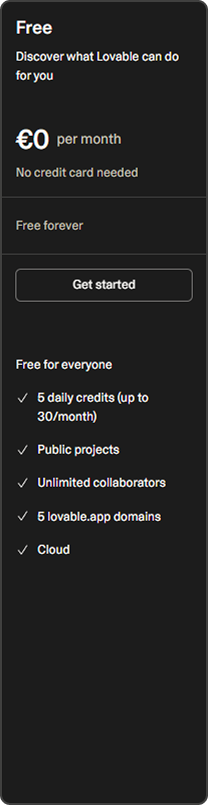
The free tier gives 30 credits monthly. That's enough for roughly 3-5 small applications or one medium-sized project with several iterations. Projects are public by default, meaning anyone with the link can view your code and prompt history. For coursework where submission requires a public link, this works fine. For portfolio pieces you'd rather keep private until polished, it's a limitation.
The student Pro plan at 250 credits monthly changes the calculus significantly. You can build 8-10 substantial applications per month, keep them private, attach custom domains for professional presentation, and get priority support when something breaks before a deadline. The custom domain feature alone matters for portfolio sites — showing a project at yourname.dev/project looks better than lovable.app/project-abc123.
Scroll horizontally to see all columns
| Feature | Free Tier | Student Pro |
|---|---|---|
| Monthly Credits | 30 | 250 |
| Project Visibility | Public only | Private or public |
| Custom Domains | Not included | Included |
| Priority Support | No | Yes |
| Monthly Cost | $0 | $10 (billed annually) |
| GitHub Integration | Yes | Yes |
| Supabase Backend | Yes | Yes |
For a student building one capstone project over a semester, the free tier might suffice. For someone building multiple portfolio pieces, contributing to hackathons, or exploring different app ideas weekly, the credit ceiling on the free tier becomes a real constraint. The $120 annual cost breaks down to $10 monthly — roughly two coffee shop visits. Whether that's worth it depends on how much you value private iteration and custom domains.
The free tier teaches you the platform. The student plan lets you actually use it for real work without constantly watching a credit counter.
Lovable Dev Free Weekend and Promotional Offers
Separate from the student discount, Lovable occasionally runs "free weekend" promotions where all users get elevated credits or temporary Pro access. These typically coincide with major feature launches, hackathon sponsorships, or back-to-school periods. The "lovable dev free weekend" searches spike during these events, but they're unpredictable — there's no published calendar.
Students should understand the difference: free weekends are temporary credit boosts for everyone. The student discount is a permanent (renewable) price reduction. You can stack them — if a free weekend happens while you're on the student plan, you get the promotional credits on top of your regular allotment. But relying on free weekends for coursework is risky. They're marketing events, not reliable infrastructure.
The company also offers a referral program where existing users share a link that grants both parties bonus credits. Students in the same program can refer each other, effectively earning extra credits on top of the discount. The referral credits don't expire monthly like the regular allotment — they sit in your account until used. This can stretch a student budget further, especially if you're in a cohort where everyone signs up together.
What Students Actually Build With Lovable
The platform excels at certain project types and struggles with others. Understanding this before committing credits saves frustration. CRUD applications — dashboards, management tools, content systems, booking platforms — are the sweet spot. The Supabase integration handles authentication, row-level security, real-time updates, and file storage out of the box. A student can build a functional project management tool with teams, tasks, comments, and notifications in an afternoon.
Landing pages, marketing sites, and portfolio sites work well too. The Tailwind integration means styling changes happen through natural language — "make the hero section darker with a gradient background" — without writing CSS. For design students or non-technical founders, this removes the styling bottleneck entirely.
Where it struggles: highly custom algorithms, complex data visualizations, real-time multiplayer games, applications requiring specific third-party API integrations beyond the built-in Stripe, Supabase, and GitHub connectors, and anything needing native mobile capabilities. The generated code is standard React — you can extend it manually — but the AI assistance drops off once you leave the well-trodden path.

Computer science students often use Lovable for the boilerplate — authentication, database schema, basic CRUD — then eject to local development for custom logic. This hybrid approach consumes fewer credits because you're not asking the AI to generate complex business logic. You prompt for the scaffold, then write the hard parts yourself. The GitHub integration makes this workflow smooth: generate, pull, code locally, push, deploy.
Credit Consumption Patterns for Student Projects
Credits are the currency, and understanding consumption helps you pick the right plan. A typical interaction — "create a user dashboard with sidebar navigation" — might cost 3-5 credits. Refining it — "add dark mode toggle to the sidebar" — costs 1-2 more. Each regeneration of the same component consumes fresh credits. This is where students burn through allotments: iterating on UI details through repeated prompts instead of editing the generated code directly.
A practical breakdown for common student projects: a personal portfolio site with blog, contact form, and project showcase runs 15-25 credits for the initial version plus 5-10 for polish. A course registration system with student/admin roles, waitlists, and email notifications runs 40-60 credits. A marketplace prototype with listings, search, favorites, and checkout integration runs 80-120 credits. These are rough estimates — complexity, prompt clarity, and iteration count all shift the numbers.
Scroll horizontally to see all columns
| Project Type | Initial Build | Polish & Iteration | Total Range |
|---|---|---|---|
| Portfolio Site | 15-25 | 5-10 | 20-35 |
| Course Management Tool | 40-60 | 10-20 | 50-80 |
| Marketplace MVP | 80-120 | 20-40 | 100-160 |
| SaaS Dashboard | 60-90 | 15-30 | 75-120 |
| Internal Admin Panel | 30-50 | 10-15 | 40-65 |
The free tier's 30 credits monthly covers a portfolio site with room to spare. It won't cover a marketplace MVP. The student Pro's 250 credits handles a marketplace MVP with iteration budget left over, or two substantial projects per month. The key insight: credits don't roll over. Unused monthly credits disappear. Plan your project timeline to align with billing cycles if you're near the limit.
GitHub Integration and Local Development Workflow
The GitHub integration is where Lovable shifts from toy to tool. Every project connects to a GitHub repository — public on the free tier, private on paid plans. The platform pushes commits automatically as you generate and modify. You can clone locally, write custom code, push, and Lovable will deploy the updated version. This two-way sync means you're not locked into the browser editor.
For students, this enables a workflow that professors and employers recognize: version control, commit history, branch-based feature development, code review via pull requests. You can show a GitHub repository with meaningful commit messages — "feat: add user authentication with Supabase" — rather than just a deployed link. The generated code uses standard patterns: Vite for bundling, React Router for navigation, Supabase client for data, Tailwind for styling. It's readable, maintainable React.
One limitation: the sync isn't perfectly bidirectional in real time. If you push changes to GitHub while the Lovable editor is open, you'll need to refresh to see them. Merge conflicts can occur if you edit the same files in both places. The platform handles simple merges automatically but flags complex conflicts for manual resolution. For solo student projects this rarely matters. For group projects, establish who edits where.
Supabase Backend: What Students Get
Every Lovable project provisions a Supabase project automatically. This gives you a PostgreSQL database, authentication (email/password, OAuth providers, magic links), row-level security policies, real-time subscriptions, edge functions, and file storage. The AI generates the schema migrations, RLS policies, and client-side hooks based on your prompts. You don't write SQL unless you want to.
For students learning backend concepts, this is both a shortcut and a learning tool. You can inspect the generated migrations to see how tables, indexes, and policies map to your requirements. The Supabase dashboard lets you run raw SQL, view query plans, and monitor performance. Many students report understanding database design better after seeing what the AI produces for their described features.
The Supabase project lives in your Supabase account, not Lovable's. If you leave Lovable, the backend stays yours. You can continue using it with any frontend — Next.js, Remix, vanilla React, mobile apps. This matters for capstone projects or portfolio pieces you want to maintain long-term. You're not renting the database; you're using Lovable to scaffold it.
Supabase's free tier is generous: 500MB database, 1GB file storage, 2GB bandwidth monthly, 50MB edge function deployment. Most student projects stay well within these limits. The Lovable student discount doesn't affect Supabase limits — those are separate. But the integration means you hit the ground running with a configured backend instead of spending your first week on infrastructure.
Team Collaboration on Student Projects
Group projects introduce coordination challenges. The student Pro plan supports private projects but not team collaboration features — those require the Scale plan. However, the GitHub integration provides a workaround: all team members clone the repository, work locally, push to branches, and one person (the repo owner) merges to main, triggering deployment. This is standard Git workflow and costs no extra credits beyond the owner's account.
The Scale student plan at $25 monthly (billed annually) adds explicit team features: shared project access in the Lovable editor, centralized billing, usage analytics per team member. For a senior capstone team of 3-4 students splitting the $300 annual cost, that's $75-100 each — reasonable for a semester-long project with professional tooling. But most student teams manage fine with the GitHub workflow on individual Pro plans.
A practical note: only the account owner's credits are consumed for generation. If a teammate without a paid plan opens the project in Lovable, they can view but not generate. They can still edit code locally and push. This asymmetry matters for credit budgeting — designate the team member with the highest credit allotment as the primary generator.
After Graduation: What Happens to Your Discount
The student discount lasts one year from verification. Near expiration, you'll receive an email prompting re-verification. If you're still enrolled — graduate school, another degree, continuing education — you re-verify and continue. If you've graduated, the discount ends at the next billing cycle. Your projects remain accessible. Private projects stay private. Custom domains keep working. You simply lose the discounted rate.
At that point, you decide: pay full price for Pro ($20/month annually or $25/month monthly), downgrade to free tier, or migrate off the platform. The free tier downgrade makes projects public. If you have portfolio pieces you'd rather keep private, you'll need to either maintain a paid plan or export the code and host elsewhere. The GitHub repository is yours — you can deploy to Vercel, Netlify, or any static host for free.
Some graduates negotiate. Emailing support with "I just graduated, love the platform, can't afford full price yet" sometimes yields a short extension or a one-time credit grant. There's no guarantee, but the company has a track record of accommodating recent graduates transitioning to employment. Don't count on it, but it's worth asking before your renewal date.
Your code and GitHub repo are yours forever. The discount is just a pricing layer on top of infrastructure you already control.
Comparing Lovable Student Discount to Alternatives
Students evaluating AI app builders should compare the total package, not just the discount percentage. Bolt.new offers a free tier with daily limits but no student discount. Replit's education program provides free private repls for verified students but uses a different architecture — more traditional IDE, less AI generation. v0 by Vercel focuses on UI components rather than full applications. Cursor's student discount gives free Pro access but it's an editor, not an app builder.
Lovable's student discount is competitive because it unlocks the full Pro feature set at half price. The 250 monthly credits exceed what most students need. The Supabase backend is production-grade. The GitHub integration means zero lock-in. The custom domain support matters for professional presentation. For a student building a portfolio to get hired, these features align directly with outcomes that matter.
Scroll horizontally to see all columns
| Platform | Student Discount | Key Limitation |
|---|---|---|
| Lovable Dev | 50% off Pro/Scale | Annual billing only |
| Bolt.new | None | Daily generation limits |
| Replit | Free education plan | Less AI-focused workflow |
| v0 by Vercel | None | UI components only |
| Cursor | Free Pro for students | Code editor, not app builder |
The comparison changes if your school provides tool access. Some universities have partnerships with Vercel, GitHub, or cloud providers that include credits or free tiers. Check your CS department's resources page or ask a professor. You might already have Vercel Pro, GitHub Copilot, or AWS credits that change the calculus for hosting and AI assistance elsewhere.
Common Pitfalls Students Encounter
The biggest pitfall: treating credits like infinite resources. Students on the free tier hit the wall mid-project and either abandon work or scramble for alternatives. On the student plan, the 250 credits feel abundant until you spend a weekend regenerating the same component twenty times because the prompt wasn't specific enough. Prompt discipline — writing clear, complete requirements upfront — stretches credits dramatically.
Another trap: over-relying on the AI for everything. The platform generates solid boilerplate and standard patterns. It struggles with novel business logic, complex state management, or performance optimization. Students who try to prompt their way through a custom scheduling algorithm or real-time collaboration engine waste credits and time. The hybrid approach — AI for scaffold, manual code for logic — works better.
A third issue: ignoring the generated code until deployment breaks. The AI makes mistakes — incorrect RLS policies, missing TypeScript types, accessibility gaps, responsive design oversights. Students who treat the output as finished product ship bugs. Students who review the code like a pull request catch issues early. This habit also builds the code-reading skills employers expect.
Building a Portfolio That Gets Interviews
The end goal for most students is a portfolio that demonstrates hireable skills. Lovable projects can serve this purpose, but they need framing. A deployed link alone tells an employer you can prompt an AI. A GitHub repository with commit history, a README explaining the problem and your architectural decisions, and a live demo with custom domain tells them you understand the full stack.
Include in each portfolio project: the problem statement, why you chose this tech stack, what the AI generated versus what you wrote manually, challenges you encountered and how you solved them, and what you'd do differently with more time. This narrative matters more than the application's feature count. Employers know AI can generate features. They want to see how you think.
The student Pro plan's custom domain feature lets you host portfolio projects at subdomains of your personal domain — projects.yourname.dev/taskmanager, projects.yourname.dev/marketplace. This looks professional and costs nothing extra. The free tier forces you to use lovable.app subdomains, which signals "student project" rather than "professional work."
A portfolio of AI-generated apps with no code review visible is a red flag. A portfolio showing AI-accelerated development with human judgment is a strong signal.
Frequently Asked Questions
Can I get the student discount if I don't have a .edu email address?
Yes. You can verify with a student ID card, enrollment letter, tuition receipt, or student portal screenshot. The review is manual and takes 2-24 hours.
Does the student discount apply to monthly billing?
No. The 50% discount only applies to annual billing. Pro becomes $120/year instead of $240/year. Scale becomes $300/year instead of $600/year.
What happens to my private projects if I downgrade to the free tier after graduation?
All projects become public. If you need projects to stay private, you must maintain a paid plan or export the code and host it elsewhere.
Can I use the student discount for team projects with classmates?
The Pro student plan supports private projects but not shared editor access. For team collaboration in the Lovable editor, you need the Scale student plan. Most teams use GitHub for collaboration instead.
Do unused credits roll over to the next month?
No. Monthly credits reset each billing cycle. Unused credits do not accumulate. Plan your project work to use credits before they expire.
Is there a grace period after graduation before the discount ends?
No official grace period exists. The discount ends at the next renewal after you can no longer verify enrollment. Some graduates report short extensions by contacting support.
Can I stack the student discount with free weekend promotions?
Yes. Free weekend credit boosts apply on top of your regular plan allotment. Referral credits also stack and don't expire monthly.
What if my coding bootcamp isn't recognized for verification?
You can appeal with curriculum details, instructor contacts, and accreditation info. Approval isn't guaranteed and varies by program.
Final Assessment of Lovable Dev Student Discount
The Lovable Dev student discount delivers genuine value for students building real projects. At $10 monthly (billed annually), the Pro plan removes the credit anxiety that stalls learning on the free tier. Private projects, custom domains, and priority support are the features that matter for portfolio work. The annual commitment is the main friction point — $120 upfront is a real decision for a student budget.
The platform itself is solid for its niche: rapid CRUD application development with a production backend. It's not a universal app builder. Students building games, complex algorithms, or native mobile apps will hit walls. Students building dashboards, marketplaces, management tools, or portfolio sites will move fast. The GitHub and Supabase integration means the skills and code transfer beyond the platform.
If you're a student with a .edu address planning to build multiple projects this academic year, the discount is straightforward value. If you're in a bootcamp without .edu verification, try the documentation route but have a backup plan. If you only need one portfolio piece, the free tier plus a free weekend promotion might cover it. The referral program can stretch credits further if your cohort signs up together.
The discount doesn't lock you in. Your code lives in GitHub. Your database lives in Supabase. Your domain points wherever you configure it. When the student year ends, you own the assets. That's more than most student software discounts offer.