

AI Development Tools
Lovable Support: Complete Guide to Getting Help
Everything you need to know about Lovable's support channels, response times, and self-help resources.

Senior Software Developer & Trading Technology Specialist
Ethan Parker is a software developer with over 8 years of experience in building web applications, trading tools, and financial technology solutions. He specializes in Python, JavaScript, API integrations, and trading automation, helping traders improve efficiency through innovative technology.
Lovable has quickly become one of the most talked-about AI app builders on the market, letting developers and non-technical founders spin up full-stack applications through natural language prompts. But no matter how polished the platform gets, there will always be moments when something breaks, a feature behaves unexpectedly, or you simply need clarification on how to accomplish a specific task. That is where Lovable support enters the picture. Understanding the available support channels, typical response times, and the most effective ways to get help can save you hours of frustration and keep your projects moving forward.
Contents
- 1. Official Lovable Support Channels
- 2. Contacting Lovable Dev Support Directly
- 3. Lovable Discord Community Support
- 4. Self-Service Resources: Documentation and Guides
- 5. Troubleshooting Common Lovable Issues
- 6. Lovable Status and Outage Information
- 7. Enterprise and Priority Support Options
- 8. Community Programs and Peer Support
- 9. Best Practices for Getting Effective Help
- 10. Final Assessment of Lovable Support
This guide walks through every official and community-driven support option Lovable currently offers. We cover direct contact methods, the Discord community, documentation and guides, troubleshooting common issues, status monitoring, enterprise support tiers, and practical tips for getting useful answers quickly. Whether you are on the free plan, a paid subscription, or evaluating Lovable for a team, you will find the information you need to navigate support effectively.
The support landscape for Lovable is somewhat unusual compared to traditional SaaS products. Because the platform generates actual code — React, TypeScript, Tailwind, Supabase integrations, and more — many issues that look like platform bugs are actually downstream problems in the generated codebase, Supabase configuration, or deployment settings. Knowing where the platform responsibility ends and where your project responsibility begins is half the battle. The other half is knowing which channel to use for which type of question.
Official Lovable Support Channels
Lovable provides several official support channels, each suited to different types of inquiries. The primary direct channel is email support, which handles account issues, billing questions, technical bugs, and feature requests. There is no phone support and no live chat widget inside the application. This is common for developer-focused tools at this stage, but it means you need to set expectations around response time. The team typically responds within one business day for paying customers, though free-tier users may wait longer during high-volume periods.
- Email support for account, billing, and technical issues
- Discord community for peer help and team announcements
- Documentation site for self-service guides and API references
- GitHub issue tracker for confirmed bugs and feature requests
- Status page for real-time platform health monitoring
- In-app feedback widget for quick suggestions and bug reports
The in-app feedback widget deserves special mention. You will find it in the lower-right corner of the Lovable editor. It opens a small form where you can describe an issue, attach a screenshot, and submit directly without leaving your project. This is often the fastest way to report a reproducible bug because it automatically includes context like your project ID, browser version, and current session data. The team reviews these submissions daily and they feed directly into the product roadmap.
Contacting Lovable Dev Support Directly
The most direct way to reach the Lovable team is through their support email address. As of this writing, the primary contact is [email protected]. Some users also report success with [email protected] for general inquiries, though [email protected] is the monitored queue for technical issues. There is no public support phone number, and the team has indicated they do not plan to add phone support in the near term. If you see a phone number claimed to be Lovable support elsewhere, it is not official.
When you write to support, include as much context as possible upfront. The project URL from the Lovable editor, the exact error message (copy-paste, do not paraphrase), steps to reproduce, browser and OS, and any relevant Supabase project IDs or GitHub repository links. If the issue involves generated code, share the specific file and line number if you can. A well-structured ticket often gets resolved in one reply. A vague ticket like "my app is broken" will almost always come back with a request for more information, adding a full cycle to the resolution.
Lovable Discord Community Support
The Lovable Discord server is arguably the most active support channel day-to-day. It serves as a real-time community hub where users help each other, the team posts announcements, and product updates are discussed before they hit the blog. The server has grown to tens of thousands of members, with several hundred typically online during peak hours. For many questions — especially "how do I do X" or "why is this pattern not working" — Discord yields faster answers than email because other builders have often solved the same problem hours or days earlier.
To get the most out of Discord, spend a few minutes understanding the channel structure. The #support channel is for general help questions. The #bug-reports channel is for confirmed, reproducible issues — the team monitors this closely. The #showcase channel is for sharing projects, not asking for help. There are also language-specific channels, framework-specific channels (React, Next.js, etc.), and channels for Supabase, Stripe, and other integrations. Search before you post. The Discord search function is surprisingly good, and most common questions have been answered multiple times.
- #support — general help, how-to questions, debugging assistance
- #bug-reports — reproducible issues with steps, screenshots, project links
- #feature-requests — product suggestions, voted on by community
- #supabase-help — database, auth, edge functions, realtime issues
- #deployment-help — Vercel, Netlify, custom domains, CI/CD problems
- #integrations — Stripe, GitHub, Figma, API connections
- #announcements — official updates, maintenance windows, releases
- #introductions — new member welcome, background sharing
Self-Service Resources: Documentation and Guides
Lovable's documentation site has improved significantly over the past year. It now covers the full lifecycle from project creation through deployment, with dedicated sections for each major integration. The docs are not exhaustive — they cannot be, given how fast the platform evolves — but they cover the happy paths well. If you are trying to do something standard like set up Supabase authentication, add Stripe checkout, or configure a custom domain, the documentation should be your first stop. It is faster than waiting for a human reply and often includes copy-pasteable code snippets.
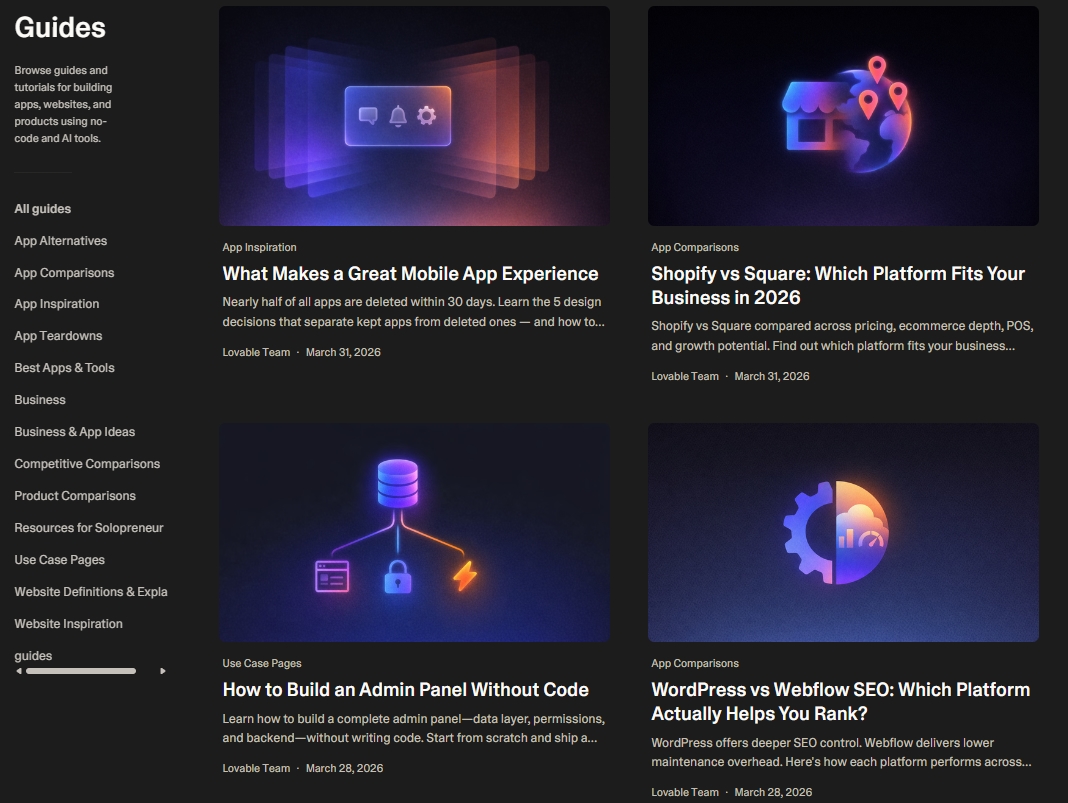
Beyond the official docs, the Lovable team publishes guides and tutorials on their blog and in the Guides section of the app. These tend to be more narrative — walking through building a specific type of application end-to-end. They are especially useful for understanding how pieces fit together: how the AI prompt translates to file structure, how Supabase tables map to TypeScript types, how environment variables flow from Lovable to Vercel. The guides are tagged by difficulty and use case, so you can filter for "beginner," "SaaS," "internal tool," or "marketplace" depending on what you are building.
Scroll horizontally to see all columns
| Factor | Documentation | Discord Community |
|---|---|---|
| Response speed | Instant (self-serve) | Minutes to hours |
| Accuracy | Official, versioned | Varies by responder |
| Depth | Happy paths only | Edge cases covered |
| Searchability | Excellent | Good with keywords |
| Best for | Standard features, setup | Custom logic, debugging |
Troubleshooting Common Lovable Issues
A large percentage of support requests fall into a handful of predictable categories. Recognizing these patterns can help you self-resolve or at least ask a much better question. The most frequent issue by far is Supabase connection problems — usually caused by mismatched environment variables, incorrect project references, or Row Level Security policies blocking the AI-generated queries. The second most common is deployment failures on Vercel, often due to build command mismatches, missing environment variables in the Vercel dashboard, or TypeScript errors that only surface during production build.
- Supabase connection fails: verify SUPABASE_URL and SUPABASE_ANON_KEY in Lovable settings match your Supabase project exactly
- Auth not working: check RLS policies, confirm email confirmation settings, verify redirect URLs in Supabase auth config
- Vercel build fails: run npm run build locally first, check for TypeScript errors, ensure all env vars are in Vercel project settings
- AI generates broken code: be more specific in prompts, reference existing files, use "fix the error in X file" follow-ups
- Custom domain not working: verify DNS records, check SSL provisioning, confirm domain is added in both Lovable and Vercel
- Stripe webhooks failing: ensure webhook endpoint is deployed, secret matches, events selected in Stripe dashboard
- GitHub sync issues: re-authenticate GitHub connection, check repository permissions, verify branch protection rules
Lovable Status and Outage Information
Before assuming a problem is on your end, always check the Lovable status page. The team maintains a public status site that shows real-time health for the editor, AI generation, deployments, API, and integrations. It also posts incident history going back several months. During a genuine platform outage, the status page is updated within minutes, and the Discord #announcements channel usually gets a message shortly after. If you see "lovable dev is down" or "lovable dev outage" trending in search, the status page is the authoritative source.

The status page also lists scheduled maintenance windows. These typically occur during low-traffic hours (late night US time, early morning EU) and last 30-60 minutes. During maintenance, the editor may be read-only or completely unavailable. AI generation and deployments are usually paused. If you have a deadline, check the maintenance schedule at the start of your week. The team announces maintenance in Discord and via email to account holders at least 24 hours in advance.
- status.lovable.dev — official status page with component-level health
- Discord #announcements — real-time incident updates from the team
- Twitter/X @lovable_dev — secondary announcement channel
- In-app banner — appears in editor during active incidents
- Email notifications — sent for major outages to account holders
Enterprise and Priority Support Options
Teams on the Enterprise plan get a significantly different support experience. Beyond faster email response times, Enterprise includes a dedicated Slack Connect channel (or Discord private channel) with direct access to solutions engineers, quarterly business reviews, custom onboarding sessions, and SLA-backed uptime guarantees. The Enterprise tier also unlocks priority bug fixes — confirmed regressions affecting Enterprise customers are typically patched within 24-48 hours, versus the standard release cycle. For organizations building mission-critical applications on Lovable, this difference can justify the price gap alone.
The Launch and Scale plans sit in the middle. They get standard email support with the 1-business-day target, but no dedicated channel, no SLA, and no guaranteed patch timing. The Starter plan is similar but with slower response targets. Free tier users rely almost entirely on community support and documentation. There is no paid support add-on for lower tiers — if you need priority support, you must upgrade to Enterprise. This is a deliberate product decision by the Lovable team to keep the support model simple.
Scroll horizontally to see all columns
| Feature | Free | Starter | Launch | Scale | Enterprise |
|---|---|---|---|---|---|
| Email support | Best effort | 2-3 days | 1-2 days | 1 day | 4 hours critical |
| Discord access | Full | Full | Full | Full | Full + private |
| Documentation | Full | Full | Full | Full | Full + custom |
| Dedicated channel | No | No | No | No | Slack Connect |
| SLA uptime | No | No | No | No | 99.9% |
| Priority bug fixes | No | No | No | No | Yes |
| Onboarding sessions | No | No | Self-serve | Group | Custom 1:1 |
Community Programs and Peer Support
Lovable runs several community programs that function as informal support layers. The Lovable Partners program connects agencies and freelancers who build on Lovable professionally. Partners get early access to features, a private channel for partner-to-partner help, and a direct line to the partnerships team. The Experts program highlights community members who consistently provide high-quality answers in Discord and create valuable templates or guides. Experts get a badge, occasional swag, and sometimes early beta access. Neither program is a formal support channel, but both expand the pool of knowledgeable people you can reach.
There is also a template marketplace where users publish complete starter projects — SaaS boilerplates, dashboard templates, landing page kits, and more. These templates often solve the "how do I structure this" questions better than documentation because they show working implementations. You can clone a template directly into your account and modify it. The marketplace has a rating and review system, and the most popular templates tend to be well-maintained by their creators. If you are stuck on a pattern, browsing the marketplace for a similar use case is often faster than asking from scratch.
- Partners program: agencies and freelancers, private channel, early access
- Experts program: top community contributors, badge, beta access
- Template marketplace: cloneable starters for common app types
- Community templates: free, user-submitted, varying maintenance
- Office hours: occasional live streams with team, announced in Discord
- Hackathons: quarterly events with prizes, good for learning patterns
Best Practices for Getting Effective Help
The quality of help you receive correlates directly with the quality of your question. This is true across every channel — email, Discord, GitHub, even the in-app widget. The most effective support requests share a few characteristics. They are specific about the goal, not just the symptom. They include minimal reproduction steps. They show what you have already tried. They provide relevant context (plan tier, project type, integrations used). And they are posted in the right channel. A question about Supabase RLS policies in #general will get redirected. The same question in #supabase-help with a screenshot of the policy and the error message will get a useful answer within minutes.
- State your goal: "I want users to only see their own data" not "RLS not working"
- Share the exact error: copy the full message from console or network tab
- Minimal reproduction: isolate the issue to the smallest possible prompt or code snippet
- Show what you tried: "I added policy X, tested with user Y, got error Z"
- Include context: plan tier, Supabase project region, Vercel deployment target
- Use the right channel: match the topic to the Discord channel or email queue
- Follow up: if a solution works, reply so others learn; if not, explain why
A vague ticket like 'my app is broken' will almost always come back with a request for more information, adding a full cycle to the resolution.
Final Assessment of Lovable Support
Lovable support is a mixed bag by design. The platform leans heavily on community and self-service, which works well for the majority of users building standard applications. The documentation covers the happy paths thoroughly. Discord provides real-time peer support that often beats email response times. The in-app feedback widget creates a direct line for bug reports. For free and lower-tier users, this ecosystem is usually sufficient — provided you are willing to search first, ask precisely, and accept that some questions require iteration. The gap appears when you hit a genuine platform bug, a complex integration edge case, or a time-sensitive production issue. That is where the Enterprise tier earns its keep: dedicated channel, SLA, and priority patching change the risk profile entirely. If your business depends on Lovable uptime and rapid issue resolution, the Enterprise conversation is worth having. For everyone else, the combination of docs, Discord, and patient email support gets the job done — just not always on your preferred timeline.
Frequently Asked Questions
What is the official Lovable support email address?
The primary support email is [email protected]. For general inquiries, [email protected] may also work, but [email protected] is the monitored queue for technical issues, account problems, and billing questions.
Does Lovable offer phone support or live chat?
No. Lovable does not provide phone support or a live chat widget. Support is handled through email, the Discord community, documentation, and the in-app feedback widget. The team has indicated no plans to add phone support.
How long does Lovable support take to respond?
Response times vary by plan. Enterprise customers typically hear back within 4 business hours for critical issues. Launch and Scale plans usually get a response within 1 business day. Starter plan users wait 1-2 days. Free tier users may wait 2-5 business days, especially during high-volume periods.
Where can I check if Lovable is down or having an outage?
Check the official status page at status.lovable.dev for real-time platform health. The Discord #announcements channel and Twitter @lovable_dev also post incident updates. An in-app banner appears in the editor during active incidents.
What should I include in a support request to get a faster resolution?
Include your project URL, the exact error message (copy-pasted), steps to reproduce, browser and OS, relevant Supabase project IDs or GitHub links, and what you have already tried. For generated code issues, reference the specific file and line number if possible.
Is there a paid support add-on for Starter or Launch plans?
No. Priority support with SLA and dedicated channels is only available on the Enterprise plan. There is no option to purchase priority support as an add-on for lower tiers. You must upgrade to Enterprise for guaranteed response times and SLA-backed uptime.
How do I report a bug in the Lovable platform?
Use the in-app feedback widget (lower-right corner of the editor) for the fastest bug reporting — it auto-includes project context. Alternatively, post in Discord #bug-reports with reproduction steps, screenshots, and project link, or email [email protected] with the same details.