

AI App Development
Lovable Stripe Integration: Complete Guide for Builders
Everything you need to know about connecting Stripe to Lovable AI-built applications

Senior Software Developer & Trading Technology Specialist
Ethan Parker is a software developer with over 8 years of experience in building web applications, trading tools, and financial technology solutions. He specializes in Python, JavaScript, API integrations, and trading automation, helping traders improve efficiency through innovative technology.
Lovable has changed how people build software. You describe what you want in plain English, and the AI writes the code, sets up the database, handles authentication, and deploys the whole thing. But most real applications need to accept money. That is where Stripe comes in. The combination of Lovable's AI-driven development and Stripe's payment infrastructure lets you go from idea to revenue-generating product in hours instead of weeks.
Contents
- 1. How Lovable Connects to Stripe
- 2. Setting Up the Integration Step by Step
- 3. Built-In Payment Components
- 4. Managing Products and Prices
- 5. Handling Webhooks and Server Events
- 6. Security and Compliance Considerations
- 7. Subscription Lifecycle Management
- 8. Testing Strategies
- 9. Common Integration Patterns
- 10. Pricing and Cost Structure
- 11. Limitations and Workarounds
- 12. Migration from Other Platforms
- 13. Performance and Monitoring
- 14. Real-World Examples
- 15. Troubleshooting Common Issues
- 16. Future-Proofing Your Integration
- 17. Final Assessment of Lovable Stripe Integration
This guide walks through the entire integration. We cover how the connection works under the hood, what you need to configure, which features are available out of the box, and where the rough edges still exist. Whether you are building a SaaS, a marketplace, a subscription service, or a simple checkout page, the patterns here apply.
I have spent time with the platform, read the documentation, and looked at what builders are actually shipping. The integration is solid for standard use cases. It handles subscriptions, one-time payments, and webhooks without requiring you to write backend code. But there are limits. Complex billing logic, custom tax rules, and multi-party payments still need manual work. Knowing those boundaries upfront saves frustration later.
The article assumes you have a Lovable account and a Stripe account. If you do not have either, sign up for both before continuing. The free tiers on both platforms are enough to follow along and test the complete flow.
How Lovable Connects to Stripe
Lovable does not host your Stripe secret keys. Instead, it uses a secure connector pattern. You provide your Stripe publishable key and a restricted secret key through the Lovable dashboard. The platform stores these encrypted and uses them to make API calls on your behalf when you add payment components to your project.
When you ask Lovable to add a checkout button, a subscription portal, or a payment form, it generates React components that call Stripe.js on the frontend. For server-side operations like creating customers, managing subscriptions, or handling webhooks, Lovable deploys Supabase Edge Functions that act as a thin proxy. Your secret key never touches the browser.
This architecture matters. It means you get the security benefits of Stripe's client-side tokenization without managing a separate backend. The Edge Functions are version-controlled alongside your frontend code. You can inspect them, modify them, or replace them entirely if you need custom logic that the built-in components do not support.
- Publishable key used for Stripe.js initialization in the browser
- Restricted secret key used only by Supabase Edge Functions
- Webhook endpoints automatically configured in your Stripe dashboard
- All sensitive operations run server-side in isolated functions
- Keys can be rotated without redeploying the frontend
The connector also handles environment separation. You can configure different Stripe accounts for development, staging, and production. Lovable switches keys based on the deployment target. This prevents test transactions from polluting your live dashboard and lets you test webhook handling safely.
Setting Up the Integration Step by Step
Start in the Lovable dashboard. Open your project, go to Settings, then Integrations. Find Stripe in the list and click Connect. You will be prompted for two keys from your Stripe dashboard: the publishable key and a secret key with restricted permissions.
In Stripe, go to Developers > API keys. Copy the publishable key directly. For the secret key, click Create restricted key. Give it a name like "Lovable Integration." Enable only the permissions your app actually needs. For most projects that means: Customers (read/write), Payment Intents (read/write), Subscriptions (read/write), Products (read), Prices (read), and Webhook Endpoints (write). Save the key and copy it immediately — you cannot view it again.
Paste both keys into Lovable. The platform validates them by making a test API call. If validation passes, you will see a green checkmark. Lovable then creates a webhook endpoint in your Stripe account pointing to your project's Edge Function URL. This endpoint listens for events like successful payments, subscription cancellations, and failed charges.
One common mistake: forgetting to enable the correct webhook events. By default, Lovable registers for checkout.session.completed, customer.subscription.updated, customer.subscription.deleted, and invoice.payment_failed. If your app relies on other events — like payment_intent.succeeded for one-time payments — you must add them manually in the Stripe dashboard or ask Lovable to update the registration.
After the keys are saved, test the connection. In your Lovable project, ask the AI to "add a Stripe checkout button for a $10 product." The AI will create a product and price in Stripe if they do not exist, generate a checkout component, and wire up the success and cancel URLs. Click the button in preview mode. You should land on a Stripe-hosted checkout page. Complete a test payment with card number 4242 4242 4242 4242. The webhook fires, your Edge Function processes it, and the UI updates.
Built-In Payment Components
Lovable ships several pre-built components that cover the most common payment flows. You add them by describing what you want in the chat. The AI places the component, configures the props, and connects the callbacks. You can also drop them manually from the component library if you prefer visual editing.
Scroll horizontally to see all columns
| Component | Use Case | Key Props |
|---|---|---|
| StripeCheckoutButton | One-time payments, donations | priceId, successUrl, cancelUrl, mode |
| StripeSubscriptionButton | Recurring billing | priceId, successUrl, cancelUrl, trialDays |
| StripeBillingPortal | Customer self-service | customerId, returnUrl |
| StripePaymentElement | Custom checkout forms | clientSecret, appearance, layout |
| StripePricingTable | Multi-plan display | pricingTableId, customerEmail |
The checkout and subscription buttons are the simplest. They redirect to Stripe's hosted page. This offloads PCI compliance, card validation, and error handling to Stripe. The downside is less control over the look and feel. You can customize colors and fonts in the Stripe dashboard, but the layout is fixed.
PaymentElement gives you an embedded form. You design the surrounding UI — headers, trust badges, upsells — and drop the element where the card fields go. This requires more setup: you must create a PaymentIntent on the server first, pass the client secret to the component, and handle the confirmation callback. Lovable's AI can scaffold all of this, but you should understand the flow in case you need to debug.
The Billing Portal is a hosted page where customers manage their own subscriptions: update payment methods, change plans, cancel, download invoices. You generate a session server-side and redirect the user. Lovable handles the session creation in an Edge Function. Just pass the customer ID and a return URL.
Managing Products and Prices
You can create products and prices directly in the Stripe dashboard, then reference their IDs in Lovable components. This works fine for a handful of static plans. But as your catalog grows, hardcoding IDs becomes brittle. Lovable offers two better approaches.
First, you can ask the AI to create products and prices programmatically when the app starts. The Edge Function checks if a product with a given name exists. If not, it creates it. If it does, it updates the price to match your current configuration. This keeps Stripe in sync with your code. The tradeoff is that price changes in the Stripe dashboard get overwritten on the next deploy.
Second, you can use Stripe's Pricing Table. Build the table in the Stripe dashboard — it supports multiple plans, intervals, trial periods, and custom metadata. Embed it with the StripePricingTable component. Changes in the dashboard reflect immediately without a redeploy. This is the most maintainable approach for SaaS pricing pages.
- Hardcoded price IDs: simple, good for 1-3 plans, manual updates
- Programmatic sync: code is source of truth, overwrites dashboard changes
- Pricing Table: dashboard is source of truth, no redeploy for price changes
- Hybrid: code manages structure, dashboard manages prices
For most teams, the hybrid approach works best. Define your product hierarchy in code — which products exist, what features each tier includes — but let the Stripe dashboard own the actual prices, currencies, and promotional discounts. The AI can generate the sync logic once, and you adjust prices in Stripe whenever you run a sale or expand to a new currency.
A practical tip: use metadata on prices to store feature flags. For example, add metadata like {"max_projects": 10, "team_members": 5, "api_access": true}. Your Edge Functions can read this metadata when checking permissions. This keeps feature logic out of your frontend code and lets you change limits without deploying.
Handling Webhooks and Server Events
Webhooks are how your app learns about asynchronous events: a subscription renewed, a payment failed, a dispute opened. Lovable registers a single webhook endpoint that receives all events and routes them to handler functions. The default handlers cover the basics: provisioning access on successful payment, revoking access on cancellation, retrying failed invoices.
You will likely need custom handlers. For example, when a customer upgrades mid-cycle, you might want to grant immediate access to new features while Stripe handles the proration. Or when a payment fails, you might want to send a custom email instead of relying on Stripe's default. The Edge Function file is in your project at supabase/functions/stripe-webhook/index.ts. Open it, add your logic, deploy.
Testing webhooks locally is tricky because Stripe needs a public HTTPS URL. Lovable solves this by providing a deployed endpoint immediately. But during development, you may want to test against a local instance. Use the Stripe CLI: stripe listen --forward-to localhost:54321/functions/v1/stripe-webhook. This tunnels events to your local Supabase instance. Remember to update the webhook secret in your local environment file.
One gap in the default setup: the webhook handler does not automatically sync customer metadata back to your user profiles. If a customer updates their email in the Billing Portal, your Supabase auth user still has the old email. You need to listen for customer.updated events and sync the fields you care about. This is a five-minute addition to the handler but easy to miss until users report it.
Security and Compliance Considerations
The integration inherits Stripe's PCI SAQ A compliance because card data never touches your servers. Stripe.js tokenizes everything in an iframe. Your Edge Functions only see payment method IDs and customer IDs. This is the highest compliance tier for a custom application.
Lovable adds a few security layers of its own. API keys are encrypted at rest in the platform's secrets store. Edge Functions run in isolated V8 isolates with no persistent filesystem. Network egress is restricted — functions can only call Stripe, Supabase, and a small allowlist of external APIs. You cannot accidentally expose secrets through console logs because the platform scrubs them.

You still have responsibilities. Rotate your restricted secret key periodically — every 90 days is a good baseline. Monitor the Stripe dashboard for unusual activity: spikes in failed payments, new webhook endpoints you did not create, API keys used from unexpected IPs. Enable two-factor authentication on your Stripe account and on your Lovable account.
- Use restricted keys with minimum necessary permissions
- Enable Stripe's radar rules for fraud prevention
- Set up alerts for dispute rates above 0.5%
- Review webhook endpoint list monthly
- Audit Edge Function code for accidental secret logging
If you operate in Europe, Stripe handles SCA (Strong Customer Authentication) automatically through 3D Secure. The checkout flow prompts for authentication when required. For embedded PaymentElement, you must handle the authentication callback. Lovable's component wrapper does this, but test with cards that require 3DS (like 4000 0000 0000 3220) to be sure.
Subscription Lifecycle Management
Subscriptions are where most complexity lives. Lovable handles the happy path well: customer subscribes, webhook fires, access granted. The edge cases require attention. Trial periods, grace periods, proration, pauses, cancellations, and reactivations each have distinct webhook sequences.
When a subscription enters past_due, Stripe retries the payment according to your retry rules. During this window, the subscription status is still active but the invoice is unpaid. Your app must decide: allow access during retry, or restrict immediately? The default Lovable handler allows access until the subscription moves to canceled or unpaid. You can change this by checking invoice.status in the webhook handler.
Scroll horizontally to see all columns
| From Status | Trigger | To Status | Typical Action |
|---|---|---|---|
| trialing | Trial ends | active | Grant full access |
| active | Payment fails | past_due | Notify customer, allow grace period |
| past_due | Payment succeeds | active | Restore full access |
| past_due | Retries exhausted | canceled / unpaid | Revoke access |
| active | Customer cancels | canceled (at period end) | Allow access until period ends |
| canceled | Customer resubscribes | active | Grant access immediately |
Proration deserves special mention. When a customer upgrades mid-cycle, Stripe creates a proration invoice item. The default behavior charges the difference immediately. Some businesses prefer to defer the charge to the next billing cycle. You control this with the proration_behavior parameter on the subscription update. Lovable's AI can add a toggle for this in your admin panel if you ask.
Cancellation at period end is the most customer-friendly default. The subscription stays active until the current period expires, then moves to canceled. The customer retains access the whole time. If they change their mind, they can reactivate from the Billing Portal without re-entering payment details. This reduces churn significantly compared to immediate cancellation.
Testing Strategies
Test thoroughly before launching. Stripe provides test card numbers for every scenario: successful payments, declined cards, 3D Secure, insufficient funds, expired cards, processing errors. Use them in Lovable's preview mode. The preview environment uses your test keys automatically.
- 4242 4242 4242 4242 — always succeeds
- 4000 0000 0000 0002 — declined, generic
- 4000 0000 0000 9995 — insufficient funds
- 4000 0000 0000 3220 — requires 3D Secure
- 4000 0000 0000 0069 — expired card
- 4000 0000 0000 0127 — incorrect CVC
Test webhooks with the Stripe CLI as mentioned earlier. But also test the full user journey: sign up, start trial, enter payment method, convert to paid, upgrade, downgrade, cancel, reactivate. Each transition fires webhooks. Verify your database state matches the subscription status at each step. Pay special attention to the moment a trial ends — that is where most bugs hide.
Automate regression tests if you can. Lovable projects can run Playwright or Cypress tests in CI. Write tests that simulate the checkout flow using Stripe's test mode. Mock the webhook endpoints to verify your handlers process events correctly. This catches breaking changes when you update the Edge Functions or when Lovable updates its component library.
Common Integration Patterns
Beyond basic checkout, builders use a few recurring patterns. Understanding them helps you architect your app correctly from the start.
Usage-based billing: You charge a base subscription plus metered usage. Stripe supports this with subscription items that have usage_type=metered. You report usage via the API from your backend. Lovable's Edge Functions can expose an endpoint your app calls to increment counters. At the end of the billing period, Stripe calculates the total. This works for API call limits, AI token consumption, or storage overages.
Multi-price subscriptions: A single subscription can have multiple prices — for example, a base plan plus add-ons. The customer manages all of them in one Billing Portal session. In Lovable, you create the subscription with multiple items. The AI can build an add-on selector that calls the subscription update API. This is cleaner than creating separate subscriptions for each add-on.
Team billing: One person pays, multiple people use the product. Stripe's subscription model assumes one customer per subscription. For teams, you have two options. Option one: the payer is the customer, and you track team members in your own database with a foreign key to the Stripe customer. Option two: use Stripe's customer portal with multiple email recipients (limited support). Most builders choose option one and build a simple team invitation flow in their app.
Marketplace payouts: If you take a platform fee and pay out sellers, you need Stripe Connect. This is a different integration entirely. Lovable does not have built-in Connect components yet. You would need to write custom Edge Functions for onboarding sellers (OAuth flow), creating charges with application_fee_amount, and handling payouts. It is doable but expect to write more code than the standard integration requires.

Pricing and Cost Structure
Lovable's pricing is seat-based with usage credits. Stripe's pricing is transaction-based. They stack. You pay Lovable for the development platform and Stripe for each successful payment. There is no extra fee from Lovable for using the Stripe integration.
Stripe's standard rates: 2.9% + 30¢ per successful card charge for US businesses. International cards add 1%. Currency conversion adds 1%. ACH direct debit is 0.8% capped at $5. Subscriptions have no extra fee beyond the transaction cost. Stripe Billing (which powers the subscription logic, invoicing, and portal) is included.
Volume discounts kick in at $80k/month processing volume. You can negotiate custom rates. If you are building a high-volume business, talk to Stripe sales before you hit that threshold. The savings can be significant.

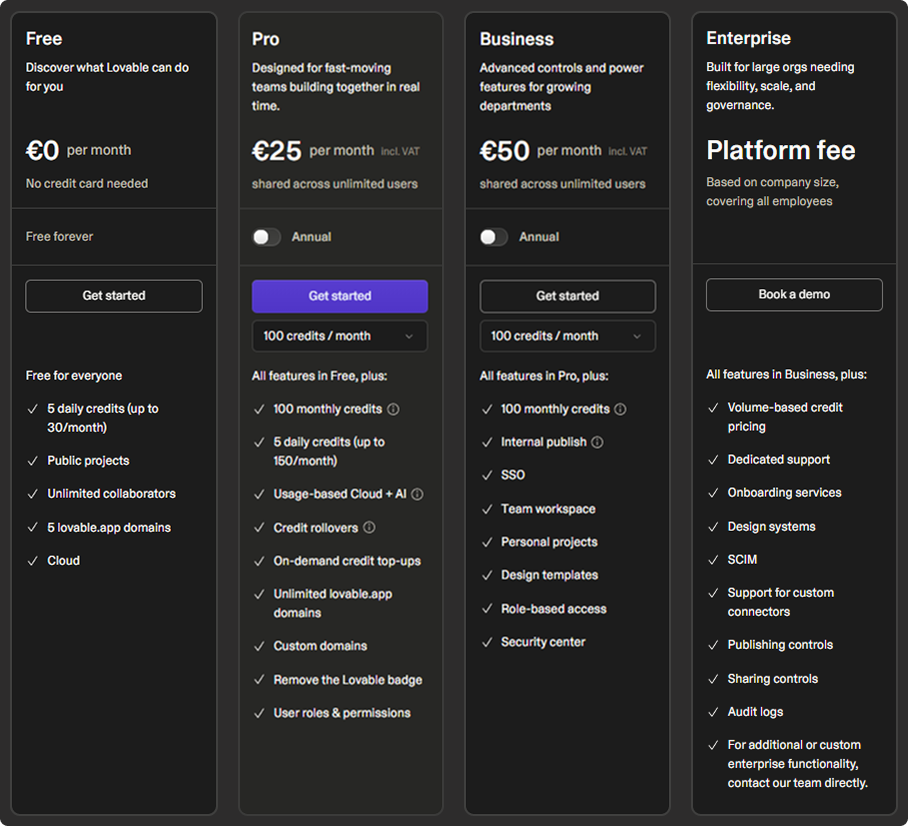
Lovable's free tier includes enough credits to build and test a full Stripe integration. The Pro tier adds more credits, custom domains, and higher limits. For a solo founder launching a SaaS, Pro is usually sufficient until you have consistent revenue. Enterprise adds SSO, audit logs, and dedicated support — relevant when you have a team managing the account.
Limitations and Workarounds
The integration covers 90% of what most apps need. The remaining 10% requires custom code. Here are the most common gaps.
Complex tax rules: Stripe Tax handles automatic tax calculation for digital goods in many jurisdictions. But if you sell physical goods, have nexus in unusual places, or need custom exemption logic, you must integrate a tax provider like TaxJar or Avalara. This means calling their API from your Edge Function before creating the PaymentIntent.
Custom trial logic: Stripe trials are time-based. If you want usage-based trials (first 100 API calls free) or milestone-based trials (trial ends when user completes onboarding), you need to manage the trial state yourself and only create the Stripe subscription when the trial truly ends.
Dunning customization: Stripe's default dunning emails are functional but generic. You can customize the templates in the Stripe dashboard, but you cannot add dynamic content like "your current usage is X" without using the API to send your own emails. Many builders disable Stripe's emails and handle all communication from their app.
Multi-currency settlements: Stripe settles in your default currency. If you want to hold balances in multiple currencies and settle each separately, you need separate Stripe accounts per currency. This multiplies your integration complexity. Most early-stage businesses accept the conversion fee and settle in one currency.
- No built-in support for Stripe Connect (marketplaces)
- No built-in support for Stripe Terminal (in-person)
- No built-in support for Stripe Issuing (cards)
- Limited customization of hosted checkout pages
- Webhook handler requires manual edits for custom events
- Pricing Table component cannot be styled via CSS
The workaround for most of these is the same: write a custom Edge Function. Lovable gives you the escape hatch. You are not locked into the high-level components. The platform generates the boilerplate — authentication, CORS, secrets management — and you fill in the business logic. This is a reasonable tradeoff. The alternative would be a bloated component library that tries to do everything and configures nothing well.
Migration from Other Platforms
If you are moving an existing Stripe integration to Lovable, the migration path is straightforward. Export your customers, subscriptions, and products from Stripe (they stay in Stripe — you are only moving the frontend and backend logic). Recreate your Edge Functions in Lovable. Point your webhook endpoint to the new URL. Update your frontend to use Lovable's components.
The main risk is webhook duplication during the cutover. If both your old endpoint and the new Lovable endpoint are active, each event processes twice. Disable the old endpoint in Stripe before deploying the Lovable version. Or add a deployment flag in your database that the webhook handler checks — only process events if the flag matches the current deployment.
Customer data in Supabase must match Stripe. If your old system stored Stripe customer IDs on user records, those IDs remain valid. The Lovable integration uses the same customer IDs. Just ensure your user table has a stripe_customer_id column and that it is populated for existing users. New users get the ID automatically when they first check out.
Performance and Monitoring
The integration adds minimal latency. Checkout buttons redirect to Stripe — no added delay. PaymentElement makes one API call to create the PaymentIntent, then Stripe.js handles the rest. The Edge Function cold start is typically 50-200ms. Warm invocations are under 50ms. For most apps, this is negligible.
Monitor three metrics: webhook processing time, Edge Function error rate, and Stripe API error rate. Lovable's dashboard shows function logs and invocation counts. Stripe's dashboard shows API success rates and latency percentiles. Set up alerts for error rates above 1% or p95 latency above 2 seconds.
One performance trap: creating products and prices on every app load. Some AI-generated code does this by default. Move product creation to a one-time setup script or admin panel. Check for existence before creating. This avoids hitting Stripe's rate limits (100 writes/second) and prevents duplicate products.
The integration feels like it was designed by people who have actually shipped SaaS products. The defaults are sensible, the escape hatches exist, and the documentation does not lie about what is automated.
Real-World Examples
A solo founder built a newsletter platform with paid subscriptions. Used StripePricingTable for the pricing page, StripeSubscriptionButton for the upgrade CTA, and Billing Portal for management. The entire payment flow took two hours to implement. The founder spends zero time on billing infrastructure.
A small agency built a client portal where clients pay monthly retainers. They used PaymentElement embedded in a custom form that includes project scope and terms acceptance. The Edge Function creates a PaymentIntent with metadata linking to the project record. Webhook handler updates the project status to "active" on success. Clean separation of concerns.
A team building an AI image generator used usage-based billing. Base subscription includes 100 generations. Additional generations are metered. They call a custom Edge Function endpoint from their generation API to report usage. Stripe handles the aggregation and invoicing. The billing logic is about 50 lines of TypeScript.
These examples share a pattern: the builders started with the highest-level component that worked, then dropped down to custom Edge Functions only where the components fell short. This is the right approach. Do not write custom code because you can. Write it because the component cannot express your requirement.
Troubleshooting Common Issues
Webhook signature verification fails: This usually means the webhook secret in your environment variables does not match the one Stripe uses. In Lovable, the secret is set automatically when you connect. If you manually added a webhook in the Stripe dashboard, it has a different secret. Delete the manual webhook and let Lovable manage it.
Checkout redirects to a 404: The success_url or cancel_url contains a placeholder like {CHECKOUT_SESSION_ID} that Stripe does not replace. Use the actual URL pattern your app expects. For success, typically /payment/success?session_id={CHECKOUT_SESSION_ID}. Stripe replaces the placeholder when redirecting.
Subscription status not updating: The webhook handler may be throwing an error before it reaches the database update. Check the Edge Function logs. Common cause: the user record does not exist in Supabase yet. This happens if the webhook fires before the auth signup completes. Add a retry with exponential backoff in the handler.
Price ID not found: You hardcoded a price ID from test mode but are running in live mode, or vice versa. Price IDs are mode-specific. Use environment variables for price IDs, or fetch them dynamically by product name.
- Check Edge Function logs first — most errors are visible there
- Verify Stripe dashboard shows webhook delivery attempts
- Confirm environment variables match the deployment mode
- Test with Stripe CLI to isolate frontend vs backend issues
- Review Supabase RLS policies if database writes fail
Future-Proofing Your Integration
Stripe evolves. New payment methods, new APIs, new compliance requirements. Lovable updates its components and Edge Function templates periodically. When you create a new project, you get the latest version. Existing projects do not auto-update — you would need to regenerate components or manually apply changes.
Stay informed by watching Stripe's changelog and Lovable's release notes. Subscribe to both. When a breaking change is announced (rare but happens), you have months of notice. The most recent example was the transition from Sources to PaymentMethods. Builders who used the high-level components migrated automatically. Builders who called the API directly had to update their code.
Design your Edge Functions to be replaceable. Keep business logic out of the webhook handler itself. Put it in separate modules that the handler imports. This lets you swap the handler entirely without rewriting your core logic. It also makes unit testing possible — you can test the logic without mocking the entire Stripe event structure.
Frequently Asked Questions
Can I use Lovable Stripe integration without a Supabase project?
No. The Edge Functions that handle server-side Stripe operations run on Supabase. Every Lovable project includes a Supabase project automatically.
Does Lovable take a percentage of my Stripe revenue?
No. Lovable charges a flat subscription fee. Stripe charges its standard transaction fees. There are no additional fees from Lovable for payment processing.
Can I use Apple Pay and Google Pay with this integration?
Yes. Stripe.js automatically presents Apple Pay and Google Pay when the customer's device and browser support them. No extra configuration needed in Lovable.
How do I handle refunds?
Process refunds in the Stripe dashboard. The webhook handler receives charge.refunded events and can update your database accordingly. Partial refunds are supported.
Can I migrate my existing Stripe customers to a Lovable project?
Yes. Your Stripe customers stay in Stripe. You only need to ensure your Supabase user records have the correct stripe_customer_id. New checkouts will attach to existing customers automatically.
What happens if Lovable goes down? Can my customers still pay?
Hosted checkout pages (StripeCheckoutButton, StripeSubscriptionButton) work independently of Lovable once the session is created. PaymentElement and Billing Portal require Lovable's Edge Functions to be reachable.
Is there a limit on how many products or prices I can create?
Limits are set by Stripe, not Lovable. Stripe allows thousands of products and prices. Practical limits come from your ability to manage them, not the integration.
Final Assessment of Lovable Stripe Integration
The integration is production-ready for standard SaaS, subscription, and one-time payment use cases. It removes the boilerplate that usually consumes days — webhook setup, Edge Function scaffolding, component wiring, environment management. You describe the payment flow in natural language, and the AI generates working code that follows Stripe best practices.
The escape hatches are real. You can read and modify every generated Edge Function. You can drop down to raw Stripe API calls when the components are insufficient. You are not locked into a proprietary abstraction that hides the underlying platform. This matters when you inevitably hit a requirement the high-level components do not cover.
The main friction points are documentation gaps for advanced scenarios and the lack of built-in Connect support for marketplaces. Both are solvable with custom code, but they require you to understand Stripe well enough to implement them correctly. If you are building a marketplace, budget extra time for the Connect integration.
For a solo founder or small team launching a paid product, this integration saves weeks of backend work. The cost is negligible compared to the time saved. The risk is low because you own the generated code and can eject from the platform if needed. That combination — speed now, ownership forever — is rare in developer tools.