

AI Development Tools
Lovable Scale Plan: Features, Pricing, and Value Analysis
Everything you need to decide if the Scale plan fits your AI app development workflow.

Senior Software Developer & Trading Technology Specialist
Ethan Parker is a software developer with over 8 years of experience in building web applications, trading tools, and financial technology solutions. He specializes in Python, JavaScript, API integrations, and trading automation, helping traders improve efficiency through innovative technology.
Lovable has positioned itself as one of the more ambitious AI-powered application builders on the market. The platform promises to take natural language descriptions and turn them into working React applications with Supabase backends, Stripe payments, and authentication — all without writing code manually. For teams and founders who have moved past the experimentation phase, the pricing tier called Scale becomes the relevant decision point. It sits above the Launch tier and below Enterprise, targeting users who need higher limits, better collaboration, and more predictable performance without committing to a custom contract.
Contents
- 1. What the Scale Tier Actually Includes
- 2. Pricing Structure and Seat Economics
- 3. Credit Consumption Patterns in Real Workflows
- 4. Team Collaboration Features That Matter
- 5. Technical Limits and Infrastructure Details
- 6. Integrations and Ecosystem Compatibility
- 7. Security Posture and Compliance Readiness
- 8. Support Experience and Response Commitments
- 9. Who Should Choose Scale Over Launch or Enterprise
- 10. Limitations and Friction Points to Expect
- 11. Migration Paths and Exit Considerations
- 12. Final Assessment of Lovable Scale
Understanding what Scale actually delivers requires looking past the marketing language. The tier includes increased message credits, higher concurrent build limits, priority queue access, and team collaboration features that the lower tiers restrict. But it also introduces new constraints — seat-based pricing, usage caps that can trigger overages, and feature gaps that only Enterprise resolves. This article breaks down each component so you can evaluate whether the plan matches your actual workflow or if you're better off staying on Launch or jumping to a custom agreement.
The context matters because Lovable's pricing model ties directly to how the AI generates code. Each prompt, revision, and regeneration consumes credits. A complex dashboard with authentication, database relationships, and payment flows might burn through hundreds of credits in a single session. Scale increases the monthly allowance substantially, but the per-seat model means costs grow linearly with team size. For a solo founder building an MVP, the math often favors Launch. For a three-person product team shipping weekly, Scale starts to make sense. The inflection point depends entirely on your velocity and team structure.
What the Scale Tier Actually Includes
At its core, Scale is a capacity upgrade. The monthly credit allocation jumps to a level that supports sustained daily development rather than occasional prototyping. You get priority access to the generation queue, which matters during peak hours when Free and Launch users experience noticeable delays. Concurrent builds increase, so you can run multiple preview environments simultaneously — useful when testing different architectural approaches side by side. Team seats are included up to a limit, with additional seats available at a per-user cost. The plan also unlocks advanced collaboration features: shared workspaces, granular permission controls, and audit logs for compliance-conscious organizations.
- Monthly AI generation credits scaled for daily production work
- Priority queue positioning during high-traffic periods
- Multiple concurrent preview environments
- Team workspace with role-based access control
- Audit logging for security and compliance tracking
- Enhanced Supabase project limits and database resources
- Custom domain support with SSL management
- Stripe integration without transaction fee surcharges
- GitHub synchronization with branch protection rules
- Dedicated support channel with faster response targets
The credit system deserves special attention because it's the primary constraint you'll hit. Lovable doesn't publish a simple formula for credit consumption — it varies by model complexity, prompt length, and the number of files touched. A simple landing page might cost 20-30 credits. A multi-tenant SaaS dashboard with role-based access, real-time subscriptions, and Stripe Connect can easily exceed 500 credits in a single iteration cycle. Scale's allocation is designed to absorb that variance, but teams building complex applications should still monitor usage closely. The dashboard provides real-time tracking, and alerts fire at 80% and 95% consumption.
Pricing Structure and Seat Economics
Scale uses a hybrid pricing model: a base subscription covering a fixed number of seats, plus per-seat overages beyond that threshold. The base price positions it significantly above Launch but well below Enterprise custom quotes. This creates a step function in your budget — adding a fourth team member to a three-seat plan triggers an immediate cost increase. For organizations with fluctuating contractor access, this can create unpredictable monthly bills. The per-seat overage rate is published but not negligible, so capacity planning becomes part of financial planning.
Scroll horizontally to see all columns
| Feature | Free | Launch | Scale | Enterprise |
|---|---|---|---|---|
| Monthly Credits | Limited | Moderate | High | Custom |
| Included Seats | 1 | 1 | 3-5 | Unlimited |
| Concurrent Builds | 1 | 2 | 5+ | Unlimited |
| Queue Priority | Standard | Standard | Priority | Dedicated |
| Team Workspace | No | No | Yes | Yes |
| Audit Logs | No | No | Yes | Yes |
| Custom Domains | No | Yes | Yes | Yes |
| Support SLA | Community | Priority Email | Dedicated |
The table above simplifies considerably. Actual limits involve nuance — Launch includes custom domains but with restrictions on subdomain depth. Scale's audit logs capture workspace actions but not granular AI prompt history. Enterprise's dedicated support includes a named solutions engineer, not just faster email responses. These distinctions matter when you're evaluating against specific compliance or operational requirements. The credit tiers also have soft limits with overage pricing that kicks in automatically unless you configure hard stops, which Scale allows but Launch does not.
Annual billing offers a discount that effectively gives you two months free. For teams confident in their usage pattern, the savings are meaningful. However, the commitment locks you into the seat count for the year — reducing seats mid-contract isn't supported. If your team size fluctuates seasonally, monthly billing with its higher per-unit cost may actually be cheaper overall. There's no prorated refund for unused credits, so the incentive structure encourages maximizing consumption rather than efficient prompting. That's a subtle but real influence on how teams use the platform.
Credit Consumption Patterns in Real Workflows
Understanding credit burn requires looking at typical development cycles. The initial scaffold of a new project — authentication, database schema, basic routing, UI component library — typically consumes 150-300 credits depending on specificity. Each major feature iteration (adding a dashboard, implementing real-time chat, building an admin panel) adds another 100-400 credits. Bug fixes and refinements are cheaper, often 10-50 credits per cycle. But architectural changes — switching from REST to GraphQL, migrating from Supabase to a custom backend, restructuring the component hierarchy — can reset the counter because they touch dozens of files simultaneously.
- Project initialization with auth and database: 150-300 credits
- Core feature implementation per module: 100-400 credits
- UI refinement and responsive adjustments: 20-80 credits
- Bug fixes and minor logic changes: 10-50 credits
- Major architectural refactors: 300-600+ credits
- Third-party integration setup (Stripe, SendGrid, etc.): 50-150 credits
- Testing and deployment configuration: 30-100 credits
These ranges assume reasonably specific prompts. Vague instructions like "make it look modern" or "fix the bugs" trigger more regeneration cycles because the AI interprets them broadly. Teams that invest in prompt discipline — specifying exact component names, referencing existing files, constraining scope — consistently use 30-40% fewer credits for equivalent output. Scale's higher allocation accommodates less disciplined workflows, but the efficiency gains from better prompting compound across a team. Some organizations treat prompt engineering as a shared skill and run internal workshops to reduce waste.
Team Collaboration Features That Matter
The workspace model in Scale changes how multiple people interact with the same project. Instead of sharing a single login or passing export files, each member gets their own account with defined roles. Owners control billing and workspace settings. Admins manage members and projects. Developers can create and modify projects but not delete them or change workspace configuration. Viewers can inspect code and previews but not trigger generations. This granularity prevents accidental deletions and unauthorized credit consumption — both real risks when everyone shares a single API key on lower tiers.
Branch protection rules integrate with GitHub synchronization. You can require pull request reviews before merging AI-generated changes into protected branches, enforce status checks, and restrict who can push directly. This matters for teams treating Lovable output as production code rather than throwaway prototypes. The audit log captures every workspace action: member invitations, role changes, project creation, deployment triggers, and credit consumption by user. It's not a full SIEM feed, but it satisfies basic SOC 2 evidence requirements for access control and change management.
- Role-based access: Owner, Admin, Developer, Viewer
- GitHub branch protection with required reviews
- Audit log with 90-day retention on Scale
- Project-level permissions within workspace
- Credit usage attribution per team member
- Shared component library across projects
- Workspace-wide AI model preferences
- Automated dependency update notifications
Technical Limits and Infrastructure Details
Scale projects run on infrastructure with higher resource ceilings than Launch. The Supabase projects provisioned for Scale applications get larger database compute, more generous connection pooling, and extended log retention. Edge function execution time limits increase. Bandwidth allowances scale with the tier. These aren't marketed heavily but they affect real-world performance — a Launch-tier database might throttle under moderate concurrent load during a product launch, while Scale absorbs the same traffic without intervention. The platform also prioritizes Scale deployments in the build queue, reducing the time from "push" to "live preview" during peak hours.
Scroll horizontally to see all columns
| Resource | Launch | Scale | Enterprise |
|---|---|---|---|
| Database Compute | Shared small | Dedicated medium | Dedicated large+ |
| Connection Pool | 50 connections | 200 connections | Configurable |
| Edge Function Timeout | 30 seconds | 60 seconds | Custom |
| Log Retention | 7 days | 30 days | 1 year+ |
| Monthly Bandwidth | 100 GB | 500 GB | Unmetered |
| Build Queue Priority | Standard | High | Dedicated |
| Concurrent Previews | 2 | 5 | Unlimited |
| Custom Environment Variables | 20 | 100 | Unlimited |
The database compute upgrade is the most impactful for data-intensive applications. Launch's shared small instance works fine for prototypes and low-traffic tools. But once you have real users generating write load — analytics events, real-time subscriptions, background jobs — the shared instance becomes a bottleneck. Scale's dedicated medium instance provides consistent IOPS and memory, eliminating the noisy neighbor problem. Connection pooling at 200 handles typical application loads without PgBouncer tuning. For reference, a typical Next.js application with Prisma opens 10-20 connections per instance; Scale's limit supports 10-15 instances comfortably.
Edge function timeout extension from 30 to 60 seconds enables more complex serverless logic — PDF generation, video thumbnail creation, bulk data transformations — without splitting work across multiple functions. Log retention at 30 days covers most debugging windows and compliance spot-checks. Bandwidth at 500 GB/month accommodates image-heavy applications and file uploads without surprise overages. These limits feel generous until you hit them, at which point the upgrade path to Enterprise involves a sales conversation rather than a self-serve toggle.
Integrations and Ecosystem Compatibility
Scale doesn't unlock new integrations — the catalog is the same across paid tiers. What changes is the depth of configuration and the absence of artificial restrictions. Supabase integration includes full database management, auth providers, storage buckets, and real-time subscriptions. Stripe supports Connect, Billing, and Checkout with webhook handling. GitHub synchronization works with private repositories, organization accounts, and branch protection. Figma import translates design tokens and component structures into Tailwind classes. The AI models available (Claude, GPT-4 variants) are identical across tiers; only the credit cost per generation differs based on model selection.
- Supabase: Database, Auth, Storage, Realtime, Edge Functions
- Stripe: Payments, Subscriptions, Connect, Customer Portal
- GitHub: Repos, Actions, Pages, Branch Protection, Dependabot
- Figma: Design tokens, Components, Auto-layout translation
- Vercel: Preview deployments, Edge middleware, Analytics
- Resend: Transactional email, Broadcasts, Audiences
- Sentry: Error tracking, Performance monitoring, Session replay
- PostHog: Product analytics, Feature flags, Session recording
- Custom REST/GraphQL endpoints via Supabase Edge Functions
- Webhook receivers for third-party callbacks
The integration experience is where Lovable's opinionated stack shows both strengths and constraints. You get working implementations fast because the platform owns the glue code. But you're locked into their patterns — Supabase for backend, Vercel for hosting, Tailwind for styling, React for frontend. Ejecting means exporting the codebase and maintaining the integrations yourself. Scale doesn't change this dynamic. It just gives you more runway before you hit the walls. Teams planning to migrate to custom infrastructure eventually should treat Lovable as a prototyping accelerator, not a permanent platform, regardless of tier.
Security Posture and Compliance Readiness
Scale adds several security features that Launch lacks. Workspace audit logging captures administrative actions with timestamps and actor identities. Role-based access control prevents privilege escalation. GitHub branch protection enforces code review workflows. Custom domain management includes automated SSL certificate provisioning and renewal. The platform maintains SOC 2 Type II certification, and Scale customers can request the audit report for vendor assessment. Data encryption at rest and in transit is standard across all tiers. However, Scale does not include dedicated VPC deployment, customer-managed encryption keys, or private network connectivity — those remain Enterprise features.
The audit log retention of 90 days on Scale covers most internal review cycles but falls short of annual audit requirements. You'll need to export logs periodically if your compliance program demands longer retention. The export format is JSONL, parseable by standard log aggregation tools. Workspace administrators can configure webhook notifications for sensitive actions — new member invitations, role escalations, project deletions — enabling real-time alerting in SIEM systems. This is a meaningful improvement over Launch's complete absence of administrative visibility.
Support Experience and Response Commitments
Priority email support on Scale means your tickets route to a different queue with a published 24-business-hour initial response target. In practice, responses often arrive within 4-8 hours during business days. The support team can access workspace diagnostics — build logs, credit consumption patterns, deployment failures — without requiring you to paste screenshots. They cannot modify your code or trigger generations on your behalf, but they can identify platform-side issues (queue delays, Supabase provisioning errors, GitHub sync failures) and escalate to engineering when warranted. There's no phone support, no Slack channel, and no dedicated contact at this tier.
The knowledge base and community forum remain the primary self-service resources. Lovable's documentation covers the common integration patterns well but lacks depth on edge cases — custom Supabase RLS policies, complex Stripe webhook handling, Figma-to-code translation quirks. The Discord community is active and often faster than email for peer-solvable problems. Scale customers don't get priority in the community; the tier only affects official support channels. For teams that rely heavily on vendor support, this limitation is worth weighing against Enterprise's dedicated solutions engineer.
Who Should Choose Scale Over Launch or Enterprise
The decision framework is straightforward. Choose Launch if you're a solo founder or a two-person team building one product, your credit usage stays under the monthly cap, and you don't need audit logs or team permissions. Choose Scale if you have 3-5 active developers, you're shipping to production and need priority queue access, you require workspace-level access control for compliance or security, or your credit consumption regularly exceeds Launch's allowance. Choose Enterprise if you need dedicated infrastructure, custom contracts, HIPAA/FedRAMP compliance, single sign-on with SAML/OIDC, or a named solutions engineer. The boundaries blur at the edges — a two-person team with high velocity might need Scale's credits, while a five-person team doing light prototyping might survive on Launch.
- 3-5 developers working daily in the platform
- Production applications with real users and revenue
- Compliance requirements for audit trails and access control
- Credit usage consistently above 70% of Launch allowance
- Need for concurrent preview environments for QA
- Team onboarding requiring role-based permissions
- Custom domain and SSL management for multiple projects
- GitHub branch protection for production deployments
A practical litmus test: if you've hit Launch's credit cap twice in the last three months, or if you've shared a login with a contractor and regretted it, Scale solves those specific problems. If you're evaluating between Scale and Enterprise, the deciding factors are usually compliance (BAA, FedRAMP), infrastructure isolation (VPC, dedicated database), or support intensity (dedicated engineer, SLA with penalties). Scale is the last self-serve tier; everything beyond it requires a sales conversation and custom pricing.
Limitations and Friction Points to Expect
No tier is without friction. Scale's seat model creates budget unpredictability when contractors join for short engagements — you pay for the full month even if they only need two weeks. The credit overage pricing kicks in automatically unless you set hard limits, and the dashboard doesn't project end-of-month usage based on current velocity. Workspace audit logs don't capture AI prompt content, only administrative actions, so you can't reconstruct what a team member asked the model to generate. GitHub sync occasionally creates merge conflicts when multiple developers trigger generations on the same branch simultaneously — the platform doesn't prevent concurrent edits.
- Seat-based pricing penalizes variable team sizes
- Automatic credit overages without opt-in confirmation
- No usage forecasting or velocity projections in dashboard
- Audit logs exclude AI prompt and generation history
- Concurrent generation conflicts on shared branches
- No dedicated VPC or network isolation option
- Single sign-on (SAML/OIDC) not available
- No customer-managed encryption keys
- Support limited to email with no SLA penalties
- Annual commitment required for discount pricing
The concurrent generation conflict is more common than you'd expect. Two developers working on different features in the same repository can both trigger generations that modify overlapping files — routing configuration, shared components, environment files. The second generation to complete overwrites the first unless GitHub's merge conflict detection catches it. The workaround is coordinating via Slack or using feature branches with pull requests, but that adds process overhead the platform doesn't enforce. Enterprise customers get dedicated support for workflow design; Scale teams figure it out themselves.

Another underdiscussed limitation: the AI model selection affects credit consumption non-linearly. GPT-4 variants cost more credits per generation than Claude models, but sometimes produce better results for complex logic. Scale's credit allowance is calibrated for mixed model usage. Teams that standardize on the most expensive model for quality reasons will burn through the allocation faster. The platform doesn't enforce model budgets per project or user — it's a workspace-wide setting. This means one developer's preference for GPT-4 can consume credits that another developer needed for their Claude-based workflow.
Migration Paths and Exit Considerations
Lovable allows full code export at any tier. The exported repository is a standard Vite + React + TypeScript project with Supabase client configuration, Tailwind setup, and all generated components. You own the code — there's no license restriction on the output. However, the exported code loses the AI generation capability. You can't prompt for changes anymore; you maintain it like any hand-written codebase. The Supabase project remains yours and continues functioning. Stripe integration, GitHub repository, and custom domains all transfer cleanly. The friction is in the loss of velocity, not vendor lock-in.
Teams planning to migrate off Lovable should export early and often, not just at the end. The generated code evolves with each iteration, and the git history in Lovable's workspace doesn't export — you get a single commit with the current state. If you want preserved history, you need to push to GitHub continuously (which Scale supports with branch protection) and clone from there. The GitHub sync is bidirectional: changes pushed to GitHub appear in Lovable, and generations in Lovable push to GitHub. This works well until merge conflicts arise, at which point manual resolution is required.
- Full code export available anytime — Vite, React, TypeScript, Tailwind
- Supabase project ownership transfers completely
- GitHub repository remains intact with full history if synced
- Custom domains and SSL certificates portable
- Stripe integration continues without reconfiguration
- No license restrictions on generated code output
- Git history only preserved via continuous GitHub sync
- AI generation capability lost after export
- Merge conflicts require manual resolution post-export
Final Assessment of Lovable Scale
Lovable Scale occupies a specific niche: teams that have validated their product direction, need to ship production code daily, and require enough governance features to satisfy basic security reviews — but aren't ready for Enterprise's cost and commitment. The tier delivers on its core promise of higher capacity and better collaboration. The credit allowance supports genuine production velocity. The workspace model prevents the credential-sharing anti-pattern. Audit logs and branch protection check compliance boxes that Launch ignores. For a 3-5 person team building a SaaS product with real users, Scale is often the rational choice.
The weaknesses are predictable for a self-serve mid-market tier. Seat-based pricing creates step-function costs. Automatic overages can surprise finance teams. The absence of SSO, dedicated networking, and customer-managed keys limits adoption in regulated industries. Support is email-only with no financial SLA. These aren't flaws — they're boundary markers defining where Scale ends and Enterprise begins. If you need those features, the platform signals clearly that you should talk to sales. If you don't, Scale provides substantial value at a predictable price point.
Frequently Asked Questions
How many credits does the Scale plan include per month?
Lovable doesn't publish exact credit numbers publicly as they adjust based on model pricing changes. The Scale tier provides a high allocation designed for daily production use by 3-5 developers. Current subscribers see their exact monthly limit in the workspace billing dashboard.
Can I add more than 5 seats to a Scale plan?
Yes, additional seats are available at a per-seat monthly rate. The base Scale plan includes 3-5 seats depending on the current packaging. Each additional seat adds to the monthly bill. Teams needing more than 10-15 seats typically evaluate Enterprise for volume pricing.
Does Scale include HIPAA compliance or BAA?
No. HIPAA Business Associate Agreements and FedRAMP-equivalent compliance are Enterprise-only features. Scale provides SOC 2 Type II audit report access and workspace audit logs, but not the legal agreements required for protected health information.
What happens if I exceed my monthly credit allowance on Scale?
Overage charges apply automatically at the published per-credit rate unless you configure a hard limit in workspace settings. The dashboard shows real-time usage and sends alerts at 80% and 95% consumption. There's no grace period or free buffer.
Can I switch from Scale to Launch mid-cycle?
Downgrades take effect at the next billing cycle. You retain Scale features until the period ends. If you're on annual billing, you cannot reduce the commitment mid-year — the seat count and tier are locked for the contract duration.
Does Scale support single sign-on (SAML/OIDC)?
No. SSO integration with identity providers like Okta, Azure AD, or Google Workspace is an Enterprise feature. Scale uses email/password authentication with optional two-factor authentication for workspace members.
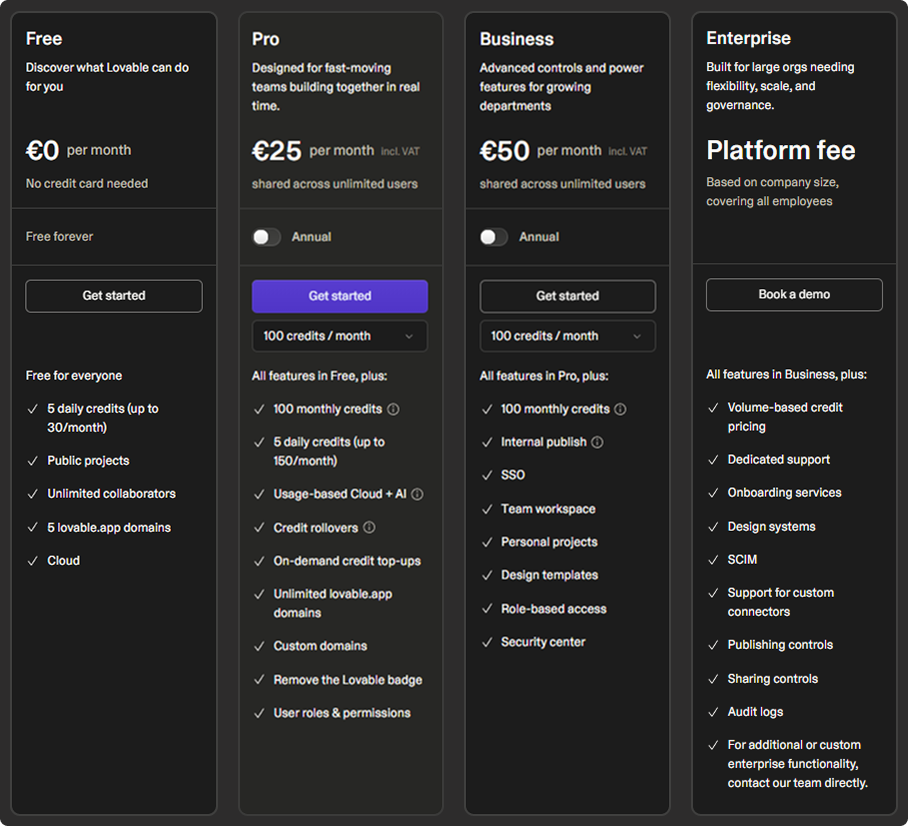
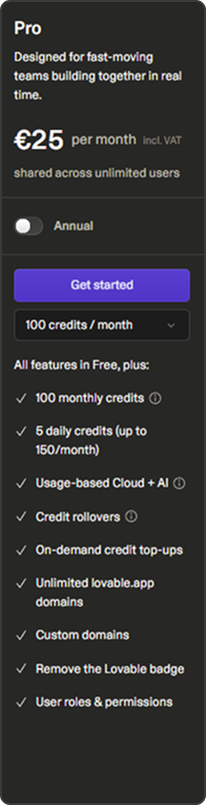
What's the difference between Scale and the Pro tier shown in pricing images?
Scale and Pro refer to the same tier — the naming varies across marketing materials and the dashboard. The website structure uses "Scale" while some pricing visuals show "Pro." They represent the identical plan between Launch and Enterprise.
Can I use my own Supabase project instead of Lovable's managed one?
Yes, at any paid tier including Scale. You can connect an external Supabase project during project creation or migrate later. This gives you full control over database configuration, but you lose Lovable's automated schema migrations and preview environment provisioning.