

AI Development Tools
Lovable vs Cursor: AI App Builder vs Code Editor Compared
A practical breakdown of two different approaches to AI-assisted development


Senior Software Developer & Trading Technology Specialist
Ethan Parker is a software developer with over 8 years of experience in building web applications, trading tools, and financial technology solutions. He specializes in Python, JavaScript, API integrations, and trading automation, helping traders improve efficiency through innovative technology.
The way developers build software is shifting. Two tools that represent very different approaches to AI-assisted development are Lovable and Cursor. Lovable positions itself as a full-stack app builder where you describe what you want in natural language and get a working application with backend, database, and deployment handled automatically. Cursor is a code editor — a fork of VS Code — that embeds AI directly into the coding workflow, letting you write, edit, and refactor code with natural language commands while staying in a familiar development environment.
Contents
- 1. What Lovable Actually Does
- 2. What Cursor Actually Does
- 3. Core Workflow Differences
- 4. AI Capabilities and Model Access
- 5. Integrations and Ecosystem
- 6. Pricing Models Compared
- 7. Learning Curve and Daily Experience
- 8. Code Ownership and Portability
- 9. Deployment and Hosting
- 10. Templates and Starting Points
- 11. Debugging and Error Handling
- 12. Team Collaboration Features
- 13. Use Cases Where Lovable Excels
- 14. Use Cases Where Cursor Excels
- 15. Combining Both Tools
- 16. Limitations to Know Before Committing
- 17. Decision Framework: Which Tool for Your Situation
- 18. Final Assessment: Lovable vs Cursor
They are not direct competitors in the traditional sense. One abstracts away code almost entirely. The other amplifies your ability to write code. But both target developers and product builders who want to move faster, and the choice between them — or using both — depends on what you are building, how much control you need, and where you want to spend your time.
This comparison breaks down the practical differences: how each tool works day to day, what they cost, where they excel, and where they fall short. The goal is not to declare a winner but to help you decide which fits your workflow, or whether there is room for both.
What Lovable Actually Does
Lovable is a browser-based platform that generates complete applications from prompts. You describe a feature — "build a SaaS dashboard with user authentication, Stripe billing, and a PostgreSQL database" — and it produces a React frontend with TypeScript, a Supabase backend, authentication flows, database schema, and deployment configuration. The generated code lives in a GitHub repository you own. You can open it in any editor, modify it manually, and push changes back to Lovable.
The platform handles the infrastructure pieces that usually slow down early development: Supabase for database and auth, Stripe for payments, Vercel or Netlify for hosting, custom domains, environment variables, and CI/CD. It also provides a visual editor for tweaking UI components without touching code, a template library for common patterns like landing pages, dashboards, and e-commerce stores, and a component marketplace for reusable blocks.
Lovable targets founders, product managers, designers, and developers who want to validate ideas quickly or build internal tools without spending weeks on boilerplate. It also serves agencies that need to deliver client projects on tight timelines. The learning curve is low for non-technical users, but developers get full code access when they need it.
What Cursor Actually Does
Cursor is a standalone code editor built on VS Code. It keeps the VS Code interface, extensions, keybindings, and settings — so if you already use VS Code, there is almost no adjustment period. The difference is the AI layer woven throughout: a chat pane that can see your entire codebase, inline editing with Ctrl+K, a Composer mode for multi-file changes, and automatic context gathering from your project.
You write code normally, but you can highlight a function and ask Cursor to refactor it, add tests, or explain it. You can describe a new feature in the chat and have it generate the implementation across multiple files. Composer takes this further: you describe a larger change — "add user authentication with JWT tokens, a login page, and protected routes" — and it plans and executes the edits across your codebase, showing you a diff before applying.
Cursor supports multiple models including GPT-4, Claude 3.5 Sonnet, and its own custom models. It indexes your codebase locally for fast context retrieval, respects .gitignore and .cursorignore files, and works offline for basic editing. It does not host your code, manage infrastructure, or deploy anything. It is purely a development environment.
Core Workflow Differences
The fundamental difference shows up in how you start a project. In Lovable, you open the dashboard, click New Project, type a description, and within minutes you have a deployed URL with a working app. You then iterate by chatting with the AI: "add a dark mode toggle," "change the pricing table to three tiers," "connect the contact form to SendGrid." Each request modifies the codebase and redeploys automatically.
In Cursor, you create a folder, run your usual init commands — npm create vite@latest, or rails new, or whatever stack you prefer — and start coding. The AI assists as you go. You might ask it to scaffold a component, write a complex regex, generate a test suite, or refactor a messy module. You remain responsible for the architecture, the build configuration, the deployment pipeline, and every infrastructure decision.
Lovable removes infrastructure decisions. Cursor leaves them entirely to you. Lovable gives you a working app fast but constrains you to its supported stack (React, TypeScript, Tailwind, Supabase, Vite). Cursor works with any language, any framework, any stack — but you build the plumbing yourself.
Scroll horizontally to see all columns
| Aspect | Lovable | Cursor |
|---|---|---|
| Starting point | Natural language prompt | Empty repository or existing codebase |
| Infrastructure | Managed (Supabase, Stripe, hosting) | Your responsibility |
| Supported stack | React, TypeScript, Tailwind, Vite, Supabase | Any language, any framework |
| Code ownership | Your GitHub repo, full access | Local files, your repo |
| Deployment | Automatic via Vercel/Netlify | Manual or your CI/CD |
| Primary interaction | Chat-based iteration | Inline editing, chat, Composer |
AI Capabilities and Model Access
Both tools rely on large language models, but they expose them differently. Lovable uses a combination of models — primarily Claude 3.5 Sonnet and GPT-4o — orchestrated behind the scenes. You do not choose the model. The platform routes requests based on the task: code generation, UI tweaks, database schema changes, or debugging. This abstraction means you cannot optimize for a specific model's strengths, but it also means you do not need to think about it.
Cursor gives you model selection. In the chat pane, you can switch between GPT-4o, Claude 3.5 Sonnet, Cursor's own fast model, and others. Different models excel at different tasks: Claude tends to be stronger at complex reasoning and large refactors; GPT-4o is fast and good at boilerplate; the fast model handles simple completions with low latency. Power users develop preferences and switch models per task.
Cursor's Composer mode is its most distinctive AI feature. It acts like an agent: you give it a high-level goal, it explores your codebase, proposes a plan, shows diffs for each file, and applies changes after your approval. It can run terminal commands, read documentation, and iterate on its own output. Lovable's chat is more conversational and scoped to the app generation paradigm — it does not have a comparable multi-step autonomous mode.
Integrations and Ecosystem
Lovable's integrations are built-in and opinionated. Supabase handles database, authentication, storage, edge functions, and realtime. Stripe handles payments and subscriptions. GitHub handles version control and triggers deployments. Vercel or Netlify handles hosting. Figma imports designs. The platform manages the credentials, environment variables, and connection logic. You connect each service once in the dashboard, and Lovable wires everything together.
This is convenient but limiting. If you need PlanetScale instead of Supabase, or Paddle instead of Stripe, or AWS instead of Vercel, you are outside the supported path. You can eject the code and rewire it manually, but then you lose the automatic redeployment and the visual editor's ability to manage those services.
Cursor has no built-in integrations. It works with whatever you configure in your project. Want to use Prisma with PlanetScale? Add the packages, write the schema, configure the connection. Want to deploy to Fly.io with a custom Dockerfile? Write the Dockerfile, set up the GitHub Action. Cursor's AI can help you write all of that configuration — it knows the syntax for Docker, GitHub Actions, Terraform, Kubernetes manifests — but it does not manage any of it for you.
Pricing Models Compared
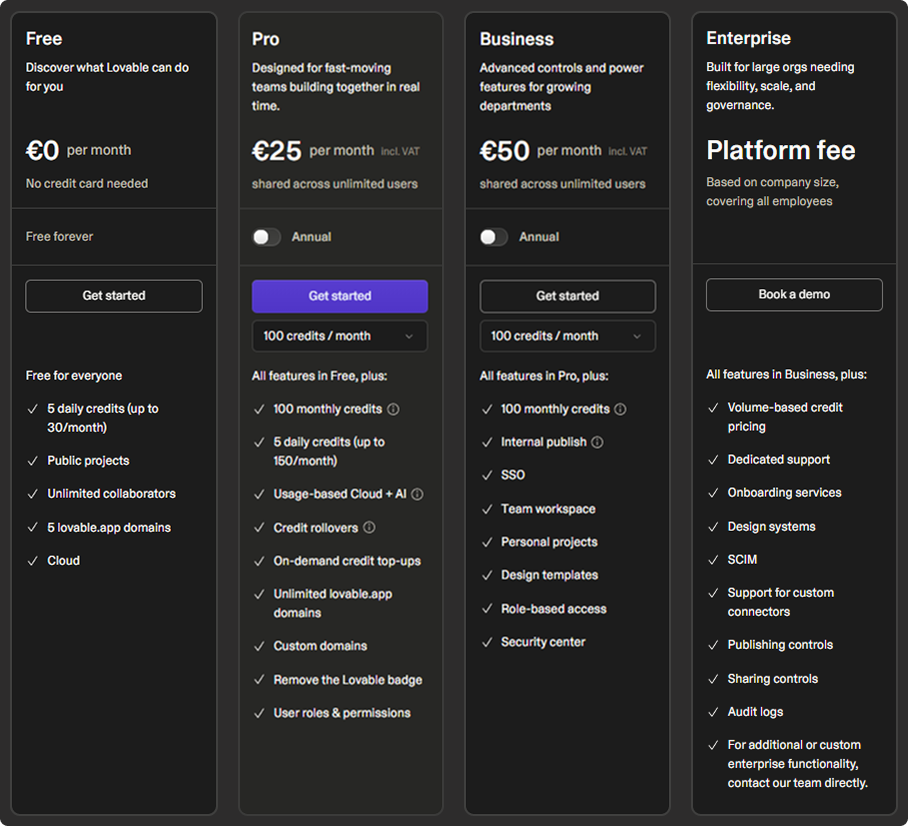
Lovable uses a credit-based subscription model. The Free tier includes 50 credits per month — enough for light experimentation. Pro at $25/month gives 500 credits. Business at $100/month gives 2,500 credits and team features. Enterprise is custom. Credits are consumed by AI operations: generating code, making edits, running previews. Complex requests use more credits. Unused credits do not roll over. The model aligns cost with AI usage, but it can be hard to predict how many credits a project will need.
Cursor uses a simpler seat-based model. The Free tier includes 2,000 completions per month and 50 slow premium model requests. Pro at $20/month gives unlimited completions, 500 fast premium requests, and unlimited slow premium requests. Business at $40/user/month adds centralized billing, admin controls, and privacy features. There are no credits to track. You pay per seat, not per AI operation.
For a solo developer building one project, Cursor Pro at $20/month is predictable. Lovable Pro at $25/month is also predictable if you stay within 500 credits — but a complex app with many iterations can burn through credits quickly. Teams need to model their usage: Cursor scales linearly with headcount; Lovable scales with AI activity volume.
Scroll horizontally to see all columns
| Tier | Lovable | Cursor |
|---|---|---|
| Free | 50 credits/month | 2,000 completions, 50 slow premium requests |
| Individual Paid | Pro: $25/mo, 500 credits | Pro: $20/mo, unlimited completions, 500 fast premium |
| Team/Business | Business: $100/mo, 2,500 credits, team features | Business: $40/user/mo, admin controls, privacy |
| Enterprise | Custom pricing, dedicated support | Custom pricing, SSO, audit logs, on-premise option |
Learning Curve and Daily Experience
Lovable's learning curve is shallow for non-developers. The interface guides you: type a prompt, see a preview, request changes, publish. The visual editor lets you click elements and modify properties without code. Templates give you starting points. The documentation covers common patterns. A product manager can build a functional prototype in an afternoon without writing a line of code.
For developers, Lovable has a different learning curve: understanding what the platform generates, where to find the code, how to extend beyond the visual editor, and when to eject. The generated codebase follows specific conventions — React with Vite, Tailwind for styling, Supabase client for data, a particular folder structure. You need to learn those conventions to work effectively with the output.
Cursor's learning curve depends on your starting point. If you know VS Code, you are productive immediately. The AI features are additive: you discover them as you need them. The deeper features — Composer, @-mentions for context, .cursorrules for project instructions, custom modes — take time to master. Developers who invest in learning the advanced workflows see compounding returns; those who only use inline chat get a modest productivity boost.
Cursor rewards investment. The more you learn its depth, the more it feels like a force multiplier. Lovable rewards speed. The less you fight its conventions, the faster you ship.
Code Ownership and Portability
Both tools give you full code ownership, but the practical implications differ. Lovable pushes every change to a GitHub repository you control. You can clone it, open it in any editor, modify it, and push back. The platform detects external changes and merges them. You can also export the project as a zip file. If Lovable shuts down tomorrow, your code survives — but you lose the managed infrastructure, the visual editor, and the automatic deployments. You would need to configure Supabase, Stripe, and hosting yourself.
Cursor never touches your repository unless you tell it to. Your code lives locally and in whatever Git remote you configure. There is no platform lock-in because there is no platform — just an editor. If Cursor disappears, you keep using VS Code or any other editor. The only lock-in risk is muscle memory for Cursor-specific workflows (Composer, @-mentions, .cursorrules) that do not transfer elsewhere.
Deployment and Hosting
Lovable handles deployment automatically. Connect Vercel or Netlify once, and every push to your main branch triggers a preview deployment. Custom domains, SSL, environment variables, and preview URLs for pull requests are all managed in the Lovable dashboard. You can also deploy to your own infrastructure by exporting the build output, but the default path is zero-config.
Cursor does not deploy. You choose your hosting: Vercel, Netlify, AWS, Railway, Fly.io, a VPS, Kubernetes. You write the deployment configuration. Cursor's AI can generate the Dockerfile, the GitHub Actions workflow, the Terraform modules, the Kubernetes manifests — but you review, commit, and maintain them. This is more work upfront but gives you complete control over the deployment pipeline, costs, and architecture.
For early-stage projects where you want a live URL yesterday, Lovable wins. For projects with specific infrastructure requirements — compliance, data residency, existing cloud contracts, complex microservices — Cursor's flexibility is necessary.

Templates and Starting Points
Lovable provides a curated template library: SaaS starter with auth and billing, marketplace with listings and payments, dashboard with charts and tables, landing page with sections, e-commerce with cart and checkout, blog with CMS, internal tool with admin panels. Each template is a complete, deployable application. You select one, it forks to your GitHub, and you customize from there. The templates follow Lovable's conventions and integrate with its managed services.
Cursor has no official template library. The VS Code ecosystem has project generators (create-react-app, create-next-app, rails new, django-admin startproject, cargo new, go mod init), community starters on GitHub, and framework-specific templates. Cursor's AI can scaffold a project from scratch: "create a Next.js 14 app with TypeScript, Tailwind, Prisma, PostgreSQL, NextAuth, and a dashboard layout with sidebar navigation." It will generate the file structure, configuration, and starter code. But you still need to wire the database, configure auth, and deploy.
The difference is curated vs. generated. Lovable's templates are tested, maintained, and guaranteed to work with the platform. Cursor's generated scaffolds are fresh each time — they reflect current best practices but may have version conflicts or missing pieces you need to fix.
Debugging and Error Handling
Lovable surfaces errors in the chat interface. When a build fails or a runtime error occurs, the platform captures the logs and feeds them back to the AI, which attempts a fix. You can also click an error in the preview to see the relevant code. This works well for common issues: missing imports, type errors, Supabase policy mistakes. It struggles with subtle logic bugs, performance issues, or errors in ejected code that the platform no longer manages.
Cursor gives you the full debugging toolkit of VS Code: breakpoints, call stack, watch expressions, debug console, integrated terminal. The AI can help interpret error messages, suggest fixes, and even write test cases to reproduce bugs. But you drive the debugging process. For complex issues — race conditions, memory leaks, third-party integration failures — the traditional debugger is often more effective than asking an AI to guess.
Team Collaboration Features
Lovable's team features center on the dashboard: shared projects, role-based access (owner, admin, member, viewer), activity feed, and centralized billing. Multiple people can chat with the AI on the same project, though concurrent editing can create conflicts that the platform attempts to merge. The visual editor allows non-technical team members to make UI changes without touching code. Code reviews happen in GitHub as usual.
Cursor's team features are lighter: shared .cursorrules files for consistent AI behavior across the team, centralized billing and seat management in Business tier, and privacy controls (codebase indexing stays local, no telemetry). Collaboration happens through Git — pull requests, code reviews, pair programming via Live Share. The AI does not have a shared session view; each developer interacts with it independently.
For cross-functional teams with designers, PMs, and developers, Lovable's dashboard is a natural collaboration hub. For engineering teams that already work through Git and PRs, Cursor fits the existing workflow without adding a new platform to manage.
Use Cases Where Lovable Excels
Lovable shines when you need a working application with standard features fast. Founders validating a SaaS idea can go from concept to deployed MVP with auth, billing, and database in hours instead of weeks. Product managers building internal tools — admin panels, dashboards, forms, approval workflows — can deliver without engineering tickets. Agencies building client sites with common patterns (marketing pages, lead capture, booking systems) can reuse templates and customize visually.
It also works well for developers who want to skip boilerplate. A developer building a side project can generate the scaffold, then take over the code for custom logic. The platform handles the tedious parts: Supabase schema migrations, Stripe webhook handlers, Tailwind config, Vercel deployment settings. You focus on the unique business logic.
- SaaS MVPs with standard auth, billing, dashboard
- Internal tools: admin panels, CRUD apps, workflow automation
- Client projects with recurring patterns (landing pages, directories)
- Founder-led products where speed to market beats custom architecture
- Non-technical builders who need real deployments, not prototypes
Use Cases Where Cursor Excels
Cursor shines when you are deep in code and need an accelerator. Engineers working on large existing codebases — migrating a legacy system, adding features to a mature product, refactoring technical debt — get the most value. The AI understands your patterns, your conventions, your domain models. Composer can execute large-scale changes across dozens of files: "convert all class components to hooks," "add request logging to every API route," "migrate from REST to tRPC."
It also excels for polyglot projects. A backend in Go, a frontend in React, a CLI in Rust, infrastructure in Terraform — Cursor handles all of them in one editor. Lovable only does React/TypeScript/Tailwind/Supabase. If your stack differs, Cursor is the only option of the two.
- Large existing codebases needing refactors or feature work
- Polyglot projects (multiple languages, frameworks)
- Custom infrastructure requirements (Kubernetes, specific cloud providers)
- Performance-critical code needing low-level optimization
- Teams with established Git workflows and code review processes
- Developers who want AI assistance without changing their stack
Combining Both Tools
They are not mutually exclusive. A practical workflow: use Lovable to generate the initial application with all the standard pieces — auth, database, billing, deployment, UI framework. Then clone the GitHub repository and open it in Cursor for day-to-day development. Use Cursor's AI for custom features, complex refactors, test generation, and debugging. Push changes back to GitHub; Lovable detects them and keeps the preview deployment updated.
This hybrid approach captures the best of both: Lovable eliminates the weeks of boilerplate and infrastructure setup. Cursor gives you a world-class editing experience for the custom work that follows. The friction point is that Lovable's visual editor may not understand hand-written code changes perfectly, and Cursor does not know about Lovable's managed services unless you provide context.
Limitations to Know Before Committing
Lovable's limitations are structural. You are locked into React, TypeScript, Tailwind, Vite, and Supabase. If your project needs a different database, a different frontend framework, server-side rendering with Next.js (though Vite supports SSR via plugins), or a backend language other than TypeScript edge functions, you hit a wall. The credit model can become expensive for iteration-heavy projects. The visual editor cannot represent all code constructs — complex logic, custom hooks, advanced TypeScript types — so you eventually need to write code anyway.
Cursor's limitations are about scope. It does not manage infrastructure, deployments, or services. It does not generate a complete app from a single prompt — you build file by file, feature by feature. The AI can hallucinate APIs, suggest deprecated patterns, or miss project-specific context. Large codebases can exceed context windows, though Cursor's indexing mitigates this. The free tier's premium request limits are restrictive for serious use.
Lovable constrains your stack to accelerate your start. Cursor constrains nothing but accelerates only what you already know how to build.
Decision Framework: Which Tool for Your Situation
Choose Lovable if: you are building a new React/TypeScript application with standard SaaS features (auth, billing, database, dashboard), you want a deployed URL in hours not days, you have non-technical collaborators who need to contribute, you are validating a product idea and need to iterate on the full stack quickly, or you are an agency delivering similar projects repeatedly.
Choose Cursor if: you work on an existing codebase in any language or framework, you need custom infrastructure or have specific deployment requirements, you are a developer who wants AI assistance without changing your tools, you are building something that does not fit the SaaS template (CLI tools, libraries, embedded systems, data pipelines, games), or your team already has a mature Git-based workflow.
Choose both if: you are starting a new SaaS project and want the fastest possible start without sacrificing long-term development velocity, you have a mixed team where some members use the visual editor and others write code, or you want to prototype in Lovable and graduate to Cursor for the production build.
Scroll horizontally to see all columns
| Scenario | Recommended Tool |
|---|---|
| New SaaS MVP, React stack, need speed | Lovable |
| Existing codebase, any stack | Cursor |
| Non-technical founder building first product | Lovable |
| Senior engineer refactoring legacy system | Cursor |
| Internal tool with standard CRUD patterns | Lovable |
| Polyglot microservices architecture | Cursor |
| Agency delivering client marketing sites | Lovable |
| Open source library or CLI tool | Cursor |
| Team with designers + developers | Both |
Final Assessment: Lovable vs Cursor
Lovable and Cursor solve different problems. Lovable is a product development platform that happens to use AI. It removes the need to make infrastructure decisions, write boilerplate, configure deployments, or stitch services together. It gives you a working application that you can extend. The trade-off is stack rigidity and a credit-based cost model that penalizes heavy iteration.
Cursor is an AI-enhanced code editor. It meets you where you already work — in your code, with your stack, your conventions, your deployment pipeline. It accelerates the act of writing and changing code. The trade-off is that you still do all the engineering work: architecture, infrastructure, deployment, operations. It does not give you a running app; it helps you build one faster.
If you are at the idea stage with a standard SaaS concept, Lovable gets you to a live product faster than any other tool I have seen. If you are an engineer facing a complex codebase or building something off the beaten path, Cursor is the more powerful companion. Many teams will find value in both: Lovable for the zero-to-one sprint, Cursor for the one-to-N marathon.
Frequently Asked Questions
Can I use Lovable without knowing how to code?
Yes. The visual editor and chat interface let non-technical users build functional applications. However, complex customizations eventually require code changes.
Does Cursor work with languages other than JavaScript and TypeScript?
Yes. Cursor supports Python, Go, Rust, Ruby, Java, C++, and many other languages. It works with any language VS Code supports.
What happens to my Lovable project if I cancel my subscription?
Your GitHub repository and deployed applications remain accessible. You lose the visual editor, managed infrastructure updates, and automatic deployments. The code continues to run on your connected services.
Can Cursor generate a complete application from a single prompt like Lovable?
Not in one step. Cursor can scaffold a project structure and generate significant portions, but you guide it file by file. It does not manage infrastructure or deploy automatically.
Is Lovable only for React applications?
Currently yes. Lovable generates React with TypeScript, Vite, and Tailwind CSS. Other frameworks are not supported.
How does Cursor handle large codebases that exceed context windows?
Cursor indexes your codebase locally and retrieves relevant files for each request. Composer can work across many files by planning and executing changes incrementally.
Can I migrate a Lovable project to a different stack later?
You own the code and can rewrite it in any stack. However, you would need to replace Supabase, Stripe integration, and deployment configuration manually.