

Software Development
Lovable CRM: Building Customer Tools with AI
A practical look at Lovable's CRM templates, Supabase backend, and sales workflow automation for modern teams.

Senior Software Developer & Trading Technology Specialist
Ethan Parker is a software developer with over 8 years of experience in building web applications, trading tools, and financial technology solutions. He specializes in Python, JavaScript, API integrations, and trading automation, helping traders improve efficiency through innovative technology.
Lovable CRM represents a different approach to customer relationship management. Instead of buying an off-the-shelf platform with fixed workflows, you describe what you need and the AI builds a custom React application backed by Supabase. The result is a CRM that matches your actual sales process rather than forcing your team to adapt to someone else's design decisions.
Contents
- 1. Lovable CRM Templates Overview
- 2. Building a CRM with Lovable's AI App Builder
- 3. Supabase Backend and Database Structure
- 4. Sales Pipeline and Deal Tracking Features
- 5. Contact Management and Communication Tools
- 6. Integration with Stripe, GitHub, and Figma
- 7. Security and Access Controls
- 8. Pricing for CRM Projects
- 9. Who Should Use Lovable CRM
- 10. Limitations and Considerations
- 11. Comparing Lovable CRM to Traditional Options
- 12. Final Assessment of Lovable CRM
The platform targets founders, product managers, and non-technical builders who need functional software without hiring a development team. For CRM specifically, this means you can get a working pipeline tracker, contact database, and reporting dashboard in hours instead of months. The trade-off is that you're building on a generated codebase rather than a mature product with years of edge-case handling.
This article examines what Lovable CRM actually delivers today — templates, data model flexibility, integration options, security controls, and pricing — so you can decide whether it fits your team's needs or whether a traditional CRM remains the better choice.
Lovable CRM Templates Overview
Lovable provides a template gallery that includes several CRM-adjacent starting points. The most relevant are the SaaS template, the MVP template, and a dedicated CRM template that structures deals, contacts, companies, and activities in a Kanban-style pipeline. Each template ships with a Supabase schema, authentication, and a responsive UI built on Tailwind CSS.
The CRM template includes a deal board with drag-and-drop stages, a contact detail view with activity timeline, company records with associated deals, and a dashboard showing pipeline value by stage. You can preview the template before committing credits, which helps assess whether the default field set matches your qualification process.
- Deal pipeline with customizable stages and probability weighting
- Contact and company records with one-to-many relationships
- Activity logging for calls, emails, meetings, and notes
- Dashboard widgets for pipeline value, win rate, and velocity
- Role-based access for sales reps, managers, and admins
Templates are not locked down. After generating a project, you own the code and can modify the schema, add custom fields, or rewrite components. The AI chat interface accepts natural language requests like "add a lead source dropdown to deals" or "create a quarterly forecast view" and attempts to implement the changes across frontend and backend.
Building a CRM with Lovable's AI App Builder
The core interaction model is a chat interface where you describe features and the AI generates or modifies code. For a CRM project, you might start with the template then ask for specific customizations: custom deal stages per product line, a competitor tracking field, automated follow-up reminders, or a mobile-optimized quick-entry form for field reps.
The AI works with a full React + TypeScript + Vite stack. It creates components, hooks, database migrations, Row Level Security policies, and API routes. When you request a change, it shows a diff preview before applying. You can also open the generated code in a browser-based editor to make manual adjustments or review what the AI produced.
The AI sometimes misses edge cases. A request like "add email tracking" might produce a basic sent/received log but skip open-rate pixels, bounce handling, or unsubscribe compliance. You need to specify requirements precisely or be prepared to iterate. Complex workflows — territory assignment rules, multi-currency deal values, or quote generation — often require several rounds of prompting and manual cleanup.
Supabase Backend and Database Structure
Every Lovable project provisions a Supabase project automatically. The CRM template creates tables for deals, contacts, companies, activities, users, and pipeline stages with foreign keys and indexes. Row Level Security enforces that sales reps see only their assigned records while managers see everything. The database is Postgres, so you get full SQL access for reporting, triggers, or custom functions.
Scroll horizontally to see all columns
| Table | Purpose | Key Fields |
|---|---|---|
| deals | Pipeline opportunities | id, title, value, stage_id, contact_id, company_id, owner_id, probability, expected_close_date |
| contacts | People records | id, first_name, last_name, email, phone, company_id, owner_id, lead_source, status |
| companies | Organization records | id, name, domain, industry, size, address, owner_id |
| activities | Interaction log | id, deal_id, contact_id, type, subject, notes, created_at, user_id |
| pipeline_stages | Deal stages | id, name, order, probability, is_closed, is_won |
| profiles | User extensions | id, role, avatar_url, timezone, notification_prefs |
You can extend the schema with custom tables — for example, a products table linked to deals for line-item quoting, or a territories table for geographic assignment rules. Supabase's realtime subscriptions enable live pipeline updates across browser tabs without additional code. The platform also supports edge functions for server-side logic like webhook handlers or scheduled automation.
The database is yours. If Lovable disappears tomorrow, your Supabase project and all its data remain accessible. You're not locked into a proprietary data format.
Sales Pipeline and Deal Tracking Features
The default pipeline view is a Kanban board with columns for each stage. Deals display value, expected close date, and assigned rep. Drag-and-drop updates the stage and triggers probability recalculation. A list view alternative supports sorting and filtering by any field. The template includes basic pipeline analytics: total open value, weighted value by stage, average deal size, and win rate.

Deal detail pages show the activity timeline, associated contact and company, and a notes section. The AI can add features like document attachments, email thread sync, or a checklist for qualification criteria (MEDDIC, BANT, or custom). Forecasting views require additional prompting — the template doesn't include a committed/best-case/upside breakdown out of the box.
- Kanban and list views with inline editing
- Stage probability weighting for weighted pipeline
- Filter by owner, date range, value, lead source
- Activity timeline with call, email, meeting, note types
- Quick-create deal modal from any screen
One limitation: the template assumes a single pipeline. Teams with multiple sales motions (inbound vs outbound, SMB vs enterprise) need to either add a pipeline selector field and filter views, or generate separate projects. The AI can implement multi-pipeline support but it requires schema changes to deals and stages tables plus UI updates across dashboard, reports, and permissions.
Contact Management and Communication Tools
Contacts link to companies and deals through foreign keys. The contact detail view shows all associated deals, activities, and a communication history. The template includes basic fields — name, email, phone, title, lead source, status — but lacks built-in enrichment, duplicate detection, or email sequencing. These are all addable through prompting.
Email integration is not native. You can connect a shared mailbox via IMAP/SMTP using an edge function, or integrate with a transactional email service like SendGrid or Resend. The AI can generate a compose window that logs sent emails as activities, but inbound parsing, thread grouping, and bounce handling require significant custom work. For teams that live in Gmail or Outlook, a browser extension or native CRM integration would be more practical.
Integration with Stripe, GitHub, and Figma
Lovable has built-in integration helpers for Stripe, GitHub, and Figma. For a CRM, Stripe is the most relevant — you can add subscription billing for a SaaS product sold through the CRM, or create payment links for deal closure. The AI generates Stripe Checkout sessions, webhook handlers for payment success/failure, and a customer portal link on the company detail page.
GitHub integration connects your Lovable project to a repository. Every AI-generated change can be committed automatically, giving you version history, pull request workflows, and the ability to run CI/CD. This matters for CRM projects because you can enforce code review on schema migrations, run automated tests on edge functions, and deploy to staging before production.
Figma integration works in two directions: you can import designs as a starting point, or export generated components back to Figma for design system alignment. For CRM customization, this helps when your brand team needs to review UI changes before they go live. The workflow is not bidirectional sync — it's a one-time import or export per session.
Scroll horizontally to see all columns
| Integration | CRM Use Case | Setup Effort |
|---|---|---|
| Stripe | Deal payment links, subscription billing, customer portal | Low — AI generates checkout and webhooks |
| GitHub | Version control, CI/CD, team code review | Low — one-click repo connection |
| Figma | Design handoff, component library sync | Medium — requires design file preparation |
| Supabase Auth | SSO, MFA, magic links, social providers | Low — configured in Supabase dashboard |
| Custom APIs | ERP sync, marketing automation, enrichment | High — edge functions + manual coding |
Security and Access Controls
Authentication uses Supabase Auth with email/password, magic links, OAuth providers (Google, GitHub, Azure), and optional MFA. The CRM template seeds roles — admin, manager, rep — and applies Row Level Security policies so reps see only their deals while managers see team data. Admins access user management and system settings.
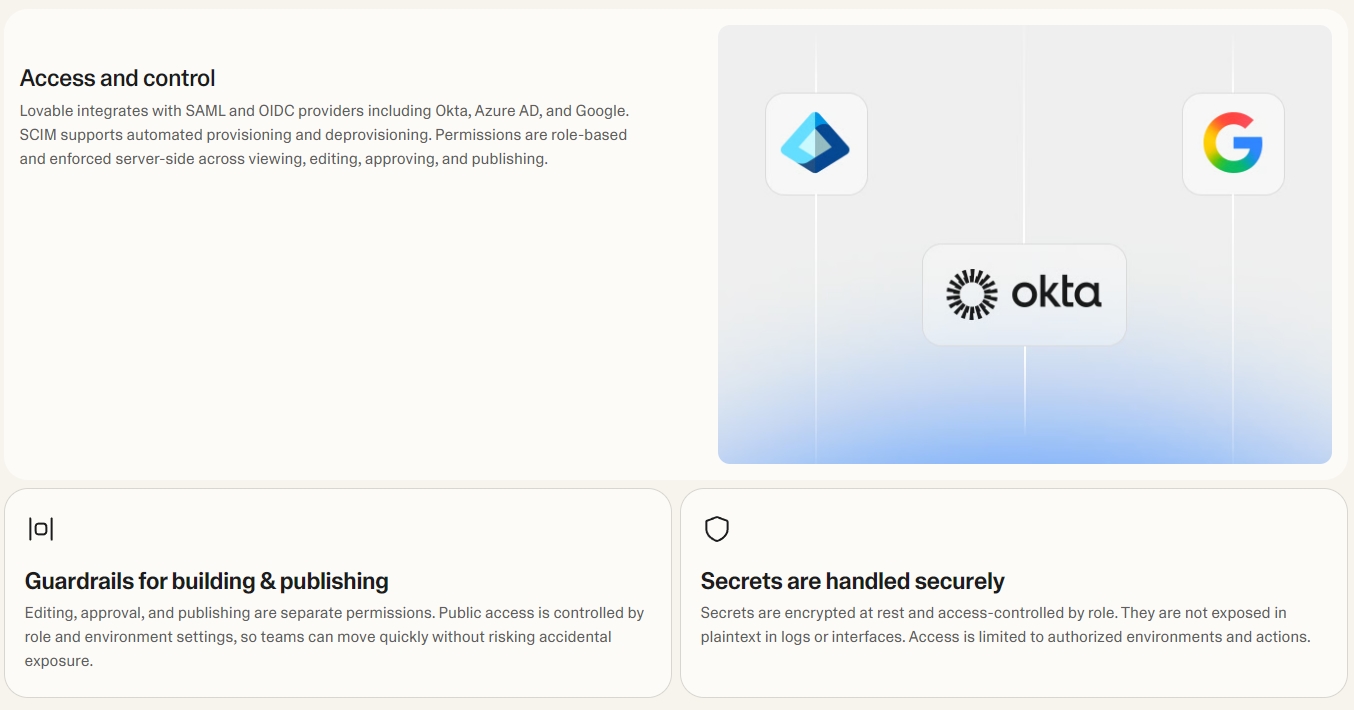
Row Level Security runs at the database level, not just the API layer. This means even direct SQL queries respect permissions. The default policies cover ownership-based access, but you can extend them for territory-based sharing, deal collaboration, or temporary access grants. Audit logging is not included by default — you'd need to add an audit table and triggers or use Supabase's pg_audit extension.
- Supabase Auth with multiple provider options
- Role-based access: admin, manager, rep
- Database-level RLS policies on all CRM tables
- Session management and token refresh handled automatically
- Custom policies for territory or team-based sharing
Data residency depends on your Supabase project region (US East, EU West, APAC). Lovable doesn't control this — you choose during project creation. Encryption at rest and in transit is standard. For compliance needs (SOC 2, HIPAA, GDPR), Supabase offers enterprise agreements with appropriate certifications, but the Lovable-generated application code itself isn't audited. You inherit the platform's posture plus whatever you build on top.
Pricing for CRM Projects
Lovable uses a credit-based pricing model. The Free tier includes 50 credits monthly — enough for initial exploration and small prototypes. Paid tiers (Starter, Launch, Scale, Enterprise) increase monthly credits and add features like custom domains, team collaboration, and priority support. Credits consume on AI generations, not on hosting or database usage.
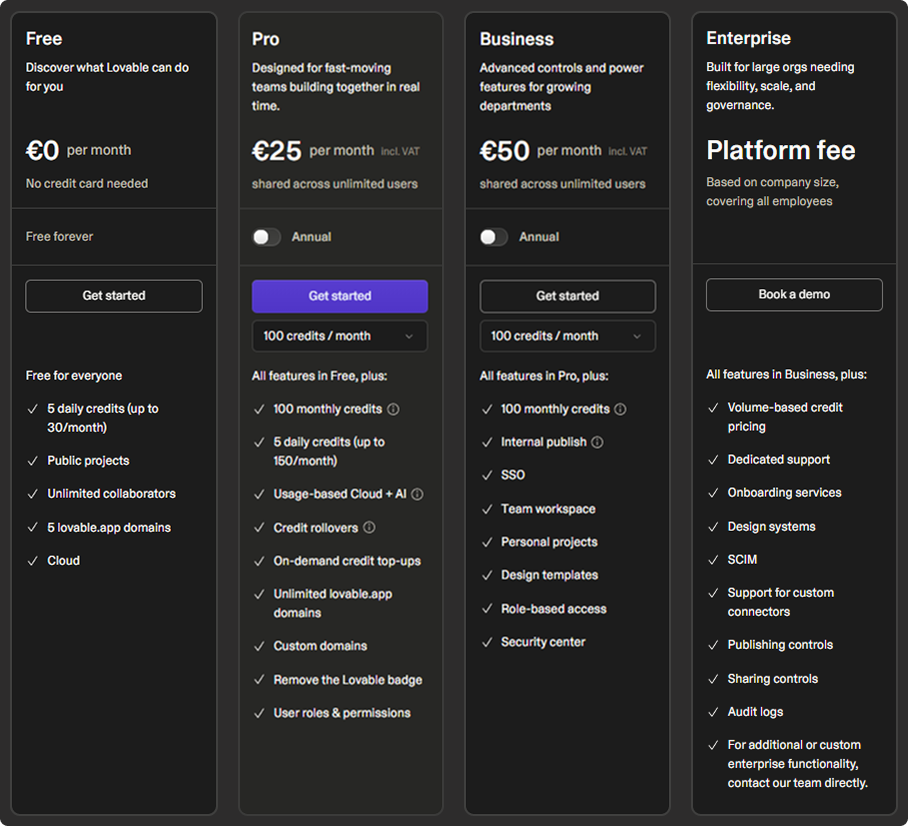
A typical CRM build might consume 200-500 credits for initial generation plus 50-100 credits per significant iteration. The Free tier won't sustain active development. Starter at $20/month (300 credits) suits solo founders. Launch at $50/month (1000 credits) fits small teams. Scale at $100/month (2500 credits) supports ongoing feature work. Enterprise adds SSO, audit logs, and dedicated support.
Scroll horizontally to see all columns
| Tier | Monthly Cost | Credits | Best For |
|---|---|---|---|
| Free | $0 | 50 | Evaluation, tiny prototypes |
| Starter | $20 | 300 | Solo founder, single CRM project |
| Launch | $50 | 1000 | Small team, active development |
| Scale | $100 | 2500 | Growing team, multiple projects |
| Enterprise | Custom | Custom | Organization, compliance, SSO |
Supabase hosting is separate. The free Supabase tier includes 500MB database, 1GB file storage, and 2 million monthly API requests — sufficient for most small CRM deployments. Production workloads typically need the Pro plan at $25/month per project for 8GB database, 100GB storage, and higher compute. Factor this into total cost of ownership alongside Lovable credits.
Who Should Use Lovable CRM
Lovable CRM fits teams that need a tailored sales tool and have more development tolerance than budget for custom software. Early-stage startups building a product-led sales motion can generate a CRM that mirrors their exact qualification criteria. Agencies delivering client portals can white-label a CRM per engagement. Internal tools teams can replace spreadsheet-based trackers with a proper app in days.
It fits less well for teams that need immediate reliability, extensive out-of-the-box integrations, or dedicated support. A 20-person sales org using Salesforce, HubSpot, or Pipedrive today would face months of migration, training, and feature parity work. The opportunity cost of building missing features — forecasting, territory management, CPQ, marketing automation sync — often exceeds the license savings.
- Founders building first sales process with unique stages
- Agencies creating client-specific CRM portals
- Product teams needing a lightweight deal tracker for beta customers
- Internal tools groups replacing Airtable/Sheets workflows
- Technical teams comfortable reviewing generated code
Non-technical founders can use Lovable but should expect a learning curve. The AI chat interface abstracts code, but understanding data relationships, permission models, and deployment helps you prompt effectively and catch errors. Teams with at least one developer who can review migrations and edge functions will move faster and produce more maintainable results.
Limitations and Considerations
The generated codebase is yours to maintain. Lovable doesn't provide automatic updates, security patches, or feature upgrades for your CRM. When Supabase releases a breaking change or a browser deprecates an API, you're responsible for fixing it. This is the fundamental difference from SaaS CRM — you own the technical debt.
Mobile experience is responsive but not native. Field reps on phones get a web app that works in Safari/Chrome but lacks offline support, push notifications, or native contact/calendar access. For teams that sell in the field, this can be a daily friction point. A PWA manifest can add home-screen installability but doesn't solve offline data entry.
You're not buying a CRM. You're buying a CRM-shaped code generator. The difference shows up when something breaks at 6 PM on a Friday and there's no vendor support line to call.
Data migration from an existing CRM is a manual project. Lovable doesn't provide import wizards for Salesforce, HubSpot, or CSV mappings. You'll write scripts or use Supabase's CSV import for the initial load, then handle delta syncs. Historical activity data — years of emails, calls, notes — rarely migrates cleanly because the data models differ.
Comparing Lovable CRM to Traditional Options
Traditional CRMs (Salesforce, HubSpot, Pipedrive, Close) offer mature feature sets, ecosystems, and support. They handle edge cases — duplicate merging, territory hierarchies, forecast categories, compliance reporting — that would take months to build in Lovable. The trade-off is rigidity: custom objects, workflow automation, and UI changes often require admin certification or developer resources anyway.
Scroll horizontally to see all columns
| Factor | Lovable CRM | Traditional CRM |
|---|---|---|
| Time to first usable pipeline | Hours (template) to days (customized) | Days (setup) to weeks (customization) |
| Ongoing development control | Full — you own the code | Limited — vendor roadmap priority |
| Out-of-the-box integrations | Minimal (Stripe, GitHub, Figma helpers) | Hundreds via marketplace |
| Mobile experience | Responsive web app only | Native iOS/Android apps |
| Support model | Community, docs, Enterprise tier | Phone, chat, dedicated CSM options |
| Compliance certifications | Inherited from Supabase only | SOC 2, ISO, HIPAA, GDPR standard |
| Total cost (year 1, 5 users) | ~$1,200-3,000 + dev time | ~$3,000-15,000 licenses only |
No-code CRM builders (Airtable, Notion, Coda, Attio) sit between Lovable and traditional CRMs. They offer visual builders, better mobile apps, and some integrations, but hit limits on complex permissions, custom logic, and data volume. Lovable generates actual code, so it scales further technically but requires more technical confidence.
Final Assessment of Lovable CRM
Lovable CRM is a credible option for teams that need a custom sales tool and have the technical capacity to own the result. The AI-generated starting point eliminates weeks of boilerplate — authentication, database schema, CRUD UI, deployment pipeline — letting you focus on the domain-specific logic that makes your sales process unique. For a solo founder or small team building something atypical, it can be the fastest path to a working tool.
The decision hinges on honest assessment of your maintenance appetite. Every custom field, workflow rule, and integration becomes code you understand, test, and update. If that sounds like a distraction from selling, a traditional CRM's license fee buys you the luxury of ignoring the plumbing. If it sounds like leverage — a tool that bends to your process instead of the reverse — Lovable delivers that leverage with a real codebase you can extend indefinitely.
Frequently Asked Questions
Can I migrate my existing Salesforce data to Lovable CRM?
Yes, but there's no automated migration tool. You'll export from Salesforce (CSV or API), map fields to your Lovable schema, and import via Supabase's CSV loader or custom scripts. Plan for data cleaning — Salesforce's picklists, record types, and lookup relationships don't map 1:1.
Does Lovable CRM work offline for field sales reps?
No. The generated app is a standard web application requiring an internet connection. There's no service worker or local database for offline writes. Reps without connectivity cannot view or update records until they're back online.
What happens if I exceed my monthly Lovable credits?
AI generation pauses until the next billing cycle or you upgrade. Your deployed CRM continues running — credits only gate the AI chat interface, not hosting or database access. You can still edit code manually in the browser editor.
Can I add marketing automation features like email sequences?
You can build them using Supabase edge functions and a transactional email API (Resend, SendGrid). The AI can scaffold the database tables, enrollment logic, and send scheduling. However, deliverability management, unsubscribe handling, and analytics are not included — you'll build or integrate those pieces.
Is the generated code deployable to my own infrastructure?
Yes. The project is a standard Vite + React + TypeScript application with a Supabase backend. You can eject the code, connect your own Supabase project or Postgres database, and deploy to Vercel, Netlify, AWS, or any static hosting. Lovable's hosting is optional.
How does Lovable handle multi-currency deals?
The template uses a single currency. Adding multi-currency requires a currencies table, exchange rate storage (daily snapshots or API), and conversion logic in deal views and reports. The AI can generate this schema and UI, but you'll need to specify rounding rules, rate sources, and whether historical rates lock at deal creation.
Can non-technical team members use the AI chat to make changes?
They can try, but results vary. Simple requests ("change the deal stage names") often work. Structural requests ("add a approval workflow with email notifications") frequently produce broken code that a developer must fix. Treat the AI as a developer accelerator, not a no-code replacement for all changes.