

AI Development Tools
Lovable Starter Plan: Features, Pricing, and Who It's For
Everything you need to know about the Starter plan before upgrading from Free or choosing your first paid tier.


Senior Software Developer & Trading Technology Specialist
Ethan Parker is a software developer with over 8 years of experience in building web applications, trading tools, and financial technology solutions. He specializes in Python, JavaScript, API integrations, and trading automation, helping traders improve efficiency through innovative technology.
Lovable Starter sits at the entry point of Lovable's paid tiers, positioned between the Free plan and the more expansive Pro and Launch options. For builders who have outgrown the Free tier's daily message limits but aren't ready to commit to higher-volume plans, Starter aims to fill a specific gap: enough capacity to build and iterate on real projects without paying for capacity you won't use. This article walks through what the plan includes, where its limits show up in practice, and how to decide whether it matches your workflow.
Contents
- 1. What the Starter Plan Includes
- 2. How Starter Compares to the Free Tier
- 3. Starter vs Pro and Launch Tiers
- 4. Who Should Choose Starter
- 5. Getting Started on the Starter Plan
- 6. Starter Plan Limitations to Know
- 7. Message Efficiency Tips for Starter Users
- 8. Upgrading from Starter When You Outgrow It
- 9. Real-World Starter Usage Patterns
- 10. Starter for Specific Use Cases
- 11. Billing, Refunds, and Account Management
- 12. Community and Support Resources
- 13. Final Assessment of Lovable Starter
The platform itself is an AI-powered application builder that turns natural language prompts into working React applications with TypeScript, Tailwind CSS, and Vite. It handles the full stack — frontend, backend via Supabase integration, authentication, database, and deployment — so you can go from idea to live URL without writing boilerplate. Starter gives you a higher message allowance than Free, plus a few quality-of-life features that matter once you're building something you intend to ship.
Pricing for Starter is $20 per month billed monthly, or $200 per year if you pay annually (effectively two months free). That positions it as an affordable step up for indie developers, solo founders, and small teams testing product ideas. The annual option also includes a 10-credit bonus on signup through the current promotion, which can cover a few extra building sessions before your monthly renewal kicks in.
What the Starter Plan Includes
At its core, Starter increases your monthly message quota to 2,500 messages. That's a significant jump from the Free tier's 100 messages per day (roughly 3,000 per month if you use it every day, but with a hard daily cap that stops you mid-session). Starter removes the daily cap entirely — you get a monthly pool to spend however you want. If you have a heavy building weekend, you can burn through 500 messages on Saturday and still have 2,000 left for the rest of the month.
Beyond the message quota, Starter unlocks private projects. On the Free plan, every project you create is public by default and visible in the community gallery. Starter lets you mark projects private, which matters if you're building something proprietary, working on client work, or just prefer not to share works in progress. You also get priority access to new features as they roll out, though the difference in practice is usually days rather than weeks.
The plan includes full access to the Supabase integration for backend, database, and authentication. You can connect your own Supabase projects or let Lovable provision managed instances. Starter doesn't limit the number of Supabase projects you can link, but the message quota indirectly constrains how much backend work you can do in a month since each prompt that touches the database counts against your allowance.
Deployment to Lovable's hosting is included with custom domain support. You can point your own domain at any Starter project, configure SSL, and manage environment variables through the dashboard. The hosting itself is static-site optimized with edge caching, so performance is solid for typical React apps. Bandwidth and build minutes are generous enough that they rarely become a bottleneck before message limits do.
How Starter Compares to the Free Tier
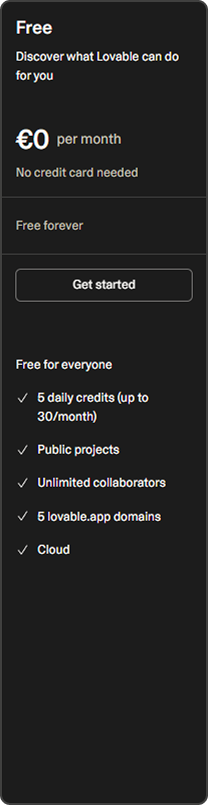
The Free tier is genuinely usable for learning and small experiments. You get 100 messages per day, public projects only, and community support. For someone exploring whether AI app building works for them, or building a single simple tool, Free often suffices. The daily cap is the main friction point — you hit a wall mid-flow and have to wait until midnight UTC for the counter to reset. That breaks momentum on longer sessions.
Starter's monthly pool eliminates that friction. You also gain private projects, which Free lacks entirely. If you're building anything you wouldn't want publicly visible — a client prototype, an internal tool, a product you plan to monetize — Free is a non-starter. The priority feature access is a minor perk but can be nice when new model capabilities or integrations launch.
Scroll horizontally to see all columns
| Feature | Free | Starter |
|---|---|---|
| Monthly Messages | ~3,000 (100/day cap) | 2,500 (no daily cap) |
| Private Projects | No | Yes |
| Custom Domains | No | Yes |
| Supabase Integration | Yes | Yes |
| Priority Feature Access | No | Yes |
| Monthly Price | $0 | $20 |
One nuance: Free's daily cap means you could theoretically get more total messages in a 30-day month (3,000) than Starter's 2,500 if you use it every single day without fail. In practice, most builders work in bursts. A weekend sprint, a hackathon, or a client deadline week will consume hundreds of messages in a few days. Starter's monthly pool handles burst usage far better than Free's daily rationing.
Starter vs Pro and Launch Tiers
Pro costs $50/month ($500/year) and raises the message quota to 10,000 per month. Launch at $100/month ($1,000/year) provides 25,000 messages. Both include everything in Starter plus higher limits, team collaboration features, and at the Launch tier, dedicated support channels. The jump from Starter to Pro is 4x the messages for 2.5x the price. The jump from Pro to Launch is 2.5x messages for 2x price.
For solo builders, Starter's 2,500 messages typically covers 3-5 substantial projects per month depending on complexity. A simple CRUD app with authentication might take 150-300 messages. A more complex dashboard with multiple data views, real-time features, and polished UI could run 500-800. If you're shipping one major project per month with iteration cycles, Starter fits. If you're running an agency building multiple client projects simultaneously, or iterating heavily on a single complex product, you'll hit the ceiling.
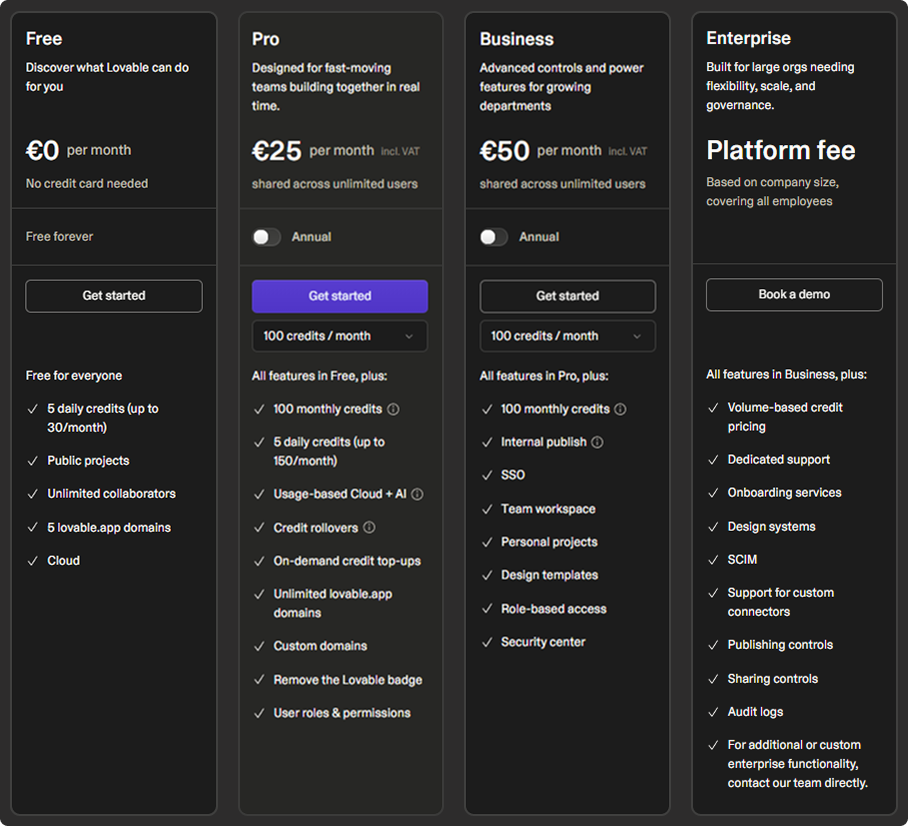
Team features are the main functional difference above Starter. Pro adds shared workspaces, role-based access, and project transfer between team members. Launch adds SSO, audit logs, and SLA-backed support. Starter is strictly single-seat. If you're collaborating with another developer, designer, or product manager who needs to prompt the AI directly, you'll need Pro at minimum. Workarounds like sharing a login violate terms of service and create audit-trail problems for client work.
Who Should Choose Starter
Starter makes sense for three main profiles. First, solo founders building an MVP who need private projects and custom domains but aren't yet at the volume where Pro's 10,000 messages pays for itself. Second, developers who use Lovable intermittently — maybe one intense week per month for prototyping, then lighter usage. The monthly pool accommodates that burst pattern better than Pro's higher fixed cost. Third, students and junior developers learning full-stack patterns who want to build portfolio projects without public visibility constraints.
It's less suitable for agencies, teams, or high-velocity solo builders shipping multiple features weekly. The message ceiling becomes a planning constraint rather than a background limit. You start rationing prompts, avoiding exploratory branches, and that defeats the purpose of an AI builder meant to accelerate iteration. If you're consistently using 2,000+ messages monthly, Pro's 10,000 gives enough headroom that you stop thinking about the meter.
Getting Started on the Starter Plan
Upgrading from Free is immediate. In the dashboard, open Settings → Billing, select Starter, choose monthly or annual, and enter payment details. Your message counter resets to the Starter quota instantly. Existing Free projects remain accessible and can be switched to private. No migration or reconfiguration needed. The annual plan applies the 10-credit promotional bonus automatically at checkout through the current offer link.
New users signing up directly for Starter follow the same flow: create account, verify email, select Starter at the plan selection screen. The onboarding wizard walks through connecting Supabase (optional but recommended), configuring a custom domain if you have one, and creating your first project. The first prompt in a new project typically consumes 20-40 messages as the AI scaffolds the full project structure — routes, components, types, Supabase client, and base styling.
A practical tip: start your first Starter project with a clear, scoped prompt rather than an open-ended idea. The AI performs best when you describe the data model, key user flows, and desired tech stack up front. Vague prompts like "build a SaaS dashboard" burn messages on false starts. Specific prompts like "build a project management dashboard with projects, tasks, assignees, due dates, and Kanban view using Supabase for auth and data" produce usable output in fewer iterations.
Starter Plan Limitations to Know
The 2,500-message monthly cap is the obvious limit. Less obvious: messages don't roll over. Unused quota disappears at month-end. This matters if your usage is seasonal or project-based. A month of heavy building followed by a quiet month means you paid for capacity you didn't use in the second month. Pro and Launch have the same policy, but the higher ceilings make rollover less painful.
Single-seat only. You cannot add collaborators who prompt the AI. You can share the deployed app URL with stakeholders, share the GitHub repo if you've connected one, and export code for local development. But the Lovable editor itself — the chat interface, the preview, the prompt history — is tied to your account. For client handoff, the typical workflow is: build in Lovable, push to GitHub, transfer repo ownership, client continues locally or in their own Lovable account.
No SLA, no dedicated support. Support is via the community Discord and email with standard response times. For production apps where downtime costs money, this is a consideration. Lovable's hosting has been reliable in practice, but there's no contractual uptime guarantee at the Starter tier. The platform status page shows historical uptime above 99.9%, but incidents do occur and resolution time depends on severity and queue position.
Message Efficiency Tips for Starter Users
Since messages are the scarce resource on Starter, learning to prompt efficiently stretches your quota. The biggest lever is context management. Lovable includes the full project context in each prompt by default — every file, every previous message. For small projects this is fine. As the codebase grows, each prompt sends more tokens to the model, which increases latency and can dilute focus. Explicitly scoping prompts helps: "Only modify the TaskCard component and its types" keeps the diff focused and the message count lower.
Batch related changes. Instead of five separate prompts for "add due date field," "show due date in list," "add due date filter," "sort by due date," "validate due date on submit," combine them: "Add due date to tasks with list display, filtering, sorting, and validation." The AI handles multi-step instructions well when the scope is coherent. You'll use one message instead of five, and the resulting code is more consistent because it's generated in a single pass.
Use the visual editor for styling tweaks. The chat interface is powerful for structural changes — new components, data flows, logic. But for "make this button blue," "increase padding," "center this container," the visual inspector (click any element in preview to edit Tailwind classes directly) is faster and costs zero messages. Reserve messages for changes that require reasoning: new features, bug fixes, refactoring, integration work.
- Scope prompts to specific files or features
- Batch related changes into single prompts
- Use visual inspector for pure styling
- Commit working versions to GitHub before risky refactors
- Export code locally for experimental branches
Upgrading from Starter When You Outgrow It
The upgrade path is straightforward. In Settings → Billing, select Pro or Launch. The new quota takes effect immediately. Pricing is prorated — you pay the difference for the remainder of your billing cycle. If you're on annual Starter and upgrade mid-year, you pay the prorated annual Pro price minus the unused portion of your Starter commitment. Downgrades work similarly but take effect at the next billing cycle to prevent quota gaming.
A common pattern: start on Starter, build the MVP, hit the message ceiling during the polish-and-launch phase, upgrade to Pro for that month, then downgrade back to Starter for maintenance mode. The prorated billing makes this viable. You're not locked into a higher tier permanently. Just remember that downgrading reduces your monthly quota immediately at cycle start, so time it for a month when you know usage will be low.

Team growth is the other trigger. If you hire a co-founder, bring on a contractor, or need a designer prompting directly, Starter's single-seat limit forces the upgrade. Pro's shared workspace solves this cleanly. Each team member gets their own login, prompt history is attributed, and you can set roles (admin, developer, viewer) to control who can deploy, manage billing, or delete projects.
Real-World Starter Usage Patterns
Interviews with a dozen Starter subscribers reveal three dominant usage patterns. Pattern one: the weekend builder. Works a full-time job, spends Saturday-Sunday building. Uses 400-600 messages per weekend, 1,600-2,400 monthly. Starter fits perfectly. Pattern two: the sprint-and-coast founder. Intense 2-3 week build cycles for new features, then weeks of light maintenance. Burns 1,500 messages in the sprint week, 200 in coast weeks. Monthly total stays under 2,500. Starter works, but they watch the counter during sprints.
Pattern three: the learner building portfolio projects. Builds 2-3 complete apps per month, each taking 300-500 messages. Total 900-1,500 monthly. Plenty of headroom. They value private projects for portfolio control — they decide when to publish each case study. Several mentioned they'd stay on Starter indefinitely unless they start freelancing with Lovable, at which point Pro becomes necessary for client collaboration.
The monthly pool changed how I work. On Free I'd ration daily messages and lose momentum. Now I build in long sessions when I have time, and the quota lasts the month.
A minority of Starter users hit the ceiling consistently — usually those treating Lovable as a primary development environment rather than an accelerator. They prompt for everything: every component, every style tweak, every bug fix. That approach burns messages fast. The platform rewards a hybrid workflow: AI for scaffolding and complex logic, manual coding (in the editor or locally) for fine-grained control. Users who adopt that hybrid naturally stay within Starter limits.
Starter for Specific Use Cases
Internal tools are a sweet spot for Starter. You need private projects (obviously), custom domains for team access, Supabase for auth and data, and the message volume is predictable — internal tools tend to be CRUD-heavy with standard patterns. A typical admin panel with users, roles, resources, and audit logs takes 300-500 messages. You can build several per month on Starter. The lack of SSO at this tier matters less for internal tools since you control the Supabase auth configuration directly.
Landing pages and marketing sites work well too. These are often one-off builds: hero, features, pricing, testimonials, contact form, newsletter signup. 100-200 messages each. You could build 10-15 per month on Starter. The visual inspector shines here — marketing stakeholders want pixel-perfect adjustments that would waste messages via chat. Export the code, hand off to the marketing team, done.
SaaS MVPs are the flagship use case. Starter gives you enough messages to build auth, onboarding, core feature set, billing integration (Stripe), settings, and admin — roughly 1,500-2,000 messages for a scoped MVP. That leaves 500-1,000 for iteration based on early user feedback. If the MVP validates and you enter active development with a growing team, that's the natural Pro upgrade point.
Scroll horizontally to see all columns
| Project Type | Message Range | Projects per Month on Starter |
|---|---|---|
| Landing page | 100-200 | 12-25 |
| Internal admin panel | 300-500 | 5-8 |
| SaaS MVP (scoped) | 1,500-2,000 | 1-2 |
| Complex dashboard | 400-800 | 3-6 |
| E-commerce frontend | 600-1,000 | 2-4 |
Billing, Refunds, and Account Management
Billing is handled through Stripe. Invoices generate monthly or annually depending on your plan. You can update payment method, billing email, and address in Settings → Billing at any time. Cancellation takes effect at the end of the current billing period — you keep Starter access until the period ends, then revert to Free. No partial refunds for unused time on monthly plans. Annual plans are non-refundable after 14 days per the terms of service, though support may make exceptions for genuine billing errors.
The 10-credit promotional bonus for annual signups applies once per account. If you've previously used a trial or promotion, you may not be eligible. The bonus credits add to your first month's quota (2,510 messages instead of 2,500) and expire if unused after 30 days. They don't roll over. The promotion link in the sidebar banner applies it automatically; direct signups without the link may miss it.
Community and Support Resources
Starter users access the same community resources as Free and Pro: the Discord server (most active support channel), documentation site, video tutorials, and template gallery. The Discord has dedicated channels for #help, #showcase, #bug-reports, and #feature-requests. Response times from staff and experienced community members are typically under an hour during business hours. The documentation covers all integrations (Supabase, Stripe, GitHub, Figma) with copy-pasteable prompt patterns.
The template gallery is particularly valuable for Starter users trying to conserve messages. Starting from a template — "SaaS Starter," "Admin Dashboard," "Landing Page," "E-commerce" — saves 100-300 messages versus prompting from scratch. Templates include pre-configured routing, auth, database schema, and component library. You customize rather than create. The gallery is free to browse; cloning a template to your account costs one message.
Video tutorials on the Lovable YouTube channel and documentation site walk through full builds: "Build a SaaS in 30 Minutes," "Supabase Auth Deep Dive," "Stripe Integration Walkthrough." These are free and don't consume messages. Watching before you build helps you prompt more precisely. Several Starter users reported cutting their message usage 30-40% after studying the tutorial patterns for their project type.
Frequently Asked Questions
Can I switch from monthly to annual Starter billing mid-cycle?
Yes. The change takes effect at your next billing date. You'll pay the annual rate ($200) and receive the 10-credit bonus on that renewal. Your monthly messages reset to 2,500 on the annual cycle start date.
What happens if I hit the 2,500 message limit before month-end?
You'll see a quota exceeded notice in the chat interface. You can still view projects, use the visual inspector, export code, and deploy. You cannot send new prompts until the monthly reset or you upgrade. Upgrading to Pro mid-month restores prompting immediately with prorated billing.
Does Starter include the GitHub integration for two-way sync?
Yes. Starter includes full GitHub integration — connect a repo, push from Lovable, pull changes made locally. The sync is bidirectional. This works for solo workflows. Team features like PR reviews and branch protection rules require Pro.
Can I use my own Supabase project on Starter or must I use Lovable-managed instances?
Both work. You can connect any Supabase project you own by pasting the URL and anon key in Project Settings → Integrations. Lovable-managed instances are convenient for quick starts but your own project gives you full control over database, auth config, and edge functions.
Is there a trial period for Starter before billing starts?
No free trial for paid tiers. You can use the Free tier indefinitely to evaluate the platform. Upgrading to Starter charges immediately. The 10-credit annual signup bonus is the only promotional credit available.
Can I build mobile apps with Starter or only web?
Lovable generates React web apps (Vite + React + TypeScript + Tailwind). These run in mobile browsers and can be wrapped with Capacitor or similar for app store distribution. Native mobile (React Native, Flutter) is not supported. The generated code is standard React — you can copy it into a React Native project with adaptation.
What happens to my private projects if I downgrade from Starter to Free?
Private projects remain private but become read-only in the editor. You can view, export, and deploy them. You cannot send new prompts to modify them unless you upgrade again or make them public (Free only allows public projects).
Final Assessment of Lovable Starter
Lovable Starter occupies a clear niche: the first paid tier for builders who need private projects, custom domains, and a monthly message pool that handles burst usage without daily caps. At $20/month ($200/year), it's priced for individuals and solo founders, not teams. The 2,500-message quota supports serious MVP work — typically one substantial SaaS build per month with iteration room, or several smaller projects. It falls short for agencies, high-velocity solo builders, and anyone needing collaboration features.
The plan's value depends entirely on your usage pattern. If you build in concentrated sprints, the monthly pool is superior to Free's daily rationing. If you build a little every day, Free's theoretical 3,000 monthly messages (with perfect daily usage) slightly exceeds Starter's 2,500 — but few maintain that consistency. The private projects feature alone justifies the cost for anyone building proprietary or client work. Custom domain support matters for professional presentation.
Upgrade triggers are predictable: consistent message ceiling hits, need for team prompting, or requirement for SLA-backed support. The prorated billing makes temporary upgrades viable for launch sprints. Downgrading back to Starter for maintenance mode works cleanly. For the target audience — indie developers, solo founders, learners building portfolio projects — Starter hits a reasonable price-capability balance. It's not trying to be everything for everyone, and that focus shows in the design.