

AI Development Tools
Lovable Pricing: Plans, Credits, and What Each Tier Includes
From free tier limits to enterprise contracts — understand every pricing option before you commit.


Senior Software Developer & Trading Technology Specialist
Ethan Parker is a software developer with over 8 years of experience in building web applications, trading tools, and financial technology solutions. He specializes in Python, JavaScript, API integrations, and trading automation, helping traders improve efficiency through innovative technology.
Lovable has positioned itself as one of the more accessible AI-powered application builders on the market, but its pricing model operates differently than the typical per-seat or per-feature subscriptions most developers expect. Instead of charging for users or modules, Lovable uses a credit system where each generation, edit, or deployment consumes credits from your monthly allowance. This approach creates flexibility but also introduces complexity when trying to estimate monthly costs for a real project.
Contents
- 1. How Lovable's Credit System Works
- 2. Free Tier: Limits and Practical Reality
- 3. Starter Plan: The Entry-Level Paid Option
- 4. Launch Plan: Scaling for Active Development
- 5. Scale Plan: High-Volume and Agency Workflows
- 6. Enterprise: Custom Contracts for Organizations
- 7. Side-by-Side Plan Comparison
- 8. Deep Dive: Credit Consumption Patterns
- 9. Billing, Invoices, and Payment Mechanics
- 10. Refunds, Promos, and Special Offers
- 11. How Lovable Pricing Compares to Alternatives
- 12. Choosing the Right Plan for Your Situation
- 13. Team Workspace Dynamics and Credit Sharing
- 14. Annual vs Monthly Billing: The Real Savings
- 15. Final Assessment of Lovable Pricing
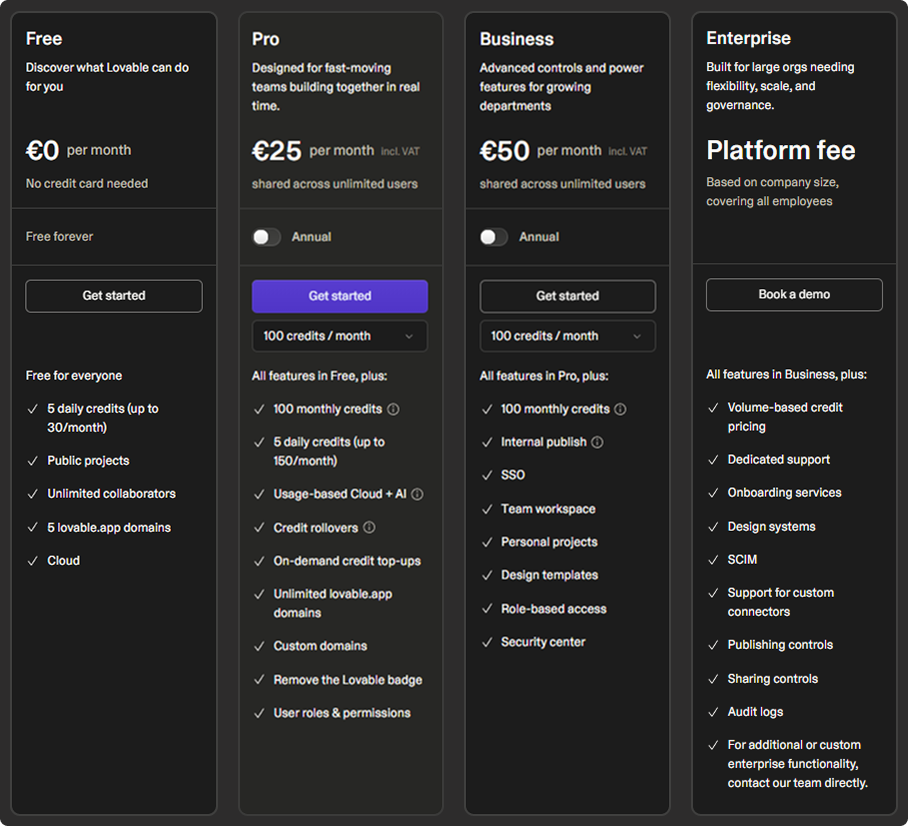
The platform currently offers four main tiers: Free, Starter, Launch, and Scale, plus an Enterprise option for organizations with custom requirements. Each tier provides a different monthly credit allocation, and the value proposition shifts significantly depending on whether you're prototyping a weekend idea, building a production SaaS, or running an agency that ships multiple client projects per month. Understanding where the boundaries lie — and what happens when you hit them — is essential before you invest time in the platform.
This breakdown covers every public pricing tier, the credit mechanics that drive actual usage, billing details that aren't always obvious from the marketing page, and practical guidance on matching a plan to your workflow. I've also included a comparison with similar tools so you can see where Lovable sits in the broader landscape of AI-assisted development platforms.
How Lovable's Credit System Works
Every action that invokes the AI — generating a new screen, modifying existing code, fixing a bug, adding a feature, or deploying to preview — draws from your monthly credit balance. The exact credit cost per action isn't published as a fixed rate card; it varies based on the complexity of the request, the model used, and the amount of context passed to the AI. In practice, a simple UI tweak might cost a few credits, while generating a full authentication flow with database integration could consume dozens.
Credits reset on your billing cycle date, not calendar month. If you sign up on the 15th, your refresh happens on the 15th of each subsequent month. Unused credits do not roll over. This is a common point of confusion for new users who assume they can bank credits during slow weeks for a heavy sprint later. The system is designed for steady usage patterns, not burst capacity.
You can monitor consumption in real time from the settings panel. The dashboard shows credits used, credits remaining, and a rough projection of whether you're on track to exhaust your allowance before the next reset. There's no hard cutoff mid-cycle — you can purchase additional credit packs if you run out, but the per-credit cost in those packs is higher than the effective rate bundled into the paid tiers.
Free Tier: Limits and Practical Reality
The Free tier provides 50 credits per month. That's enough to explore the interface, generate a few screens, and understand the workflow — but it won't sustain a real project beyond the first day or two of active development. You also get access to the community templates, basic GitHub integration, and the ability to export code. What you don't get: custom domains, priority support, team collaboration features, or the higher-context models that produce better results on complex tasks.
The Free tier is genuinely useful for evaluation. You can build a complete small application — think a personal portfolio site, a simple landing page, or a basic CRUD interface — within the 50-credit limit if you're deliberate about your prompts. But the moment you start iterating on design, fixing AI hallucinations, or adding backend logic, the credits evaporate quickly. Most developers who move past the evaluation phase upgrade within their first week.
One constraint that catches people off guard: the Free tier uses a shared model pool with lower priority during peak hours. Response times can be noticeably slower, and the model may truncate longer outputs. This isn't a hard limit, but it affects the development experience when you're trying to move fast. Paid tiers route requests through higher-priority infrastructure with access to more capable model variants.
Starter Plan: The Entry-Level Paid Option
At $20 per month, the Starter plan (sometimes labeled Pro in older documentation) provides 500 credits — a 10x increase over Free. This is the tier most individual developers and solo founders gravitate toward first. It unlocks custom domains, removes the Lovable branding from deployments, and grants access to the full model suite including the higher-context variants that handle larger codebases more reliably.
Five hundred credits sounds generous, but the math changes when you're building a production application. A typical SaaS MVP with authentication, a dashboard, user settings, billing integration, and a handful of CRUD features might consume 200–400 credits in its initial build phase, leaving limited room for iteration, bug fixes, and the inevitable redesign cycles. If you're shipping one project per month, Starter works. If you're iterating daily or building multiple projects, you'll hit the ceiling.
Starter also includes basic team features: you can invite one collaborator to your workspace. This is useful for a founder-designer pair or a developer working with a product manager, but it's not built for larger teams. The collaborator shares your credit pool, so coordination matters — two people prompting simultaneously can burn through the monthly allowance faster than expected.
Launch Plan: Scaling for Active Development
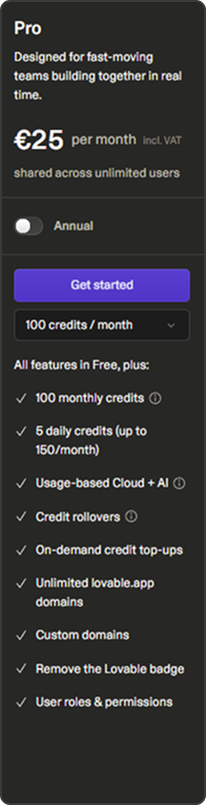
The Launch plan sits at $50 per month with 2,000 credits — a 4x jump from Starter for 2.5x the price. This tier targets developers who are actively shipping and iterating, not just building once and maintaining. The credit allowance supports multiple projects per month or a single complex application with ongoing feature work. You also get up to five team members, priority support with faster response times, and access to beta features before they roll out broadly.
For a solo founder building a SaaS in public, Launch is often the sweet spot. The 2,000 credits absorb the inevitable waste from failed generations, design experiments, and refactoring sessions without requiring constant credit-pack top-ups. The team limit of five covers a typical early-stage startup: a couple of developers, a designer, a product person, and maybe a contractor. Priority support becomes valuable when a deployment issue blocks a launch — the Free and Starter tiers route through community channels with no SLA.
One practical advantage at this tier: the higher credit buffer means you can afford to use the more powerful model configurations for complex tasks without constantly watching the counter. On Starter, developers often downgrade to faster, cheaper models for routine edits to stretch credits. On Launch, you can default to the best model and only optimize when genuinely necessary.
Scale Plan: High-Volume and Agency Workflows
At $100 per month with 5,000 credits, Scale is built for agencies, consultancies, and product teams running multiple concurrent projects. The per-credit cost drops to $0.02, the lowest effective rate on the standard tiers. Team capacity expands to 20 members, and you get dedicated support with a named contact, SLA-backed response times, and early access to platform updates. This is also the first tier where volume discounts on additional credit packs become meaningful.
Agencies using Lovable for client work typically find Scale pays for itself within the first project. A typical client engagement — discovery, prototyping, iteration, handoff — might consume 1,000–2,000 credits. With five projects a month, you're still within the base allowance. The team limit of 20 allows project-based workspaces where each client team has isolated credits and repositories, though all draw from the same organizational pool.
Scale also includes advanced security features: SSO integration, audit logs, and granular permission controls. These matter when you're handling client IP or operating in regulated environments. The dedicated support contact helps with architecture reviews, migration planning, and troubleshooting edge cases that community support can't resolve. For pure development velocity, the difference between Scale and Launch is mostly headroom — but for business operations, the compliance and support features are the real upgrade.
Enterprise: Custom Contracts for Organizations
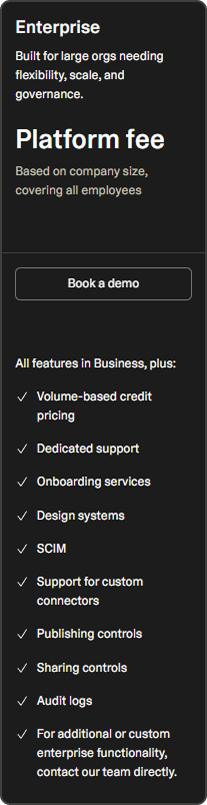
Enterprise pricing is not published. It requires a sales conversation, and the contract is tailored to the organization's usage patterns, security requirements, and support needs. Typical Enterprise engagements start around $500–$1,000 per month for smaller teams with dedicated infrastructure, and scale into five figures for large deployments with on-premise options, custom model fine-tuning, and dedicated engineering support.
What distinguishes Enterprise from Scale isn't just volume — it's architectural. Enterprise customers can deploy Lovable within their own VPC, connect to internal model endpoints, enforce data residency requirements, and integrate with existing identity providers beyond standard SSO. The platform also offers custom SLA terms, including uptime guarantees and penalty clauses that don't exist on self-serve tiers. For companies in finance, healthcare, or government contracting, these capabilities are often mandatory rather than nice-to-have.
The sales process typically involves a proof-of-concept period where your team evaluates the platform on a real project while Lovable's solutions engineers assess your infrastructure and compliance needs. This isn't a quick sign-up; expect 2–6 weeks from first conversation to signed contract. If you're evaluating Enterprise, start the conversation early — don't wait until you've hit Scale limits and need an immediate upgrade.
Side-by-Side Plan Comparison
The table below summarizes the key differences across all public tiers. Enterprise is excluded since its terms are negotiated individually. All prices reflect monthly billing; annual commitments typically offer a 20% discount, which brings the effective per-credit cost down further on paid tiers.
Scroll horizontally to see all columns
| Feature | Free | Starter | Launch | Scale |
|---|---|---|---|---|
| Monthly Price | $0 | $20 | $50 | $100 |
| Monthly Credits | 50 | 500 | 2,000 | 5,000 |
| Effective Cost/Credit | N/A | $0.04 | $0.025 | $0.02 |
| Team Members | 1 (solo) | 2 | 5 | 20 |
| Custom Domains | No | Yes | Yes | Yes |
| Priority Support | No | No | Yes | Yes (dedicated) |
| SSO / Audit Logs | No | No | No | Yes |
| Beta Feature Access | No | No | Yes | Yes (early) |
| Credit Pack Discount | No | No | 5% | 15% |
The per-credit economics improve significantly at each tier. Free users effectively pay infinite per credit since there's no monetary cost but the allowance is tiny. Starter users pay 4 cents per credit if they use the full allocation. Launch drops that to 2.5 cents, and Scale reaches 2 cents. Annual billing improves these rates to roughly $0.032, $0.02, and $0.016 respectively. If you consistently use 80%+ of your monthly credits, the higher tier almost always wins on pure economics.
Deep Dive: Credit Consumption Patterns
Understanding what burns credits helps you budget accurately. Based on community reports and my own testing, here are rough ranges for common actions. These are estimates — actual costs vary with prompt complexity, codebase size, and model selection.
- Generate a new page/component from scratch: 15–40 credits
- Modify an existing component (layout, styling, logic): 5–20 credits
- Add authentication flow (signup, login, password reset): 30–60 credits
- Integrate Supabase database with types and hooks: 25–50 credits
- Set up Stripe billing with webhooks: 35–70 credits
- Fix a bug reported by the AI: 3–15 credits
- Refactor a feature across multiple files: 20–50 credits
- Deploy to preview environment: 1–3 credits
- Export codebase to GitHub: 1–2 credits
The wide ranges reflect a key reality: the same nominal task can cost very different amounts depending on context. Adding a button to a fresh component might cost 5 credits. Adding that same button to a complex dashboard with 50 existing components, TypeScript types, and nested state management might cost 30 credits because the AI needs to ingest more context to produce a correct edit. This is why credit estimation for a full project is notoriously difficult — the marginal cost of each feature increases as the codebase grows.
Billing, Invoices, and Payment Mechanics
Lovable bills monthly on your cycle date via Stripe. The billing portal (accessible from Settings → Billing) shows your current plan, next invoice date, payment method, and invoice history. Invoices are generated automatically and include VAT/GST where applicable based on your account's billing address. You can update payment details, download past invoices, and switch between monthly and annual billing from this portal.
Switching plans mid-cycle prorates the difference. Upgrading charges the prorated amount immediately and grants the new credit allowance right away. Downgrading applies at the next cycle — you keep your current credits and features until the period ends, then the new tier takes effect. This is more generous than platforms that downgrade immediately. However, if you downgrade from a higher tier and have used more credits than the lower tier provides, you won't lose access mid-cycle, but you'll start the next cycle with the reduced allowance.
Credit packs are available for one-time purchase when you exceed your monthly allowance before the reset. They come in increments of 500, 2,000, and 5,000 credits. The per-credit price on packs is higher than the effective rate on any paid tier — roughly $0.06–$0.08 per credit depending on volume. Packs don't expire, but they also don't auto-renew. They're a safety valve, not a substitute for choosing the right tier. If you're buying packs regularly, you're on the wrong plan.
Refunds, Promos, and Special Offers
Lovable's refund policy is standard for SaaS: you can request a refund within 7 days of a new subscription charge if you haven't used significant credits. 'Significant' isn't defined publicly, but in practice, using more than 10% of your monthly allowance typically disqualifies you. Refunds for annual plans are prorated based on unused months, minus a processing fee. The policy is enforced by support, not automated — you need to open a ticket.
Promo codes appear occasionally through partnerships, conference sponsorships, and the affiliate program. The most common offer is bonus credits on the first month (typically 500–1,000 extra credits) or a percentage discount on the first 1–3 months. Student discounts exist but require verification through a third-party service (usually Student Beans or similar). There's no permanent nonprofit or educational discount program published, though Enterprise sales sometimes accommodate academic institutions with custom terms.
The affiliate program pays 20% recurring commission for 12 months on referred subscriptions. This is relevant if you're an agency or consultant recommending Lovable to clients — you can earn back a portion of your own subscription cost. The referral link is available in the dashboard once you're on a paid tier. Commissions are paid monthly via Stripe Connect once you reach a $50 threshold.
How Lovable Pricing Compares to Alternatives
The AI app builder category has several pricing models. Bolt.new uses a similar credit system but with different tier boundaries. v0 by Vercel is free for individual use with generous limits but charges for team features and higher usage. Replit's AI features are bundled into their Core/Teams plans. Cursor charges per seat with usage-based overages for their agent mode. Base44 uses a flat monthly fee with generous but opaque limits. Each model favors different usage patterns.
Scroll horizontally to see all columns
| Platform | Model | Entry Paid Tier | Best For |
|---|---|---|---|
| Lovable | Credit-based | $20/mo (500 credits) | Full-stack apps with backend |
| Bolt.new | Credit-based | $20/mo (10M tokens) | Rapid prototyping, frontend |
| v0 (Vercel) | Freemium + seats | $20/mo per seat | React/Next.js UI generation |
| Replit | Seat-based + AI | $20/mo (Core) | Full dev environment + AI |
| Cursor | Seat-based + usage | $20/mo per seat | IDE-integrated coding agent |
| Base44 | Flat monthly | $30/mo (unlimited*) | Business apps, non-technical |
Lovable's credit model is more transparent than Base44's 'unlimited' (which has fair-use limits) but less predictable than v0's per-seat model. For a solo developer building one app, v0 or Cursor might be cheaper if you stay within their free tiers. For a team building multiple full-stack applications with database, auth, and payments, Lovable's credit bundles at Scale tier often work out cheaper than per-seat alternatives once you cross 3–4 team members. The comparison shifts entirely based on whether you value the integrated backend (Supabase, Stripe, auth) that Lovable provides out of the box — those are separate costs on most other platforms.
Choosing the Right Plan for Your Situation
The decision framework below matches common profiles to the tier that usually fits. Treat it as a starting point — your actual usage may differ.
- Learning / evaluating / weekend projects → Free. Stay here until you hit the credit wall consistently.
- Solo founder building one MVP → Starter. 500 credits covers initial build plus 2–3 iteration cycles.
- Solo founder shipping continuously / multiple projects → Launch. 2,000 credits absorbs ongoing feature work.
- Two-person founding team (dev + design/PM) → Launch. Shared credits, two seats, priority support.
- Early-stage startup (3–5 people) → Launch or Scale. Depends on whether you're in build mode (Launch) or shipping mode (Scale).
- Agency / consultancy / dev shop → Scale. Team capacity, client isolation, compliance features.
- Enterprise / regulated industry / custom infra needs → Enterprise. Start sales conversation 6+ weeks before you need it.
A common mistake: upgrading too early. Developers often jump to Launch or Scale anticipating heavy usage, then use 15% of their credits for months. The credits don't roll over, so you're effectively lighting money on fire. Start lower, monitor the usage dashboard for two full cycles, then upgrade when you consistently exceed 70–80% of your allowance. Downgrading is painless and takes effect next cycle.
Another mistake: treating credit packs as a subscription substitute. If you're on Starter and buying a 500-credit pack every month, you're paying $20 + ~$35 = $55 for 1,000 credits. Launch gives you 2,000 credits for $50. The math only favors packs if your overage is occasional and unpredictable — a launch month, a client crunch, a hackathon. Predictable overage means wrong tier.
Team Workspace Dynamics and Credit Sharing
When multiple people share a workspace, credits are drawn from a single pool. This creates coordination challenges that aren't obvious until you've lived with them. Two developers prompting simultaneously can generate conflicting edits that each consume credits, then require additional credits to resolve. A designer iterating on UI while a developer adds logic can double the credit cost for what feels like one feature.
Teams that manage this well establish informal protocols: one person 'owns' the AI session for a given feature branch, others review before committing, and routine styling tasks use the faster/cheaper model setting. Some teams designate a 'prompt engineer' role — one person who translates requirements into efficient prompts, reducing waste from trial-and-error iterations. This isn't a formal platform feature, but it emerges naturally on Scale and Enterprise tiers where the team size justifies the specialization.
Workspace analytics show per-member credit consumption, which helps identify training needs. If one team member consistently uses 3x the credits for similar tasks, their prompting technique likely needs refinement. This data is only available on Launch and above — Free and Starter show only aggregate usage.
Annual vs Monthly Billing: The Real Savings
Annual billing offers a 20% discount across all paid tiers. On Starter, that's $192/year vs $240 monthly — effectively 4 months free. On Launch, $480 vs $600. On Scale, $960 vs $1,200. The per-credit cost drops proportionally: Starter annual reaches $0.032/credit, Launch hits $0.02, Scale reaches $0.016. These are meaningful savings if you're confident in your tier choice.
The catch: annual plans are not refundable after the initial 7-day window except in exceptional circumstances. If you commit to Scale annual at $960 and realize after two months that Launch would have sufficed, you're locked in for the year. Monthly billing lets you downgrade next cycle with zero penalty. The 20% discount is roughly equivalent to 2.4 months of flexibility. If there's any chance your usage pattern changes — project ends, team shrinks, you switch tools — monthly is the safer bet until you've stabilized.
A middle-ground strategy: start monthly, stay monthly for 2–3 cycles while you dial in the right tier, then switch to annual once your usage is predictable. You can switch from monthly to annual at any time; the annual term starts immediately and you get the discount on the next invoice. Switching from annual to monthly only happens at renewal.
Frequently Asked Questions
Do unused credits roll over to the next month?
No. Credits reset on your billing cycle date and unused credits expire. There is no rollover on any tier.
Can I change plans mid-cycle?
Yes. Upgrades take effect immediately with prorated billing. Downgrades apply at the next cycle start.
What happens if I run out of credits before the reset?
You can purchase credit packs (500, 2,000, or 5,000 credits) as a one-time top-up. Packs don't expire but cost more per credit than plan allowances.
Is there a free trial of paid tiers?
Not officially. The Free tier serves as the trial. Some promo codes grant bonus credits on first paid month.
How many team members can I add on each plan?
Free: 1 (solo only). Starter: 2 total. Launch: 5 total. Scale: 20 total. Enterprise: custom.
Are there student or nonprofit discounts?
Student discounts exist via third-party verification. No published nonprofit program, though Enterprise sales may accommodate academic institutions.
Can I use my own API keys for AI models to save credits?
No. Lovable uses its own model infrastructure. Credits cover compute, platform features, and integrations — not just model API calls.
What payment methods are accepted?
Credit/debit cards via Stripe. Enterprise contracts can arrange invoice-based payment (Net 30) for annual commitments.
Final Assessment of Lovable Pricing
Lovable's pricing is reasonable for what it delivers — an integrated full-stack AI builder with backend, auth, payments, and deployment bundled into a single credit metric. The credit model aligns cost with actual AI usage rather than seat count, which benefits small teams building complex apps. The tier boundaries at 500, 2,000, and 5,000 credits map cleanly to solo, founding team, and agency workloads. The main friction points are the non-rollover policy (standard but annoying), the opacity of per-action credit costs (improving with the usage dashboard), and the lack of a true trial for paid tiers. For most developers, the right move is: start Free, upgrade to Starter when you hit the wall, move to Launch when you're shipping weekly, and only reach for Scale or Enterprise when team size or compliance demands it. The annual discount is real but only worth taking once your usage has stabilized for at least two full cycles.