

AI Development Tools
Lovable vs Bolt: AI App Builder Comparison
A practical breakdown of two leading AI app builders for founders and developers.


Senior Software Developer & Trading Technology Specialist
Ethan Parker is a software developer with over 8 years of experience in building web applications, trading tools, and financial technology solutions. He specializes in Python, JavaScript, API integrations, and trading automation, helping traders improve efficiency through innovative technology.
Two tools have dominated conversations about AI-assisted app building over the past year. Lovable and Bolt.new both promise to turn natural language into working applications, but they approach the problem from different angles. One positions itself as a full-stack product engineer that handles everything from database schema to deployment. The other leans into a code-first experience where the AI writes, runs, and iterates on actual files in a browser-based IDE. Understanding which fits your workflow matters more than checking feature boxes.
Contents
- 1. Core Philosophy: Product Engineer vs Code Companion
- 2. The Development Experience: Chat vs IDE
- 3. Backend and Database Handling
- 4. Authentication and User Management
- 5. Integrations: Supabase, Stripe, GitHub, and More
- 6. AI Models and Code Generation Quality
- 7. Deployment and Hosting Options
- 8. Pricing Comparison: Free Tiers and Paid Plans
- 9. Learning Curve and Team Collaboration
- 10. Real-World Use Cases: Where Each Excels
- 11. Community, Support, and Ecosystem
- 12. Edge Cases and Known Frictions
- 13. Final Assessment: Choosing Between Lovable and Bolt
I've spent time with both platforms building everything from simple landing pages to multi-tenant SaaS prototypes. The differences show up quickly once you move past the demo stage. Lovable wants to own the entire stack — Supabase for backend, Vercel for hosting, GitHub for version control — and presents a chat interface that feels like briefing a senior developer. Bolt.new drops you into a file tree with a terminal, lets the AI edit multiple files at once, and expects you to read the code it produces. Neither is strictly better. They serve different mental models of what "building with AI" should feel like.
This comparison covers the practical differences that affect daily work: how each handles backend complexity, what the iteration loop looks like, where the pricing diverges, and which edge cases cause friction. If you're evaluating these tools for a real project, the goal isn't to pick a winner. It's to match the tool to how you actually think and work.
Core Philosophy: Product Engineer vs Code Companion
Lovable markets itself as an AI product engineer. You describe what you want in plain English — "build a project management tool with teams, tasks, and real-time comments" — and it scaffolds the entire application: React frontend, Supabase database with row-level security, authentication flows, API routes, and deployment configuration. The chat history becomes a living specification. You can scroll back, reference earlier decisions, and ask for changes without losing context. The platform manages the infrastructure connections behind the scenes. You don't write SQL migrations or configure OAuth providers unless you want to.
Bolt.new takes a different stance. It's an AI-powered development environment that runs in the browser. When you prompt it, the agent creates and edits files in a virtual filesystem — package.json, component files, database schemas, configuration — and shows you the diff. You can open any file, read the code, make manual edits, and run commands in the integrated terminal. The AI doesn't hide the stack from you. It works with you inside the codebase. This appeals to developers who want to understand, verify, and occasionally override what the AI produces.
The Development Experience: Chat vs IDE
Lovable's interface centers on a conversation panel. You type requests, the AI responds with a summary of changes, and a preview pane updates in real time. The preview is the actual deployed application — not a sandbox. Clicking elements in the preview highlights the corresponding chat message. You can select a component visually and ask for modifications: "make this button primary style" or "add a loading state to this form." The feedback loop is fast for visual and UX changes. For logic changes — "add stripe checkout with subscription tiers" — the AI handles the backend integration automatically.
Bolt.new opens with a file explorer on the left, editor in the center, terminal and preview on the right. The chat panel sits alongside the editor. When you prompt "create a dashboard with charts using Recharts," the agent writes multiple files: a dashboard page component, chart components, data fetching hooks, and updates routing. You see every file created. You can tab through them, spot a bug in the data transformation, and fix it yourself before asking the AI to continue. The terminal lets you run npm commands, check TypeScript errors, or test API endpoints manually.
- Lovable: chat-first, preview-driven, abstracts file operations
- Bolt.new: IDE-first, file-transparent, terminal access included
- Lovable excels at rapid visual iteration and non-technical collaboration
- Bolt.new excels when you need to debug, customize, or learn from generated code
Backend and Database Handling
This is where the philosophical difference becomes practical. Lovable integrates deeply with Supabase. When you ask for "user profiles with avatar uploads," it creates the storage bucket, configures RLS policies, generates the upload component with progress handling, and wires the database trigger for profile creation on signup. You never write SQL. The platform manages migrations automatically as you iterate. If you later say "add team membership with roles," it alters the schema, updates policies, and regenerates affected frontend code. The downside: you're locked into Supabase's Postgres model. Complex queries, materialized views, or custom functions require escaping to the Supabase dashboard or SQL editor.
Bolt.new doesn't prescribe a backend. It can scaffold Supabase, Firebase, Convex, PocketBase, or a raw Node/Express API with Prisma and PostgreSQL. You choose during project creation or ask the agent to switch. The agent writes the migration files, client configuration, and type definitions. You see the SQL. You can edit the schema.prisma file directly. This flexibility matters for teams with existing infrastructure preferences or unusual data requirements. The tradeoff: you own the backend decisions. The AI helps, but you need enough knowledge to evaluate its choices.
Scroll horizontally to see all columns
| Aspect | Lovable | Bolt.new |
|---|---|---|
| Default backend | Supabase (managed) | User choice (Supabase, Firebase, Convex, custom) |
| Schema management | Automatic migrations | Generated migration files you control |
| Database access | Via Supabase client, hidden | Direct client code visible in project |
| Custom SQL | Possible via Supabase dashboard | Write migrations directly in editor |
| Vendor lock-in | High (Supabase ecosystem) | Low (portable code) |
Authentication and User Management
Lovable treats authentication as a solved problem. Enable it with one click in the settings panel. The platform configures Supabase Auth with email/password, OAuth providers (Google, GitHub, Discord, etc.), magic links, and MFA. It generates the login, signup, password reset, and email verification pages with your branding. Protected routes, session management, and user metadata handling work out of the box. When you add features that need auth — "only team admins can delete projects" — the AI applies the correct RLS policies and frontend guards automatically.
Bolt.new generates authentication code based on your backend choice. With Supabase, it creates similar flows but you see the auth context provider, the callback route handler, the middleware for route protection, and the UI components. You can customize the login page layout, add custom fields to signup, or integrate a different identity provider by editing the configuration files. The AI will help if you ask, but the responsibility sits with you. For teams building B2B products with complex org structures, SSO requirements, or custom claims, this visibility is often preferred.
Lovable makes auth invisible. Bolt.new makes it editable. The right choice depends on whether you want to think about authentication at all.
Integrations: Supabase, Stripe, GitHub, and More
Lovable has built-in integration panels for Supabase, GitHub, Stripe, Resend, Sentry, and a growing list of services. Connect your accounts once, and the AI uses them natively. Ask for "stripe checkout for pro plan" and it creates the products in your Stripe dashboard, writes the checkout session endpoint, builds the success/cancel pages, and configures the webhook handler for subscription events. The GitHub integration pushes commits on every change, so you have full history and can open PRs for team review. Deployment to Vercel happens automatically.
Bolt.new handles integrations through code generation. The agent knows the SDKs and patterns for major services. Request Stripe integration and it writes the server actions, webhook routes, and client components. You'll need to add environment variables manually and configure webhooks in the Stripe dashboard yourself. GitHub integration works by initializing a repo and pushing — you control the commit messages and branching strategy. Vercel, Netlify, or Railway deployment requires connecting the repo externally. The difference: Lovable manages the plumbing. Bolt.new gives you the pipes and expects you to connect them.
- Lovable: one-click connections, managed webhooks, automatic env vars
- Bolt.new: code-generated integrations, manual configuration steps
- Lovable saves time on standard SaaS features (billing, emails, analytics)
- Bolt.new allows custom integration patterns the platform doesn't anticipate
The integration philosophy extends to third-party APIs. Lovable maintains a registry of supported services with pre-built patterns. Bolt.new's agent can write code for any API with a documented SDK or REST endpoint, but you'll guide it through authentication flows, error handling, and rate limiting. For standard SaaS stacks — auth, database, payments, email, analytics — Lovable's managed approach is faster. For unusual combinations or legacy system integration, Bolt.new's flexibility wins.
AI Models and Code Generation Quality
Both platforms use frontier models — primarily Claude 3.5 Sonnet and GPT-4o — but they prompt them differently. Lovable's system prompt emphasizes product thinking: consider user experience, follow platform conventions, handle edge cases gracefully, maintain consistency across the codebase. The agent receives context about the entire project structure, existing components, and the Supabase schema. It generates code that fits the Lovable framework: React with TypeScript, Tailwind CSS, shadcn/ui components, TanStack Query for data fetching, and a specific file organization.
Bolt.new's agent operates closer to a pair programmer. It sees the file tree and current file contents. Its prompts focus on correctness, TypeScript strictness, and following the patterns already established in the project. Because you can edit files directly, the agent adapts to your conventions. If you rename a hook or restructure a component, subsequent generations follow your lead. This creates a feedback loop where the codebase evolves toward your style rather than a platform default.
Deployment and Hosting Options
Lovable deploys to Vercel automatically. Every change in the chat produces a new preview deployment. Custom domains connect through the settings panel with automatic SSL. The platform manages environment variables across preview and production. You can promote a preview to production with one click. Rollback is a single action. For teams that want zero DevOps, this is compelling. The constraint: you're on Vercel's infrastructure with their limits and pricing. Edge functions, custom headers, or specialized build steps require workarounds.
Bolt.new generates a standard Vite/React/TypeScript project that deploys anywhere. Push to GitHub and connect Vercel, Netlify, Cloudflare Pages, AWS Amplify, or a Docker container on Railway/Render/Fly.io. The platform offers a one-click Netlify deploy button for quick previews, but production deployment is your responsibility. This matters for organizations with compliance requirements, existing CDN contracts, or multi-region needs. You own the deployment pipeline. The tradeoff is configuring it yourself.
Scroll horizontally to see all columns
| Factor | Lovable | Bolt.new |
|---|---|---|
| Default hosting | Vercel (managed) | Any static/Node host |
| Preview deployments | Automatic per change | Via Netlify button or manual |
| Custom domains | Settings panel | Host provider dashboard |
| Environment management | Built-in UI | Host provider or .env files |
| Rollback | One-click in UI | Git revert + redeploy |
Pricing Comparison: Free Tiers and Paid Plans
Lovable uses a credit-based model. The free tier includes 50 credits monthly — roughly enough for a small prototype with a few iterations. Paid plans start at $25/month for 500 credits (Starter), $100/month for 2,500 credits (Launch), and $300/month for 10,000 credits (Scale). Enterprise pricing is custom. Credits consume based on AI request complexity, not time. A simple UI change might cost 1-2 credits. A full feature with backend changes could cost 20-50. Unused credits don't roll over. The model aligns cost with AI usage, but predicting monthly spend requires experience.
Bolt.new offers a generous free tier with unlimited public projects and 100MB storage. The Pro plan at $20/month adds private projects, 10GB storage, and priority AI access. Team plans start at $40/user/month with shared workspaces and centralized billing. There's no credit system — you pay for seats and storage. For heavy daily usage, Bolt.new's flat pricing is often cheaper. For sporadic use, Lovable's free credits may suffice. Both charge separately for underlying infrastructure (Supabase, Vercel, etc.) at provider rates.
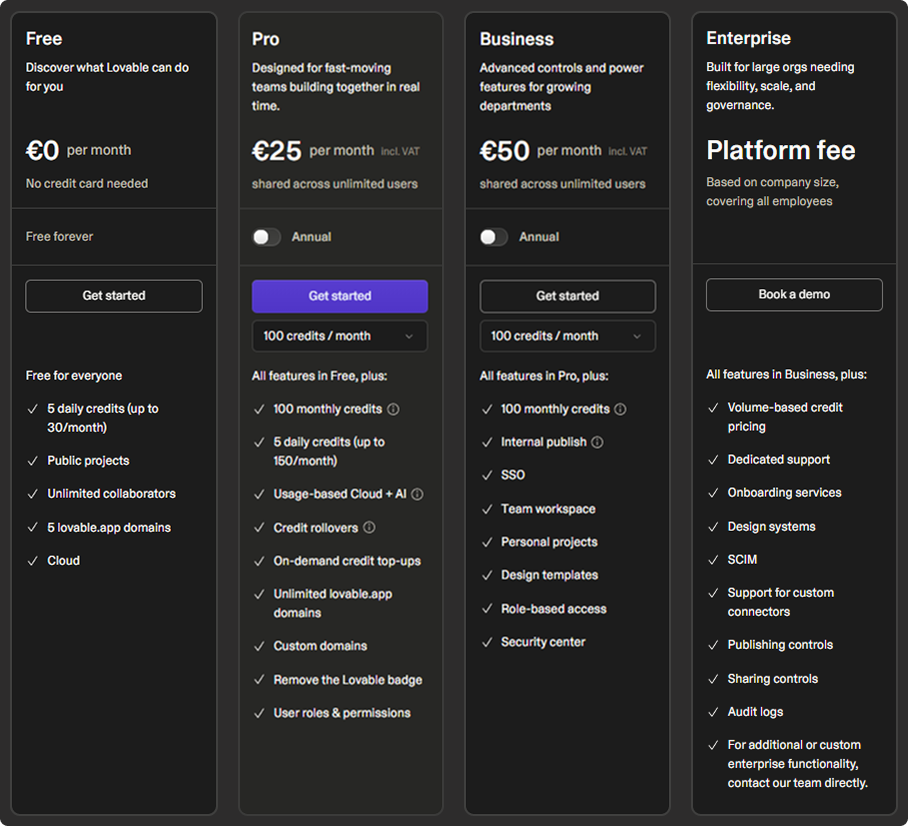
A practical note: Lovable's credits include the AI compute. Bolt.new's subscription covers the IDE and AI access, but you'll pay Supabase, Vercel, and other providers directly. For a typical SaaS prototype with auth, database, and payments, expect $25-50/month in infrastructure on either platform once you exceed free tiers. The platform cost difference matters less than the infrastructure cost at scale.
Learning Curve and Team Collaboration
Lovable's learning curve is shallow for non-developers. The chat interface feels familiar. The platform teaches concepts progressively: first you build UI, then add data, then auth, then payments. Documentation and guides are written for product thinkers. Teams with mixed technical backgrounds — a founder, a designer, one developer — can all contribute. The designer adjusts Tailwind classes visually. The founder writes feature requests. The developer reviews generated code and handles complex logic. GitHub sync means the developer can also work locally and push changes the AI incorporates.
Bolt.new assumes coding literacy. The interface is VS Code in the browser. You need to understand file structure, imports, TypeScript errors, and terminal commands. A non-technical founder will struggle past the first prompt. For developer teams, the onboarding is instant — it's the tools they already know. Collaboration happens through Git: clone, branch, PR, review. The AI becomes a team member that writes code you review like any other contribution. No special platform permissions needed.
Lovable democratizes building. Bolt.new accelerates developers. The team composition often decides the tool.
Real-World Use Cases: Where Each Excels
Lovable shines for MVP validation, internal tools, and founder-led products. A solo founder can go from idea to paying customers in weeks. The managed stack removes infrastructure decisions. Internal tools — admin dashboards, CRM extensions, reporting interfaces — benefit from the rapid iteration and built-in auth. Agencies building client prototypes appreciate the speed and the ability to hand off a deployed URL. The platform's template library (SaaS, marketplace, dashboard, landing page) provides starting points that handle common patterns correctly.
Bolt.new excels when the destination is a codebase the team will own long-term. Startups with engineering teams use it to scaffold features, generate boilerplate, and explore architectural options. The generated code is portable — eject to a local repo anytime. Teams migrating legacy systems appreciate the ability to prompt "create a React component that wraps this existing API endpoint" and get typed hooks, error boundaries, and loading states. Open source contributors use it to prototype features in a branch before committing. The browser IDE means no local setup for quick experiments.
- Choose Lovable for: founder-led MVPs, internal tools, non-technical teams, speed to validated product
- Choose Bolt.new for: engineering teams, long-term code ownership, custom architectures, learning AI-assisted development
- Both handle: SaaS dashboards, e-commerce, marketplaces, social apps, content platforms
- Neither replaces: deep systems programming, high-performance computing, specialized embedded work

There's a middle ground worth noting. Some teams start in Lovable for rapid validation, then migrate to Bolt.new or a local codebase once product-market fit is proven. Lovable's GitHub sync exports the full codebase. The migration isn't automatic — the Supabase coupling means you'll rewrite some data access — but the UI components, routing, and business logic transfer cleanly. Bolt.new can import an existing repo, so the reverse path also works. The tools aren't mutually exclusive.
Community, Support, and Ecosystem
Lovable has invested heavily in community. Their Discord is active with founders sharing prototypes, asking for help, and showcasing launches. The team runs weekly office hours, publishes detailed guides for specific patterns (multi-tenant auth, Stripe Connect, real-time chat), and maintains a template marketplace. Enterprise customers get dedicated Slack channels and SLA-backed support. The ecosystem feels product-oriented — success stories emphasize launched businesses and revenue.
Bolt.new's community centers on developers. The Discord discusses prompting techniques, architecture patterns, and integration recipes. The team shares technical deep-dives on the agent's reasoning, model selection, and sandbox architecture. StackBlitz (Bolt.new's parent) brings a decade of browser IDE experience. The ecosystem is more technical — success stories emphasize code quality, migration stories, and developer productivity gains. Documentation assumes familiarity with modern web development.
Edge Cases and Known Frictions
Lovable's abstraction leaks when you need something outside its patterns. Custom database functions, complex RLS policies with joins, background jobs, or non-standard authentication flows require dropping into the Supabase dashboard. The AI can't see or modify those manual changes, so subsequent generations may conflict. Large projects (50+ components) sometimes lose context — the AI forgets earlier architectural decisions. The credit system creates anxiety during heavy iteration sessions. Some users report the preview deployment occasionally desyncs from the chat state.
Bolt.new's friction points are different. The sandbox environment has resource limits — memory and CPU constraints can cause timeouts on large builds or heavy dependency installs. The agent sometimes gets stuck in loops editing the same files repeatedly. Complex refactors across many files may exceed the context window. Git operations in the browser can be slow on large repos. The terminal doesn't support interactive TUIs (no vim, no htop). For teams used to local IDEs, the browser environment feels constrained despite its convenience.
Scroll horizontally to see all columns
| Issue | Lovable | Bolt.new |
|---|---|---|
| Context loss | Occasional on large projects | Context window limits on big refactors |
| Custom backend logic | Requires Supabase dashboard escape | Write code directly, full control |
| Resource limits | Credit-based AI usage | Sandbox CPU/memory/timeouts |
| Version control | Managed GitHub sync | Standard Git in browser |
| Offline work | Not supported | Not supported (browser only) |
Final Assessment: Choosing Between Lovable and Bolt
The choice reduces to a question about your relationship to code. If you want to describe outcomes and have a system deliver a working application without reading the implementation, Lovable is the stronger choice. Its managed stack, integrated services, and product-oriented AI remove entire categories of decisions. You move faster on standard SaaS patterns. The cost is flexibility — you build within the Lovable way, and stepping outside it creates friction.
If you want to collaborate with an AI that writes code you read, understand, and own, Bolt.new fits better. It meets you in the codebase. You make the architectural calls. The AI handles the typing, the boilerplate, the API integration patterns. You remain the engineer. The cost is time — you'll make more decisions, configure more services, and own the deployment pipeline. For teams that value code ownership and long-term maintainability, that tradeoff is intentional.
Lovable asks: what should this product do? Bolt.new asks: how should this code work? Both questions matter. Your role determines which you answer.
Many teams will use both. Prototype in Lovable. Validate with real users. Migrate the proven core to a Bolt.new or local codebase for the production build. The export path exists. The learning from the prototype — what features matter, what the data model looks like, which integrations are essential — transfers directly. The tools complement each other more than they compete.
Frequently Asked Questions
Can I use Lovable without knowing how to code?
Yes. Lovable is designed for non-technical founders. The chat interface requires no programming knowledge. You describe features in plain language. The platform handles database, authentication, payments, and deployment automatically.
Does Bolt.new require a local development environment?
No. Bolt.new runs entirely in the browser with a built-in terminal, file editor, and preview. You can work from any device with a browser. However, you can also clone the GitHub repo and work locally if preferred.
Which platform is cheaper for a solo founder building an MVP?
It depends on usage patterns. Lovable's free tier (50 credits/month) may cover a simple MVP. Bolt.new's free tier offers unlimited public projects. For paid plans, Bolt.new's $20/month flat rate often beats Lovable's credit model for heavy iteration, but infrastructure costs (Supabase, Vercel) dominate either way.
Can I migrate from Lovable to Bolt.new later?
Yes. Lovable syncs to GitHub, giving you the full React/TypeScript/Supabase codebase. You can open it in Bolt.new or any IDE. The Supabase coupling means some data access code may need adjustment, but components, routing, and business logic transfer cleanly.
Does Bolt.new support Supabase like Lovable does?
Bolt.new supports Supabase as one of several backend options. It generates the client configuration, migration files, and type definitions. You manage the Supabase project yourself. Lovable manages the Supabase project automatically, which is easier but less flexible.
Which tool produces better code quality?
Both use frontier models (Claude 3.5 Sonnet, GPT-4o) and produce production-ready code for standard patterns. Lovable enforces consistent architecture. Bolt.new adapts to your project's existing patterns. Neither eliminates the need for code review on business-critical logic.
Can teams collaborate in real-time on either platform?
Lovable supports real-time collaboration in the chat interface — multiple users can prompt and see changes. Bolt.new collaboration happens through Git: team members clone, branch, and open PRs. No live multiplayer editing in the Bolt.new IDE currently.
What happens if I hit resource limits on Bolt.new's sandbox?
Large builds or heavy dependency installs may timeout. Workarounds include splitting work into smaller prompts, using lighter dependencies, or moving to a local environment. The Bolt.new team continues improving sandbox resources.