

AI Development Tools
Lovable Alternatives: Top AI App Builders Compared
A practical guide to AI-powered development tools that compete with Lovable


Senior Software Developer & Trading Technology Specialist
Ethan Parker is a software developer with over 8 years of experience in building web applications, trading tools, and financial technology solutions. He specializes in Python, JavaScript, API integrations, and trading automation, helping traders improve efficiency through innovative technology.
Lovable.dev has carved out a distinct space in the AI development landscape by letting users describe an application in plain English and watching it generate a working React frontend with Supabase backend integration. The experience feels closer to pair programming with a senior developer than to traditional no-code drag-and-drop. But it's not the only tool doing this anymore. A wave of competitors has emerged, each with different strengths, pricing models, and target audiences. Some focus on design fidelity, others on backend flexibility, and a few aim to be full-stack development environments rather than just frontend generators.
Contents
- 1. What Makes Lovable Distinct Before Comparing
- 2. Key Criteria for Evaluating AI App Builders
- 3. Bolt.new - The Closest Direct Competitor
- 4. v0 by Vercel - Design-First Generation
- 5. Replit Agent - Full-Stack Environment with AI
- 6. Cursor - AI-Enhanced Local Development
- 7. Base44 - No-Code Backend with AI Frontend
- 8. OpenDevin and OpenHands - Open Source Alternatives
- 9. Other Notable Alternatives Worth Knowing
- 10. Side-by-Side Comparison of Major Contenders
- 11. Choosing Based on Your Use Case
- 11.1. Non-Technical Founder Validating a SaaS Idea
- 11.2. Developer Building a Side Project
- 11.3. Agency Delivering Client Projects
- 11.4. Enterprise Team with Compliance Requirements
- 11.5. Internal Tools and Admin Panels
- 12. Pricing Reality Check
- 13. Workflow Integration and Ecosystem
- 14. Common Pitfalls When Switching Tools
- 15. Future Direction of the Category
- 16. Final Assessment of Lovable Alternatives
If you're evaluating Lovable alternatives, the right choice depends heavily on what you're building, who's building it, and how much control you need over the resulting code. A non-technical founder validating a SaaS idea has different requirements than a senior engineer prototyping internal tools. This guide breaks down the major contenders, compares them across the dimensions that actually matter, and helps you decide which tool fits your workflow.
We'll look at Bolt.new, v0 by Vercel, Replit Agent, Cursor, Base44, and the open-source OpenDevin project. Each takes a different philosophical approach to AI-assisted development. Some are cloud-first, others run locally. Some generate disposable prototypes, others produce production-ready codebases you'd actually maintain. Understanding these differences upfront saves weeks of trial and error.
What Makes Lovable Distinct Before Comparing
Lovable's core loop is conversational. You describe a feature, it generates code, you preview it in the browser, and you iterate through chat. The generated project uses React, TypeScript, Vite, and Tailwind CSS by default, with Supabase handling authentication, database, and edge functions. GitHub integration means every change commits to a repository you own. You can eject at any point and continue developing locally. This combination of chat-driven iteration, standard stack, and code ownership is what most alternatives try to replicate or differentiate against.
The platform also includes a template marketplace, a component library called Discover, and team collaboration features. Pricing tiers range from a generous free plan with daily limits to enterprise contracts with dedicated support. For many users, the deciding factor is how well the AI understands product-level requests like "add a subscription billing flow with Stripe" versus low-level implementation details. Lovable leans toward the product level, which makes it fast for MVPs but occasionally frustrating when you need precise control over a specific component.
The platform's opinionated stack is both a strength and a limitation. You get consistency and best practices out of the box, but you're locked into React, Tailwind, and Supabase unless you eject and rewrite. Some alternatives let you choose your stack from the start. Others generate vanilla HTML and CSS for maximum portability. Knowing which trade-off you prefer narrows the field quickly.
Key Criteria for Evaluating AI App Builders
Before diving into specific tools, establish what matters for your situation. The following criteria separate tools that look similar on the surface but behave very differently in practice.
- Code ownership and portability: Can you download the full source, push to your own GitHub, and continue without the platform?
- Stack flexibility: Does the tool dictate React/Tailwind/Supabase, or can you choose Next.js, Vue, Python, Go, or other stacks?
- Backend capabilities: Is there integrated database, auth, and API generation, or do you connect external services manually?
- Iteration model: Chat-based refinement, visual editing, direct code editing, or a mix?
- Deployment story: One-click deploy to Vercel/Netlify, container export, or manual setup required?
- Pricing model: Usage-based credits, seat-based subscriptions, or open-source self-hosted?
- Team features: Real-time collaboration, code review workflows, role-based access?
- Learning curve: How much technical knowledge is needed to get productive results?
Weight these criteria honestly. A solo founder building a consumer SaaS might prioritize speed to MVP and integrated backend. An agency building client projects might need code portability and stack flexibility. An enterprise team might require SSO, audit logs, and self-hosted options. No single tool wins across all dimensions.
Bolt.new - The Closest Direct Competitor
Bolt.new, from the StackBlitz team, is the most direct alternative to Lovable. Like Lovable, it runs entirely in the browser, generates a full React/TypeScript/Vite project, and lets you iterate through chat. The key difference is Bolt's WebContainer technology — it runs a genuine Node.js environment in the browser, meaning you can install npm packages, run build scripts, and start dev servers without any cloud backend. This makes Bolt feel more like a local development environment that happens to run in a tab.
Bolt's chat interface understands the full project context. You can ask it to "add a dashboard with charts using Recharts" and it will install the package, create components, and wire them up. The file explorer shows every generated file, and you can edit code directly alongside the chat. This hybrid approach — AI generation plus manual editing — feels more natural for developers who want to step in and fix things themselves.
Backend integration is where Bolt differs most. There's no built-in Supabase equivalent. You connect to whatever backend you prefer — Supabase, Firebase, PlanetScale, or a custom API — by adding environment variables and writing the integration code yourself (or asking the AI to do it). This flexibility appeals to developers who already have backend preferences, but it adds friction for non-technical users who want authentication and database working immediately.
- Runs Node.js in browser via WebContainers — no cloud compute needed for preview
- Full npm ecosystem access — install any package, run any script
- Direct code editing alongside chat — hybrid workflow for developers
- No opinionated backend — bring your own database and auth
- Free tier with generous limits, paid plans for team features and priority compute
- Exports to GitHub or downloads as zip — full code ownership
Bolt excels when you're comfortable writing some code and want maximum flexibility with minimal setup. It struggles when you need a complete backend-as-a-service experience out of the box. The AI is strong at frontend implementation but less guided on product-level decisions like "how should I structure user roles for a multi-tenant SaaS?"
v0 by Vercel - Design-First Generation
v0 takes a different angle. Instead of building full applications, it specializes in generating high-fidelity React components and pages from text descriptions or screenshots. The output uses shadcn/ui components and Tailwind CSS, matching Vercel's own design system. You describe a UI — "a pricing table with three tiers, monthly/annual toggle, and feature comparison" — and v0 produces production-ready component code you can copy into any Next.js project.
The tool doesn't manage project structure, routing, state, or backend. It generates individual components or page sections. This makes it complementary to full-app builders rather than a direct replacement. Many developers use v0 for UI scaffolding, then integrate the components into a Lovable or Bolt project, or a manually coded Next.js application. The recent addition of project-level context lets v0 reference existing components in your codebase, improving consistency.
v0's strength is design quality. The generated components follow accessibility best practices, responsive patterns, and the shadcn/ui aesthetic that many teams already use. If your bottleneck is translating Figma designs into clean React code, v0 is unmatched. If you need a working app with authentication, database, and deployment, you'll need additional tools.
Scroll horizontally to see all columns
| Dimension | v0 | Lovable |
|---|---|---|
| Output type | Components/pages | Full applications |
| Backend included | No | Yes (Supabase) |
| Design system | shadcn/ui + Tailwind | Custom + Tailwind |
| Project management | None | Full project view |
| Best for | UI implementation | MVP development |
Pricing is usage-based with a free tier. Teams on Vercel's platform get integrated deployment previews. The workflow fits naturally if you're already deploying to Vercel, but works fine standalone too. v0 doesn't try to be your IDE — it's a specialized UI generator that excels at one thing.
Replit Agent - Full-Stack Environment with AI
Replit Agent approaches the problem from the opposite direction. Replit started as a browser-based IDE supporting 50+ languages. The Agent adds an AI that can write code, run commands, install dependencies, create files, and debug errors — all within a persistent Linux container. You're not generating a project to export; you're developing inside Replit's environment with an AI pair programmer that has full shell access.
This means Replit Agent can do things the chat-only tools cannot: run database migrations, configure nginx, set up cron jobs, debug failing tests by reading stack traces, and install system-level dependencies. It supports Python, Node.js, Go, Rust, Java, and dozens of other languages. You can build a React frontend, a FastAPI backend, a PostgreSQL database, and a Redis cache all in one repl, with the Agent coordinating across them.
The trade-off is complexity. Replit Agent doesn't hold your hand with product-level abstractions. You need to understand the architecture you want — or be willing to describe it in technical terms. The AI is powerful but operates at a lower level of abstraction than Lovable. For experienced developers, this is a feature. For non-technical founders, it's a barrier.
- Persistent Linux containers with full system access
- Multi-language support — not limited to JavaScript/TypeScript
- AI can run commands, read logs, debug failures autonomously
- Integrated database (PostgreSQL) and secrets management
- Deployment to Replit's hosting or export to any cloud
- Collaborative multiplayer editing built into the IDE
- Pricing based on compute units (CPU/RAM) and AI usage
Replit Agent shines for internal tools, data pipelines, API services, and polyglot projects. It's less suited for pure frontend MVPs where you want opinionated defaults and zero configuration. The learning curve is steeper, but the ceiling is much higher.

One practical consideration: Replit's container model means you're developing in a cloud environment with latency and resource limits. Local development with Cursor or Copilot offers a similar AI-assisted experience without the cloud dependency. Replit's advantage is zero-setup collaboration and deployment.
Cursor - AI-Enhanced Local Development
Cursor isn't an app builder — it's a fork of VS Code with deep AI integration. But for many developers, it replaces the need for browser-based generators entirely. You work in your local IDE with your actual codebase, and the AI (powered by Claude, GPT-4, or local models) can edit multiple files, run terminal commands, answer questions about your code, and implement features across the stack.
The key difference from Lovable: there's no project generation from scratch. You start a repository — maybe from create-react-app, Next.js, Django, Rails, or a blank folder — and Cursor helps you build. The Composer feature lets you describe a feature and have the AI create or modify dozens of files in one pass. The Chat panel answers questions about existing code. The Tab autocomplete predicts multi-line edits.
Cursor's strength is working with real, existing codebases. Lovable and Bolt are great for greenfield projects. Cursor excels when you have a 50,000-line application and need to add a feature, refactor a module, or understand legacy code. It also respects your exact stack choices — no opinionated defaults unless you want them.
Pricing is per seat with a free tier. The Pro plan includes unlimited GPT-4 and Claude usage. For teams already using VS Code, the switching cost is near zero. For non-technical users, the learning curve is significant — you need to understand Git, terminal, package managers, and project structure.
Base44 - No-Code Backend with AI Frontend
Base44 positions itself as a no-code backend platform with an AI frontend generator. You define data models visually — Users, Products, Orders, with fields and relationships — and Base44 generates a REST API, authentication, permissions, and an admin panel. The AI frontend builder then creates a React application that connects to this backend. The result is a full-stack application where the backend is configured visually and the frontend is generated by AI.
This approach appeals to people who think in data models rather than UI descriptions. If you start by designing your database schema, Base44 feels natural. The generated backend includes role-based access control, webhooks, file storage, and scheduled jobs. The frontend AI understands the API schema and generates appropriate forms, tables, and dashboards.
The limitation is frontend flexibility. The AI generates within Base44's component system and design language. Custom UI work requires ejecting to code or working within constraints. Pricing is seat-based with usage limits on API calls and AI generations. For internal tools, admin panels, and data-heavy applications, Base44 can be faster than assembling Supabase + Lovable manually.
Scroll horizontally to see all columns
| Aspect | Base44 (Backend-First) | Lovable (Frontend-First) |
|---|---|---|
| Starting point | Data models | UI description |
| Backend config | Visual schema builder | Supabase dashboard |
| Frontend generation | AI from API schema | AI from chat |
| Best for | Admin tools, dashboards | Consumer apps, MVPs |
| Custom backend logic | Webhooks, scheduled jobs | Supabase edge functions |
OpenDevin and OpenHands - Open Source Alternatives
OpenDevin (now evolving into OpenHands) is an open-source project aiming to replicate Devin, the autonomous AI software engineer. You run it locally or on your own infrastructure. It spins up a sandboxed environment, clones your repository, and the AI agent can read files, write code, run tests, search the web, and iterate until tasks complete. There's no hosted SaaS version — you provide the compute and the LLM API keys.
This model attracts teams with strict data privacy requirements, existing GPU infrastructure, or a desire to customize the agent's behavior. The community contributes specialized skills — database migration, API integration, test generation — that extend the base agent. Development moves fast, but documentation and stability lag behind commercial products.
Running OpenDevin effectively requires technical comfort with Docker, API key management, and prompt engineering. It's not a tool for non-technical founders. For engineering teams building internal automation or wanting to integrate AI agents into their CI/CD pipeline, it offers maximum control without vendor lock-in. The cost model shifts from per-seat subscriptions to compute and LLM API expenses.
Open source AI agents trade convenience for control. You own the stack end-to-end, but you also own the operational burden.
Other Notable Alternatives Worth Knowing
Several tools occupy adjacent spaces. They're not direct Lovable competitors but solve overlapping problems.
- GitHub Copilot Workspace: Issue-to-PR automation within GitHub. Strong for teams already on GitHub Enterprise. Less about greenfield generation, more about task execution in existing repos.
- Codeium Windsurf: Free AI IDE with Cascade agent. Similar positioning to Cursor with a generous free tier. Good for individual developers.
- Tempo Labs: React codebase generation with visual editing. Bridges design tools and code. Early stage but promising for design-system-driven teams.
- Magic Patterns: AI component generator focused on Radix UI and Tailwind. Niche but high quality for design-system-aligned teams.
- FlutterFlow AI Gen: Visual builder for Flutter apps with AI assistance. Mobile-first, not web-first. Different target platform entirely.
- Bubble AI: No-code platform adding AI generation. Still fundamentally a visual editor, not a code generator. Different mental model.
Each of these deserves its own evaluation if your requirements align with their specific focus. The landscape fragments quickly once you move past the core general-purpose builders.
Side-by-Side Comparison of Major Contenders
The table below summarizes the primary alternatives across the criteria that matter most for decision-making. Values reflect typical usage as of early 2025 — platforms evolve quickly.
Scroll horizontally to see all columns
| Tool | Primary Model | Stack Freedom | Backend Included | Code Export | Best For | Pricing Model |
|---|---|---|---|---|---|---|
| Lovable | Chat + Preview | React/Tailwind/Supabase | Yes (Supabase) | Full GitHub sync | Consumer MVPs, SaaS | Credits + seats |
| Bolt.new | Chat + WebContainer | React/Vue/Svelte + any npm | Bring your own | GitHub + zip | Dev-friendly prototypes | Credits + seats |
| v0 | Component generation | Next.js + shadcn/ui | No | Copy/paste components | UI implementation | Usage-based |
| Replit Agent | Autonomous agent in container | Any language/framework | PostgreSQL included | Git export | Full-stack, polyglot | Compute units |
| Cursor | IDE-integrated AI | Unlimited (local) | Your choice | Native (local files) | Existing codebases | Per seat |
| Base44 | Visual schema + AI frontend | React (opinionated) | Visual builder + API | Eject to code | Admin tools, dashboards | Seats + usage |
| OpenDevin | Autonomous local agent | Unlimited (your infra) | Your choice | Native (your repo) | Privacy-first teams | Self-hosted compute |
No tool dominates every column. Lovable wins on integrated backend and product-level abstraction. Bolt wins on browser-based flexibility and npm access. v0 wins on component quality. Replit wins on backend depth and language support. Cursor wins on existing codebase integration. Base44 wins on data-model-first workflow. OpenDevin wins on control and privacy.
Choosing Based on Your Use Case
Match your situation to the tool that fits with least friction.
Non-Technical Founder Validating a SaaS Idea
Lovable remains the strongest choice. The Supabase integration handles auth, database, and payments without you touching backend code. The chat interface speaks product language. The template marketplace gives you starting points for marketplaces, dashboards, and social apps. Daily free credits let you iterate for weeks without paying. Export to GitHub when you hire a developer.
Developer Building a Side Project
Bolt.new or Cursor depending on preference. Bolt if you want zero setup and browser-based iteration. Cursor if you prefer local development and already have a stack in mind. Both give you clean code you'd be happy maintaining. v0 is worth adding for any complex UI components.
Agency Delivering Client Projects
Code ownership and stack flexibility are paramount. Bolt.new and Cursor both export standard repositories clients can host anywhere. Base44 works well for admin-heavy deliverables. Avoid tools that lock you into proprietary hosting or make client handoff awkward.
Enterprise Team with Compliance Requirements
Cursor (with local models), OpenDevin self-hosted, or Replit Enterprise (dedicated VPC). Browser-based tools that send code to external LLMs may violate data policies. Evaluate SSO, audit logs, and data residency before committing.
Internal Tools and Admin Panels
Base44, Replit Agent, or Lovable with Supabase. Base44's visual schema builder maps naturally to CRUD applications. Replit Agent handles custom backend logic well. Lovable works if the team already knows Supabase. Avoid v0 — it doesn't do backend.
Pricing Reality Check
Pricing models differ enough that the cheapest option for one usage pattern becomes the most expensive for another. Here's how they map to real scenarios.
Scroll horizontally to see all columns
| Pattern | Lovable | Bolt.new | v0 | Replit Agent | Cursor Pro |
|---|---|---|---|---|---|
| Light (5-10 generations/week) | $0-20 (free tier) | $0-20 (free tier) | $0-10 (free tier) | $15-30 (compute) | $20 (fixed) |
| Heavy (daily production use) | $50-100 (Pro) | $50-100 (Pro) | $30-60 (usage) | $50-150 (compute) | $20 (fixed) |
| Team of 5 | $150-300 (Team) | $150-300 (Team) | $100-200 (Team) | $200-500 (Team) | $100 (5 seats) |
Cursor's fixed per-seat pricing looks attractive for heavy usage, but it doesn't include compute — you're running locally. Replit's compute-based pricing scales with project complexity. Lovable and Bolt's credit systems penalize iteration loops that consume many generations. v0's usage-based model aligns cost with actual output volume. Calculate based on your expected generation volume, not just the headline price.
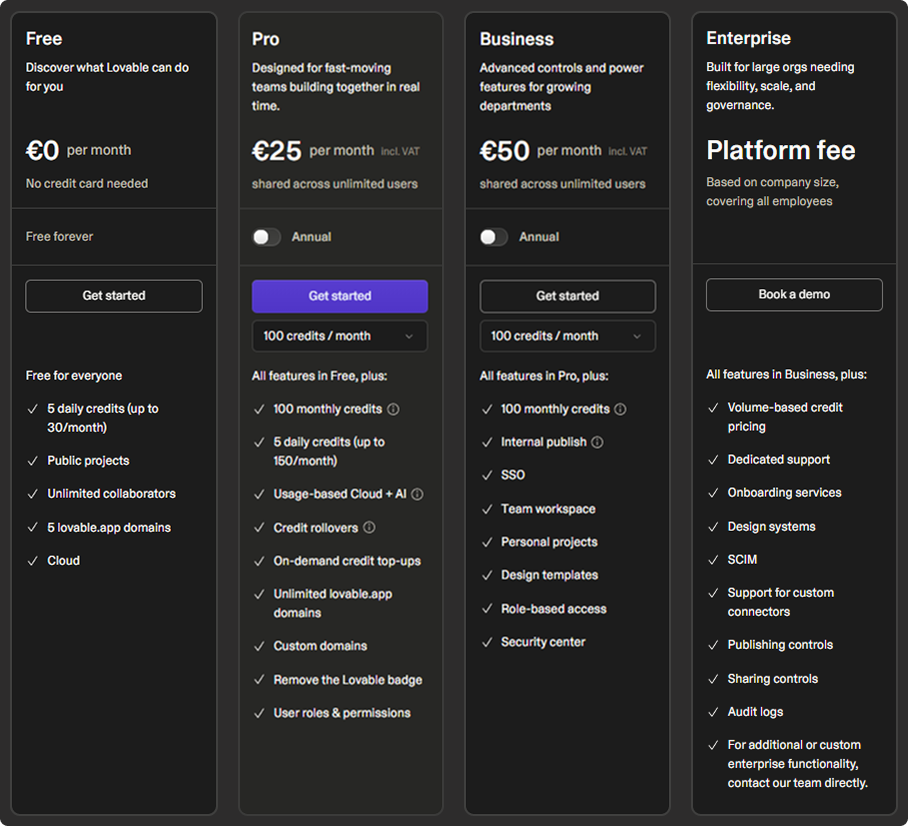
Hidden costs appear in team workflows. Lovable and Bolt charge per seat for collaboration features. Replit charges for compute hours whether the AI is active or not. Cursor's per-seat cost is predictable but requires each developer to have a license. Base44's API call limits can surprise teams building high-traffic internal tools. Read the fine print on overage charges.
Workflow Integration and Ecosystem
The tool doesn't exist in isolation. Consider how it fits with your existing stack.
- GitHub/GitLab: Lovable, Bolt, Cursor, Replit all sync bidirectionally. v0 and Base44 require manual copy or CLI tools.
- Vercel/Netlify: One-click deploy from Lovable, Bolt, v0. Replit has its own hosting. Cursor deploys via your CI/CD.
- Supabase/Firebase/PlanetScale: Lovable bakes in Supabase. Others require manual integration or MCP servers.
- Design tools: v0 and Tempo Labs import from Figma. Lovable has Figma plugin for design-to-code. Others are code-first.
- CI/CD: Cursor works with any pipeline. Browser tools need GitHub Actions or webhooks for automated deployment.
- Testing: Cursor and Replit Agent can run and fix tests. Browser generators typically don't execute test suites.
MCP (Model Context Protocol) servers are emerging as a standardization layer. They let AI tools connect to external services — databases, APIs, file systems — through a common interface. Lovable, Cursor, and others are adding MCP support. This may reduce integration friction across the board in coming months.
The best tool is the one that disappears into your workflow. If you're constantly context-switching to accommodate the tool, it's the wrong tool.
Common Pitfalls When Switching Tools
Teams often underestimate the cost of switching mental models. Each tool has its own vocabulary, iteration rhythm, and failure modes.
- Prompting style: Lovable responds to product language ("add subscription billing"). Bolt and Replit need more technical specificity ("create a Stripe webhook handler and update the user plan field"). v0 needs visual descriptions ("pricing card with hover state").
- Debugging loop: In browser tools, you chat to fix errors. In Cursor, you read the terminal. In Replit, the agent reads logs itself. The feedback loop speed varies dramatically.
- State management: Lovable and Bolt maintain project state in the browser. Cursor maintains it in your local filesystem. Replit maintains it in a cloud container. Losing state (session expiry, container restart) costs hours.
- Version control hygiene: Lovable and Bolt commit automatically. Cursor requires manual commits. Replit has its own versioning. Mixed workflows create messy histories.
- Team onboarding: A new developer joining a Lovable project reads the chat history. Joining a Cursor project reads the code. Different onboarding investments.
Future Direction of the Category
The category is converging on a few trends. Multi-file editing agents are becoming standard — every major tool now supports creating or modifying dozens of files in one operation. MCP adoption will standardize backend connections. Local-first models (Cursor, OpenDevin) are gaining ground as privacy concerns grow. Browser-based tools (Lovable, Bolt) are adding local development options via CLI companions.
The distinction between "app builder" and "AI IDE" is blurring. Lovable adds more code-editing features. Cursor adds more project-generation features. Replit sits in the middle. In two years, the category may not exist as a separate segment — AI assistance will be a baseline feature of every development environment.
We're in the awkward adolescence of AI development tools. They're powerful enough to be useful, different enough to be confusing, and evolving fast enough that today's winner may not exist in 2026.
Frequently Asked Questions
Can I use Lovable and Bolt together on the same project?
Yes. Both sync with GitHub. You can start in Lovable for the initial scaffold and Supabase setup, push to GitHub, then open the repo in Bolt for further iteration, or clone locally and use Cursor. The code is standard React/TypeScript.
Which alternative is best for non-technical founders?
Lovable remains the most accessible for zero-code users because of its integrated Supabase backend and product-level chat interface. Base44's visual schema builder is the next closest, but requires data modeling thinking.
Do any alternatives support Python backends with React frontends?
Replit Agent handles this natively — you can have a FastAPI backend and React frontend in one repl. Bolt.new can generate a React frontend and you manually create a Python backend. Cursor works with any stack locally. Lovable is locked to Supabase (PostgreSQL) for backend.
Is v0 a replacement for Lovable or a complement?
Complement. v0 generates individual components and pages, not full applications with routing, state, and backend. Many developers use v0 for UI pieces inside a Lovable or Bolt project.
What happens to my project if the platform shuts down?
With Lovable, Bolt, Cursor, and Replit, you own the code in GitHub or locally. You can continue developing without the platform. Base44 allows code ejection. OpenDevin runs on your infrastructure. No major tool locks you out of your source code.
Which tool has the best free tier for learning?
Lovable's free tier offers daily credits sufficient for learning. Bolt.new's free tier includes WebContainer compute. Cursor's free tier includes limited GPT-4 usage. Codeium Windsurf offers a generous free tier with Cascade agent. Try each for a weekend.
Can these tools generate mobile apps?
Lovable, Bolt, and v0 generate web applications (React). They can produce responsive web apps that work on mobile browsers, and you can wrap them with Capacitor or React Native WebView. For native mobile, FlutterFlow AI Gen and Expo with Cursor are better starting points.
Final Assessment of Lovable Alternatives
Lovable earned its position by making the hardest part of software development — going from idea to working full-stack application — feel like a conversation. The alternatives haven't copied that formula exactly; they've each bet on a different axis of improvement. Bolt bet on browser-based compute freedom. v0 bet on component-level design quality. Replit bet on environmental completeness. Cursor bet on local IDE integration. Base44 bet on data-model-first workflow. OpenDevin bet on user sovereignty.
For most people reading this comparison, the decision tree is simple. If you're non-technical or want the fastest path to a deployed SaaS with auth and payments, stay with Lovable. If you're a developer who wants browser-based flexibility without opinionated backend, use Bolt. If you live in Next.js and need shadcn/ui components, add v0 to your toolkit. If you build full-stack applications in multiple languages and want AI that runs commands, use Replit Agent. If you work on existing codebases daily, use Cursor. If you build admin panels and think in database schemas, evaluate Base44. If you have compliance requirements or infrastructure control needs, invest in OpenDevin.
The market is still early enough that switching costs are low. Most tools export standard code. Most offer free tiers. The risk of trying the wrong one for a week is near zero. The risk of assuming your current tool is the only option is higher — you may be fighting a workflow mismatch that a different tool solves natively. Pick two, build the same feature in both, and decide from experience rather than comparison tables.