

AI Development Tools
Lovable Marketplace: Templates, Connectors, and Community Apps
A practical guide to discovering and using templates, connectors, and apps in the Lovable ecosystem.


Senior Software Developer & Trading Technology Specialist
Ethan Parker is a software developer with over 8 years of experience in building web applications, trading tools, and financial technology solutions. He specializes in Python, JavaScript, API integrations, and trading automation, helping traders improve efficiency through innovative technology.
The Lovable Marketplace sits at the center of a growing ecosystem where developers, designers, and product teams share reusable building blocks. Instead of starting every project from a blank slate, you can browse templates, connectors, and full applications that other builders have published. The marketplace is not a separate product — it lives inside the Lovable interface, accessible from the sidebar or the Discover tab, and it updates continuously as the community contributes new items.
Contents
- 1. Marketplace Layout and Navigation
- 2. Template Categories and What They Contain
- 3. Connectors: Pre-Built Service Integrations
- 4. Apps for Builders: Complete Reference Projects
- 5. Publishing Your Own Templates and Connectors
- 6. Community Programs and Incentives
- 7. Evaluating Marketplace Items for Production Use
- 8. Versioning and Updates
- 9. Licensing and Commercial Use
- 10. Search Tips and Advanced Filtering
- 11. Common Pitfalls and How to Avoid Them
- 12. Integrating Marketplace Items into Team Workflows
- 13. Marketplace Analytics for Authors
- 14. Future Directions and Roadmap Hints
- 15. Final Assessment of Lovable Marketplace
If you have used Lovable to generate a SaaS dashboard, a landing page, or an internal tool, you already know the AI can scaffold a working React codebase in minutes. The marketplace extends that speed by letting you drop in pre-built pieces: authentication flows, Stripe checkout pages, Supabase schema setups, Tailwind component libraries, and more. Each item includes a preview, a description, and a one-click button that opens the template directly in the editor with your project context.
This article walks through how the marketplace works, what types of items you will find, how to evaluate quality, and how to publish your own contributions. It also covers the connector system that links Lovable projects to external services, and the community programs that reward active participants.
Marketplace Layout and Navigation
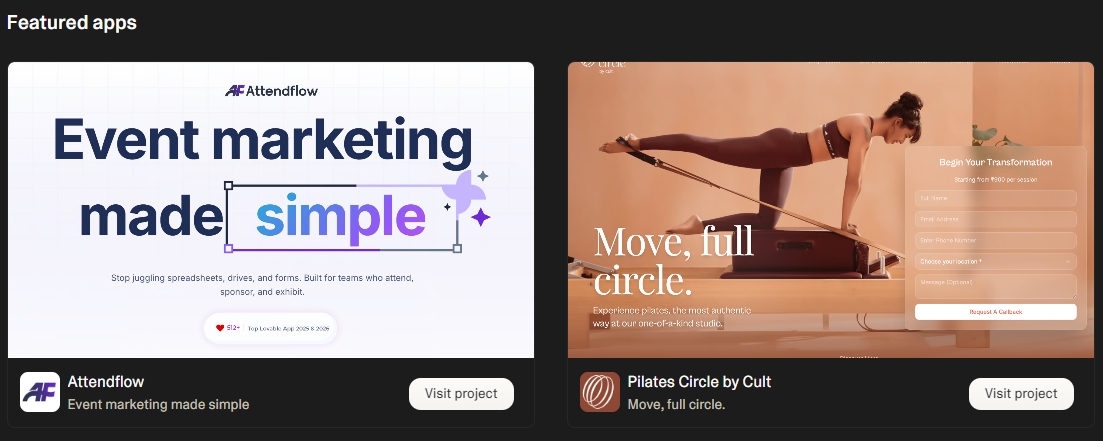
When you open the Discover tab, the default view shows featured apps — complete projects that demonstrate what is possible. A top banner highlights seasonal collections or new partner integrations. Below that, tabs let you filter by category: Templates, Connectors, Apps for Builders, and Top Rated. Each tab uses a card grid with a thumbnail, title, author, rating, and install count. Clicking a card opens a detail pane with a longer description, screenshots, tags, and the Install button.
The search bar at the top supports keyword queries and tag filters. You can type "stripe subscription" or "admin dashboard" and see results ranked by relevance, rating, and recency. Tags are standardized — common ones include authentication, payments, database, ui-kit, landing-page, and internal-tool. The filter sidebar also lets you narrow by framework (React, Next.js), styling (Tailwind, CSS Modules), and backend (Supabase, Firebase, custom API).
A useful detail: the marketplace remembers your recent searches and shows a "Continue where you left off" section when you return. This helps when you are evaluating several templates for the same feature across multiple sessions. The Install button does not clone a repository — it creates a new Lovable project pre-loaded with the template code, so you can start prompting immediately.
Template Categories and What They Contain
Templates are the most common marketplace item. They range from minimal starter kits to near-complete applications. The main categories you will encounter:
- SaaS starters — authentication, billing, team settings, onboarding flows, and a dashboard shell
- Landing page kits — hero sections, feature grids, testimonial carousels, pricing tables, footer variants
- Admin dashboards — data tables, charts, user management, role-based access, audit logs
- E-commerce foundations — product catalog, cart, checkout, order history, webhook handlers
- Internal tools — CRUD interfaces, approval workflows, reporting views, scheduled jobs
- Mobile-responsive UI kits — button systems, form components, navigation patterns, dark mode support
Each template lists its tech stack explicitly: React 18, Vite, TypeScript, Tailwind CSS, and the backend service it targets (usually Supabase). Some templates include a Supabase migration file that sets up tables, policies, and functions. Others assume you will connect your own database after installation. The description always states what is included and what you must configure.
Scroll horizontally to see all columns
| Layer | Default Choice | Alternatives Noted |
|---|---|---|
| Frontend Framework | React 18 + Vite | Next.js (some templates) |
| Language | TypeScript | JavaScript (rare) |
| Styling | Tailwind CSS | CSS Modules, Styled Components |
| Auth | Supabase Auth | Clerk, Auth0, Firebase Auth |
| Database | Supabase (PostgreSQL) | Firebase, PlanetScale, Neon |
| Payments | Stripe | Paddle, Lemon Squeezy |
| Deployment | Lovable Hosting / Vercel | Netlify, Cloudflare Pages |
A template tagged "production-ready" typically includes error boundaries, loading states, empty states, and basic tests. Templates tagged "starter" or "boilerplate" are intentionally minimal — they give you folder structure and configuration but leave business logic to you. Read the tags before installing; they are the fastest signal of completeness.
Connectors: Pre-Built Service Integrations
Connectors are a distinct category. They are not full templates — they are focused integration modules that handle the boilerplate of connecting to an external API. A Stripe connector, for example, includes the serverless function for creating checkout sessions, the webhook handler for subscription events, and the client-side hook for redirecting to Stripe Checkout. You install a connector into an existing project, and it adds the necessary files and environment variable prompts.
The connector library covers the services most Lovable projects need: Supabase (database, auth, storage, realtime, edge functions), Stripe (payments, subscriptions, billing portal, webhooks), GitHub (OAuth, repository access, Actions triggers), SendGrid/Resend (transactional email), Twilio (SMS, Verify), OpenAI/Anthropic (AI completions, embeddings), and analytics providers like PostHog and Mixpanel. Each connector follows a consistent pattern: a /connectors folder with an index.ts that exports typed functions, a .env.example listing required keys, and a README with setup steps.
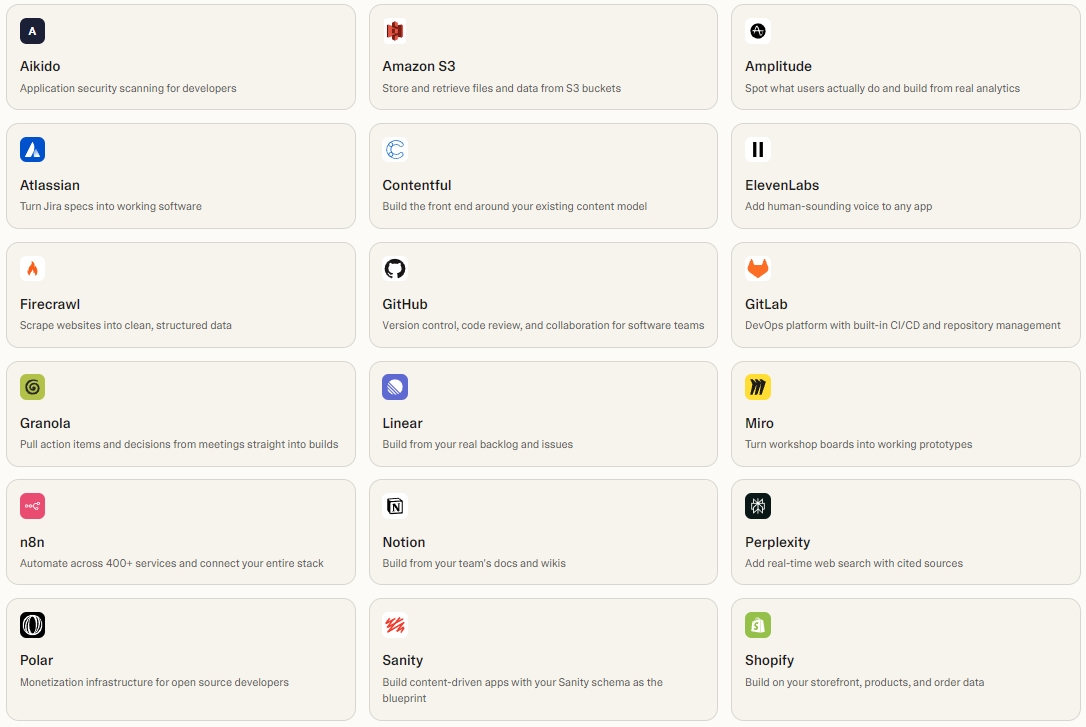
Installing a connector is a two-step process. First, click Install on the connector card — this adds the connector files to your project and opens the environment variable modal. Second, fill in the required keys (API keys, webhook secrets, project IDs) and save. The connector is then available for use in your prompts. You can type "add Stripe subscription checkout using the connector" and the AI will reference the installed connector code instead of generating from scratch.
Apps for Builders: Complete Reference Projects
The "Apps for Builders" tab shows full applications that serve as reference implementations. These are not meant to be installed and customized directly — they are too specific. Instead, you open them to study architecture patterns: how to structure a multi-tenant SaaS, how to implement row-level security in Supabase, how to handle background jobs with edge functions, or how to build a real-time collaborative editor. Each app includes a guided tour that highlights key files and explains design decisions.
Notable examples include a project management tool with Kanban boards and real-time updates, a marketplace template with seller onboarding and commission logic, a learning platform with video streaming and progress tracking, and a CRM with pipeline views and email sequences. The code is production-quality — typed, linted, and tested — but the business logic is intentionally generic so you can adapt it.
Reference apps teach more than documentation because you see the actual file structure, not just isolated snippets.
Publishing Your Own Templates and Connectors
Any Lovable user can publish to the marketplace. The process starts in your project settings: click "Publish to Marketplace," choose a category (Template, Connector, or App), fill in the metadata form, and submit for review. The metadata form asks for title, description, tags, tech stack checkboxes, a thumbnail image (1200x800 recommended), and up to five screenshots. You also set a visibility level: Public (listed in Discover), Unlisted (accessible via direct link only), or Private (only you and collaborators).
Review typically takes one to three business days. The Lovable team checks for malware, license compliance, and basic functionality — they do not judge design taste or business viability. If your item uses a paid API (like Stripe), you must include a disclaimer in the description. Items that pass review get a "Community" badge. Verified badges are reserved for Lovable staff, official partners, and authors with a track record of high-quality, maintained publications.
Community Programs and Incentives
Lovable runs several programs that reward marketplace contributors. The Creator Program gives monthly credits based on install count and rating — roughly 100 credits per 1,000 installs for templates, 200 credits per 1,000 installs for connectors (higher because they require more maintenance). Credits can be used for Lovable Pro subscriptions or cashed out via the affiliate system once you reach $50 equivalent.
The Partner Program is for agencies and consultancies that build templates for clients. Partners get a dedicated marketplace section, co-marketing opportunities (blog features, newsletter spots), and a revenue share on Pro upgrades attributed to their template installs. To join, you need at least three published templates with 4.5+ average rating and 500+ combined installs.
There is also a monthly "Template Challenge" with a theme — for example, "Best Internal Tool for Operations Teams" or "Most Creative Landing Page Kit." Winners receive 1,000 credits, a featured banner spot for two weeks, and a virtual badge on their profile. Submissions are judged on code quality, documentation, and usefulness to the target audience.

Beyond formal programs, the community Discord has a #marketplace channel where authors announce updates, ask for feedback, and coordinate cross-template compatibility (e.g., making a Stripe connector work seamlessly with a SaaS starter). The Lovable team monitors this channel and often prioritizes bug fixes that affect popular marketplace items.
Evaluating Marketplace Items for Production Use
Not every marketplace item is ready for production. The rating system (1-5 stars) and install count are starting points, but you should also inspect the code before committing. Open the template in the editor — you can do this without installing by clicking "Preview Code" on the detail pane. Look for:
- Consistent TypeScript usage — no "any" types in public interfaces
- Error handling in async functions (try/catch with user-facing messages)
- Environment variable validation at startup (fail fast if keys missing)
- Supabase RLS policies included for multi-tenant templates
- Stripe webhook signature verification (not just trusting the payload)
- Responsive breakpoints that match your design requirements
- Test files or at least a testing strategy documented in README
If a template lacks tests, that is not automatically a dealbreaker — many community templates are maintained by solo developers. But you should budget time to add tests for your critical paths. The same applies to accessibility: most templates cover basics, but complex components like data tables or date pickers often need manual audit.
Scroll horizontally to see all columns
| Signal | Green Flag | Yellow Flag | Red Flag |
|---|---|---|---|
| Last Update | < 30 days | 30-90 days | > 90 days |
| Install Count | > 500 | 100-500 | < 100 |
| Rating | 4.5+ | 4.0-4.4 | < 4.0 |
| Author Response Time | < 48 hrs on issues | 1-2 weeks | No response history |
| Documentation | Complete README + inline comments | Basic README only | Minimal or missing |
| TypeScript Coverage | Strict mode, no any | Some any types | JavaScript only |
Versioning and Updates
Marketplace items use semantic versioning. When an author publishes an update, existing installations do not auto-update — you choose when to pull the new version. The marketplace shows a "Update Available" badge on your installed items. Clicking it opens a diff view showing changed files. You can accept the update (which merges changes into your project) or dismiss it. This prevents breaking changes from silently affecting your production code.
Authors are encouraged to write changelogs. A good changelog entry includes the version number, date, breaking changes (if any), new features, bug fixes, and migration steps. For connectors, breaking changes usually mean a new major version and a new connector entry (e.g., "Stripe Connector v2") so old projects can stay on v1. Templates sometimes release major versions as separate marketplace entries with "v2" in the title.
The opt-in update model respects project stability — you control when to absorb upstream changes.
Licensing and Commercial Use
Almost all marketplace items use the MIT license, which permits commercial use, modification, distribution, and private use without attribution requirements (though attribution is appreciated). The license is included in the repository root as LICENSE. Some authors use Apache 2.0 or BSD-3-Clause — both are similarly permissive. You will rarely see GPL or AGPL items because they create compliance obligations for proprietary SaaS products.
If you plan to resell a template as part of a client deliverable, MIT allows it. However, you cannot re-publish the template to the Lovable Marketplace under your own name without substantial modification — that would violate the community guidelines and can result in removal. The guideline is: fork, customize significantly, then publish as your own derivative work with credit to the original author in the README.
Search Tips and Advanced Filtering
The marketplace search supports a few operators that are not documented in the UI but work reliably. Prefix a term with "tag:" to filter by exact tag — for example, "tag:authentication tag:supabase" returns items tagged with both. Use "author:" followed by a username to find all items by a specific creator. "stack:nextjs" filters by framework. "updated:>2024-01-01" shows items updated after a date. You can combine operators: "tag:dashboard stack:react updated:>2024-06-01".
Sorting options include Relevance (default), Most Installed, Highest Rated, Newest, and Recently Updated. For production evaluation, "Recently Updated" combined with "Highest Rated" often surfaces the best-maintained items. "Most Installed" is useful for finding de facto standards — the Stripe connector with 10,000+ installs is the one most people use, which means more community knowledge and faster issue resolution.
Common Pitfalls and How to Avoid Them
Several patterns cause friction when adopting marketplace items. First, version drift: you install a template today, the author updates a dependency next month, and your lockfile conflicts with the new version. Solution: pin major versions in package.json and update deliberately. Second, environment mismatch: a template assumes Supabase but your project uses Firebase. Solution: check the tech stack tags before installing; connectors are more portable than full templates.
Third, over-customization: you install a SaaS starter and rewrite 80% of it because the business logic does not match. At that point, a lighter boilerplate would have been faster. Solution: be honest about how much of the template you will actually use. If it is less than half, start from a minimal starter instead. Fourth, abandoned items: an author stops maintaining a popular connector, a security issue appears in a dependency, and you are stuck. Solution: prefer items with multiple contributors or verified authors, and monitor the GitHub repo (linked in the marketplace) for activity.
A template that saves two days of setup but costs two weeks of fighting assumptions is a net loss.
Integrating Marketplace Items into Team Workflows
Teams that standardize on marketplace items see faster onboarding and more consistent codebases. A practical approach: create an internal "approved list" of templates and connectors that your team has vetted. Store the list in a shared document with links, version numbers, and the team member who validated each item. When a new project starts, the lead picks from the approved list rather than browsing the marketplace fresh each time.
For connectors, consider publishing private internal connectors to the marketplace with "Unlisted" visibility. This lets your team install them with one click while keeping proprietary integration logic out of the public catalog. The unlisted URL can be shared in your internal docs. Some teams also fork public connectors into their own GitHub organization, rename them (e.g., "acme-stripe-connector"), and publish the fork as a private marketplace item — this gives full control over updates and avoids upstream breaking changes.
Marketplace Analytics for Authors
If you publish templates or connectors, the author dashboard shows installs over time, rating distribution, geographic breakdown, and referral sources (search, direct link, Discord, newsletter). It also shows "activation rate" — the percentage of installs that result in at least one prompt session within 48 hours. Low activation often means the item installs but the user gets stuck; the fix is usually better onboarding documentation or a simpler first-step prompt example.
The dashboard includes a "Feedback" tab that aggregates comments from the marketplace detail page and linked GitHub issues. You can reply publicly or mark feedback as "addressed in vX.Y.Z." Responding quickly (within a week) correlates with higher ratings — the data shows a 0.3 star average increase for authors who respond to every issue within 7 days.
Revenue analytics (for Partner Program members) show credited installs, credit earnings, and Pro upgrade attribution. The attribution model uses a 30-day cookie: if a user installs your template and upgrades to Pro within 30 days, you get the referral credit. This is tracked even if the user installs via an unlisted link you shared.
Future Directions and Roadmap Hints
Lovable has signaled several marketplace enhancements in community AMAs and the public roadmap. Private team marketplaces are in beta — they let organizations curate a fully isolated catalog with SSO access, approval workflows, and internal-only connectors. A "Template Composition" feature is in design: it would let you combine multiple templates (e.g., a SaaS starter + a Stripe connector + an admin dashboard) into a single project with automated conflict resolution.
Another planned addition is "Marketplace CI" — a GitHub Action that runs on every template push, executing the build, type-check, and a smoke test against a temporary Supabase project. Results would display as a badge on the marketplace card ("CI Passing" / "CI Failing"). This would give users a stronger signal than install count alone. Finally, a "Template Linter" is being discussed: a set of rules (TypeScript strict, no console.log, accessibility minimums) that runs automatically on publish and blocks items that fail.
Automated quality gates will raise the floor without raising the barrier to entry.
Frequently Asked Questions
Can I use marketplace templates for client work and charge for it?
Yes. Almost all items use MIT or similarly permissive licenses that allow commercial use, modification, and redistribution. You can build a client project on a template and charge your normal rate. You cannot re-publish the template as your own without substantial changes.
Do marketplace items auto-update when the author releases a new version?
No. Updates are opt-in. You see an "Update Available" badge on installed items and can review a diff before merging changes into your project. This prevents breaking changes from affecting production code unexpectedly.
What is the difference between a template and a connector?
A template is a complete or near-complete project starter (SaaS, landing page, dashboard). A connector is a focused integration module for a specific service (Stripe, Supabase, GitHub) that you add to an existing project. Templates give you structure; connectors give you wiring.
How do I know if a marketplace item is actively maintained?
Check the "Last Updated" date on the detail card, the author's response time on issues (visible in the Feedback tab), and the GitHub repo link if provided. Items updated within 30 days with author responses under 48 hours are generally well-maintained.
Can I publish a private template that only my team can access?
Yes. When publishing, choose "Unlisted" visibility. The item will not appear in public search or Discover tabs, but anyone with the direct link can install it. For fully private team catalogs, the Private Team Marketplace beta offers SSO-gated access.
What happens if a marketplace item has a security vulnerability?
The Lovable team can unpublish items with critical vulnerabilities. Authors are notified and expected to publish a fix. Users with the item installed see a security warning badge and an urgent update prompt. For connectors, the team may also rotate compromised example keys in documentation.
Are there costs to use marketplace items beyond the Lovable subscription?
No. All marketplace items are free to install and use. Some templates integrate with paid services (Stripe, SendGrid, etc.), but those costs come from the service providers, not Lovable. The Creator Program rewards authors with credits, not direct payments from users.
Final Assessment of Lovable Marketplace
The Lovable Marketplace functions as a practical accelerator for AI-assisted development. It does not replace architectural decisions — you still choose your stack, data model, and business logic — but it removes the repetitive scaffolding that slows down the first week of a project. The template quality varies, but the rating system, install counts, and author verification provide reasonable signals. Connectors are the highest-leverage category because they encapsulate finicky API integration code that every project rewrites.
For teams, the marketplace becomes more valuable when you treat it as a curated internal library rather than a public bazaar. Standardize on a few vetted templates, publish your own connectors as unlisted items, and schedule regular reviews of updates. The opt-in update model respects production stability, and the MIT licensing keeps legal friction near zero. If you are building with Lovable today, spending an hour browsing the marketplace before your next project will likely save a day of boilerplate work.